75
Recorder
Song Recorder (Internal memory)
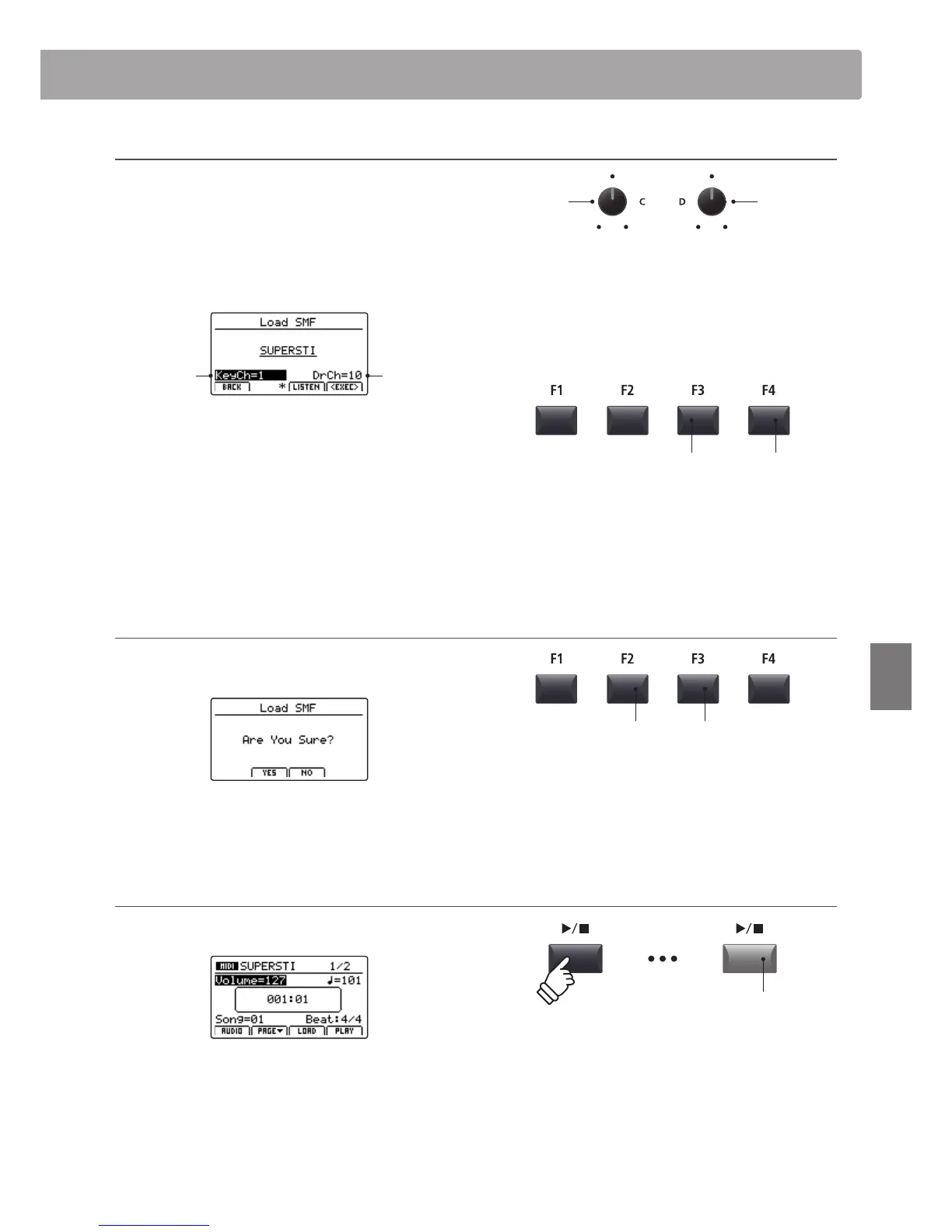
5. Selecting the keyboard and drum channels
Turn control knobs C and D to specify which channels of the
SMF le should be loaded into the MP7 recorder’s keyboard and
drum tracks.
* The MP7 will attempt to detect the correct keyboard and drum tracks
automatically, based on the contents of the SMF le.
* When loading an SMF le created by the MP7, the drum track will be
turned OFF.
Drum
channel
Keyboard
channel
Press the F3 function button (LISTEN) to audition the current
channel settings.
Press the F4 function button (EXEC) to load the selected SMF le
into the song memory.
The Load SMF conrmation screen will be shown in the LCD
display.
6. Conrming the Load SMF operation
Press the F2 button (YES) to conrm the Load SMF operation, or
the F3 (NO) button to return to the previous screen.
* The +/YES and –/NO buttons can also be used to conrm or cancel the
load SMF operation.
7. Playing the loaded SMF le
After loading the SMF le, the recorder screen will be shown in the
LCD display.
For more information about playing the loaded MIDI le, please
refer to page 70.
Keyboard
channel
Drum
channel
F3 button:
Audition settings
F4 button:
Load le
F3 button:
NO: Cancel
F2 button:
YES: Conrm
LED indicator ON:
Playback is in progress



 To Next Page