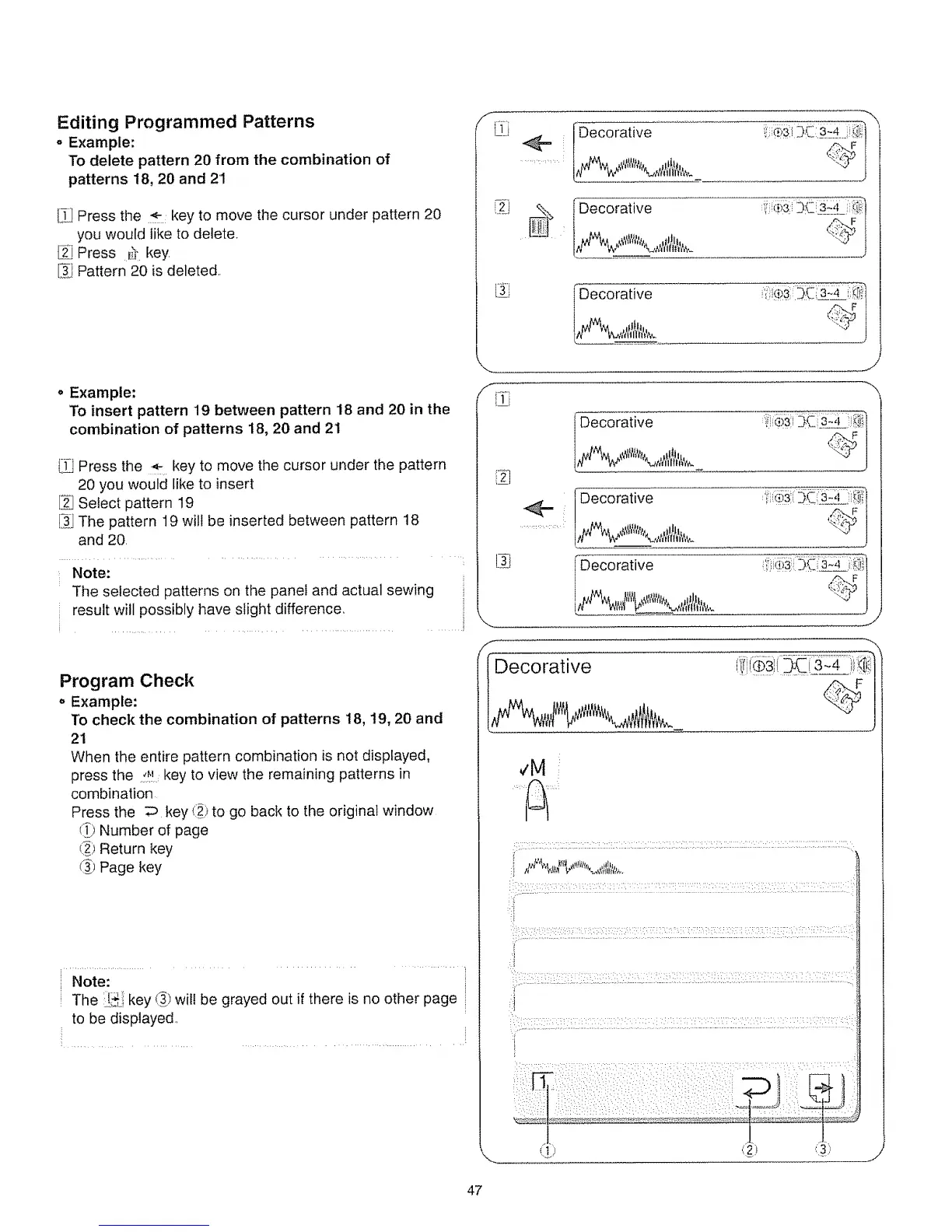
Editing Programmed Patterns
o Example:
To delete pattern 20 from the combination of
patterns 18, 20 and 21
[_] Press the key to move the cursor under pattern 20
you would like to delete.
Press _ key.
[_J Pattern 20 is deleted.
o Example:
To insert pattern 19 between pattern 18 and 20 in the
combination of patterns 18, 20 and 21
l-_ Press the key to move the cursor under the pattern
20 you would like to insert
F;_JSelect pattern 19
t_ The pattern 19 will be inserted between pattern 18
and 20,
Note:
The selected patterns on the panei and actual sewing
result will possibly have slight difference,
.............. ........ ........................ ...... !
Program Check
o Example:
To check the combination of patterns 18, 19, 20 and
21
When the entire pattern combination is not displayed,
press the !_! key to view the remaining patterns in
combination
Press the D key (_) to go back to the original window
(_) Number of page
!_) Return key
(_) Page key
Note:
The Ji_..ikey (_')will be grayed out if there is no other page
to be displayed..
Deco rative
i1|1 i
_&iive
'., 3.E::3_4 :_iii:
Decorative ',_!_iii3::3L _:4
J
Decorative
'h.dq{ill It flt_.
Decorative
......................
Decorative
,t'!%,'#'S
f
,_F
47






 To Next Page