Designs i:_
HoopSizeF:126x110mm ....".....
4_;:¢b-,1
J
:_'_. .,is]
3 4 _ ............
-7
If
t......... -
.....Designs.......1.........................................i:ii..........
H0opSize F: 126x110mm
........ 5
,t,
V
Mode Selection
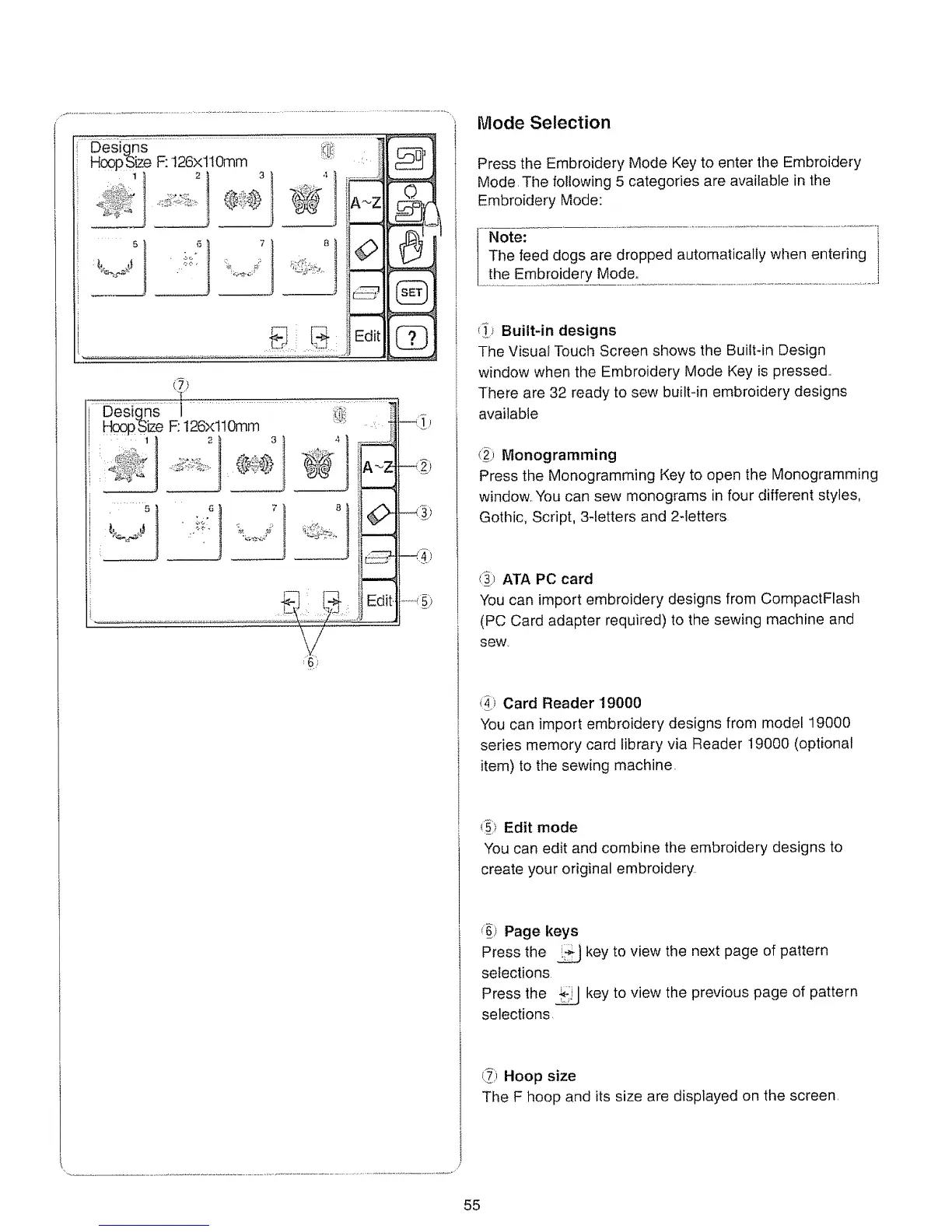
Press the Embroidery Mode Key to enter the Embroidery
Mode, The following 5 categories are available in the
Embroidery Mode:
............................................................................................................. i
Note:
The feed dogs are dropped automatically when entering i
....the Embroi_de[y_M__ode:..................................................................................................
_ Built-in designs
The Visual Touch Screen shows the Built-in Design
window when the Embroidery Mode Key is pressed..
There are 32 ready to sew built-in embroidery designs
available
(_ Monogramming
Press the Monogramming Key to open the Monogramming
window, You can sew monograms in four different styles,
Gothic, Script, 3-letters and 2detters
_:_ ATA PC card
You can import embroidery designs from CompactFlash
(PC Card adapter required) to the sewing machine and
sew.
_i_ Card Reader '19000
You can import embroidery designs from model 19000
series memory card library via Reader 19000 (optional
item) to the sewing machine.
__i)Edit mode
You can edit and combine the embroidery designs to
create your original embroidery,,
_) Page keys
Press the _ key to view the next page of pattern
selections
Press the _ key to view the previous page of pattern
selections,
(_i; Hoop size
The F hoop and its size are displayed on the screen,
55






 To Next Page