j,_jL
o_jj
v_j,
YJS
7t 81 e :oKlcaooo B,s
¢_) % r?)
_ Short of memory space,
the file cannot be saved,,
_, The same file name exists
overwrite it?
Assigning a File Name
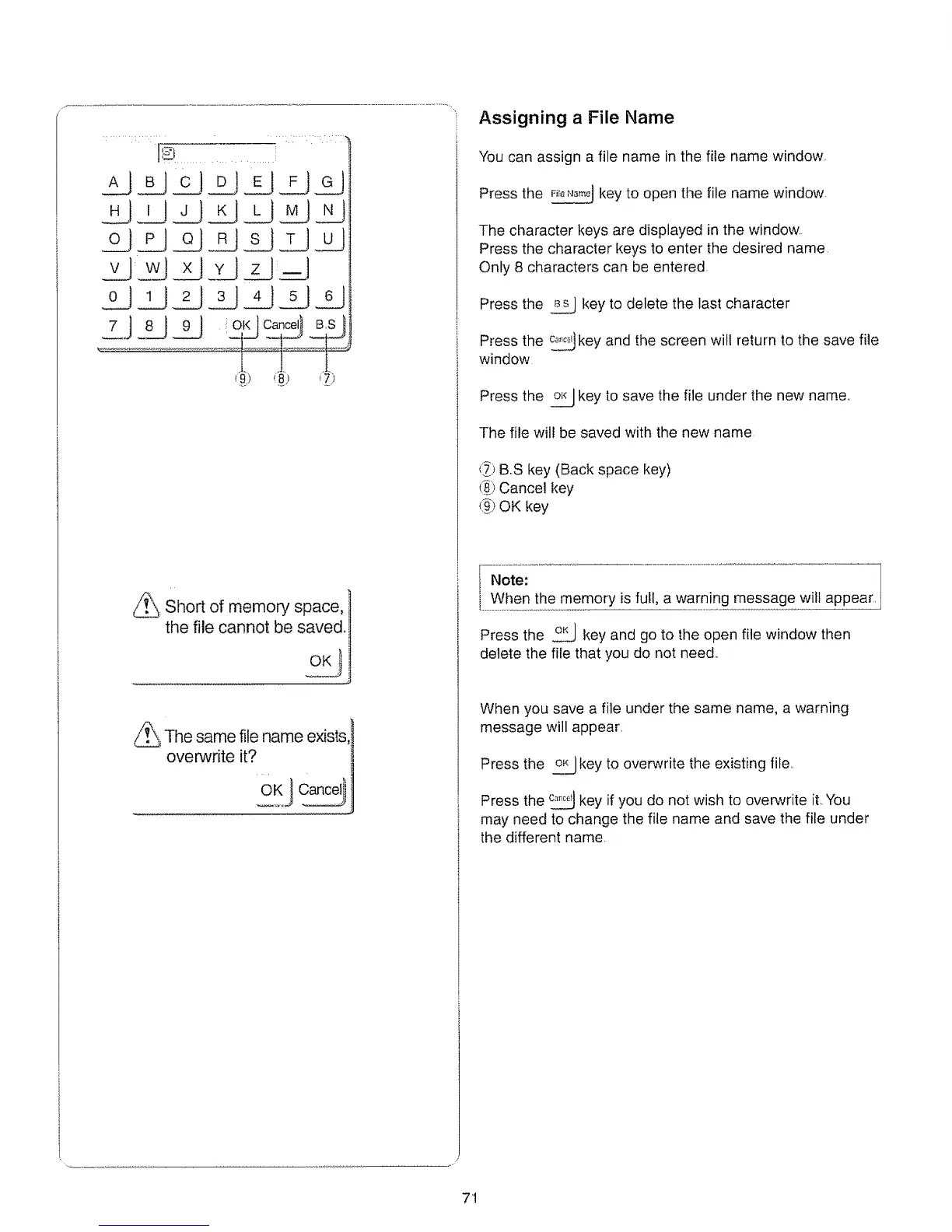
You can assign a file name in the file name window,
Press the nr_._.,_jkey to open the file name window
The character keys are displayed in the window.
Press the character keys to enter the desired name,
Only 8 characters can be entered
Press the _ key to delete the last character
Press the _key and the screen wilt return to the save file
window
Press the _ key to save the file under the new name°
The file will be saved with the new name
(_9BoS key (Back space key)
(_ Cancel key
t_) OK key
I Note:
i When the memory is full, a warning message will appear.
Press the _ key and go to the open file window then
delete the file that you do not need..
When you save a file under the same name, a warning
message will appear..
Press the _ key to overwrite the existing file..
Press the _ key if you do not wish to overwrite it. You
may need to change the file name and save the file under
the different name
71






 To Next Page