SECTION V. SATIN AND DECORATIVE
STITCHES
Key Functions
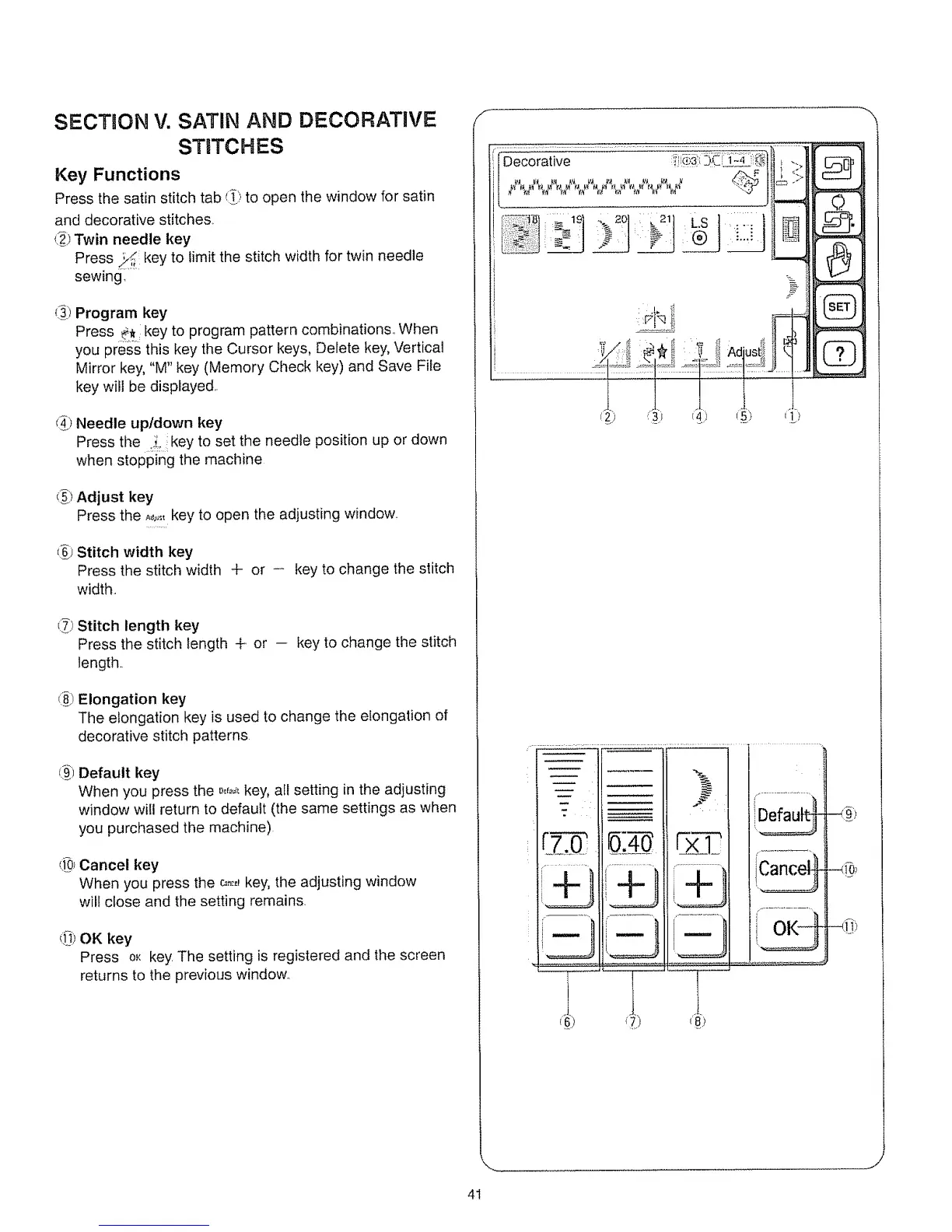
Press the satin stitch tab _)to open the window for satin
and decorative stitches.
t_) Twin needle key
Press key to limit the stitch width for twin needle
sewing
(_1Program key
Press _, key to program pattern combinations.. When
you pre_ssthis key the Cursor keys, Delete key, Vertical
Mirror key, "M" key (Memory Check key) and Save File
key will be displayed
d_)Needle up/down key
Press the ..i. key to set the needle position up or down
when stopping the machine
(_) Adjust key
Press the _,,,.,.key to open the adjusting window..
L_)Stitch width key
Press the stitch width + or - key to change the stitch
width,,
(_) Stitch length key
Press the stitch length + or -- key to change the stitch
length..
(_) Elongation key
The elongation key is used to change the elongation of
decorative stitch patterns
_,_)Default key
When you press the _,0f=_,key, all setting in the adjusting
window will return to default (the same settings as when
you purchased the machine)
(_0_Cancel key
When you press the c_:,_key, the adjusting window
will close and the setting remains.
_]) OK key
Press oK key.The setting is registered and the screen
returns to the previous window..
Decorative
!,,,,t, >
CD
-_:_>
41






 To Next Page