.ii,............iii¸
1,; !ii
L,!.._ ..i.Li
4-i ..............÷i
!Ti (4)
s L--
_,i1__'
................: ............. I
o
,/
r •
(2D
"/
13
i_i, #
-,4_T_: i i li+i i¸¸
I
+-
i:! i:_;iI:: i ' _ it-_
::iiii _'_ i i _ t r" !A Z
............... !
I
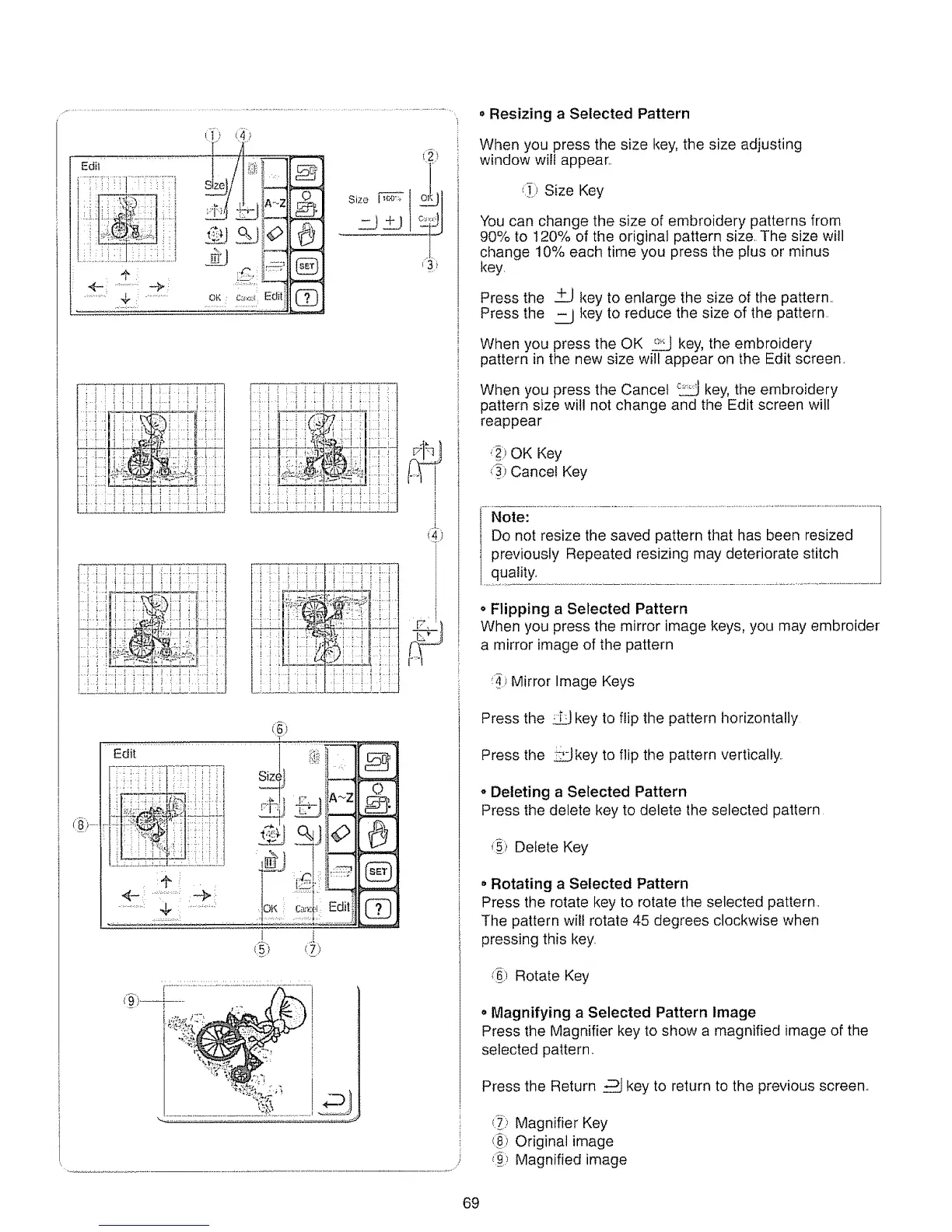
• Resizing a Selected Pattern
When you press the size key, the size adjusting
window will appear,,
_i_)Size Key
You can change the size of embroidery patterns from
90% to 120% of the original pattern size, The size will
change 10% each time you press the plus or minus
key
Press the +_Jkey to enlarge the size of the pattern.
Press the _T__Jkey to reduce the size of the pattern.
When you press the OK °20LJkey, the embroidery
pattern in the new size will appear on the Edit screen.
When you press the Cancel _ key, the embroidery
pattern size will not change and the Edit screen will
reappear
':_:)OK Key
Cancel Key
Note:
Do not resize the saved pattern that has been resized
previously Repeated resizing may deteriorate stitch
quality..
o Flipping a Selected Pattern
When you press the mirror image keys, you may embroider
a mirror image of the pattern
:_ Mirror Image Keys
Press the _ key to flip the pattern horizontally
Press the _key to flip the pattern vertically.
o Deleting a Selected Pattern
Press the delete key to delete the selected pattern
,::i_:iDelete Key
• Rotating a Selected Pattern
Press the rotate key to rotate the selected pattern,
The pattern will rotate 45 degrees clockwise when
pressing this key.
Rotate Key
o Magnifying a Selected Pattern Image
Press the Magnifier key to show a magnified image of the
selected pattern,.
Press the Return _ key to return to the previous screen°
_) Magnifier Key
(_) Original image
(_) Magnified image
69






 To Next Page