0
• i
@
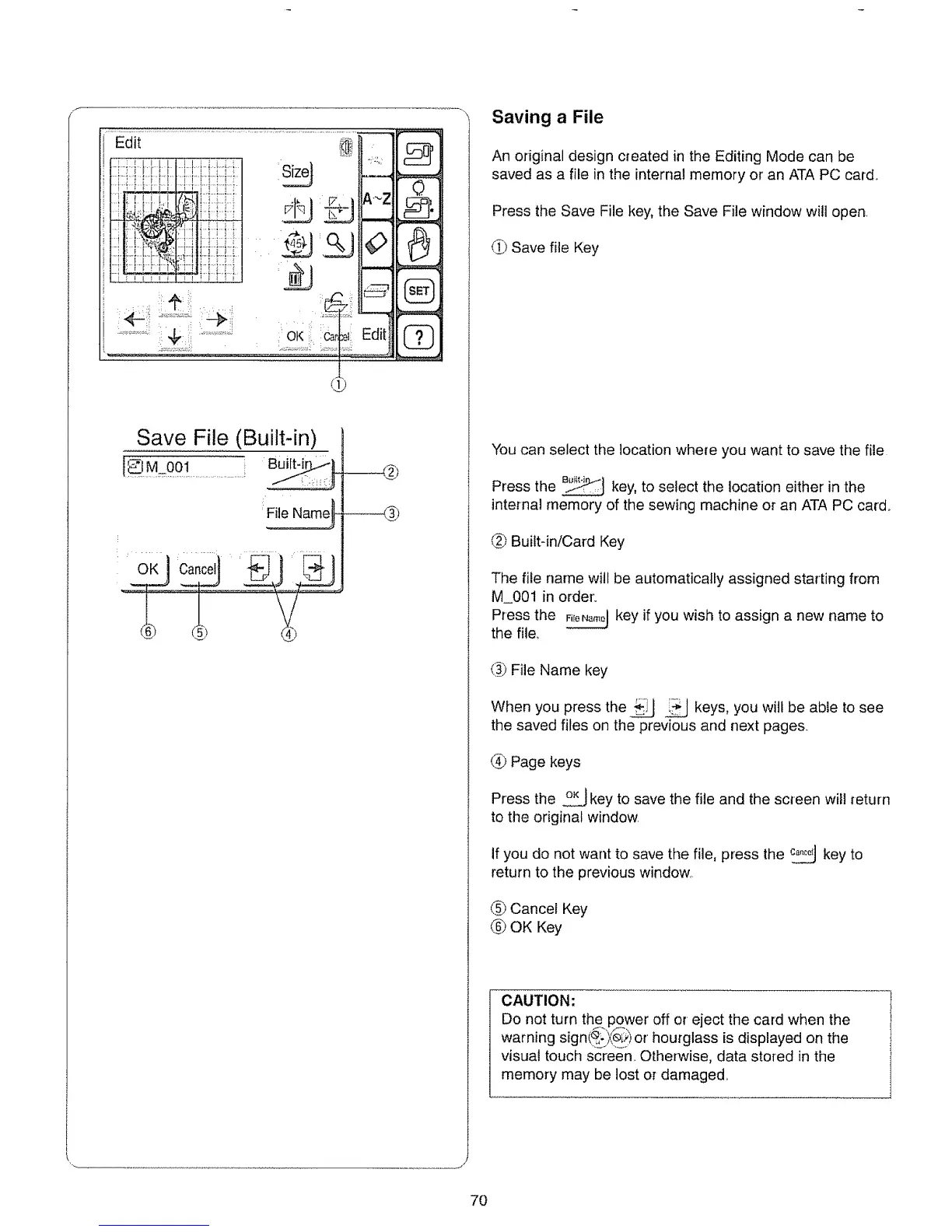
Save File (Built-in)
1 M.OOl..........................J
:File Namel
Saving a File
An original design created in the Editing Mode can be
saved as a file in the internal memory or' an ATA PC card.
Press the Save File key, the Save File window will open.
(._ Save file Key
You can select the location where you want to save the file
Press the _ key, to select the location either in the
internal memory of the sewing machine or an ATA PC card.
L_)Buittqn/Card Key
The file name will be automatically assigned starting from
M_O01 in order.
Press the _ key if you wish to assign a new name to
the file_
(_ File Name key
When you press the _ _ keys, you will be abie to see
the saved files on the previous and next pages..
(_ Page keys
Press the o_._jkey to save the file and the screen will return
to the original window.
if you do not want to save the file, press the _ key to
return to the previous window..
(_) Cancel Key
(_ OK Key
CAUTION:
Do not turn the power off or eject the card when the
warning sign(_(,e_;)or hourglass is displayed on the
visual touch screen,. Otherwise, data stored in the
memory may be lost or damaged_
7O






 To Next Page