HoopTSizeF:126x110mm _ :'_':
2 .... 3
m
Edi
OPen File(Built:in)
_JABC _f_J
I_M 002 |_
0 lcanc0,t#1
Are you sure you want
to delete this file?
i Opening a Saved File
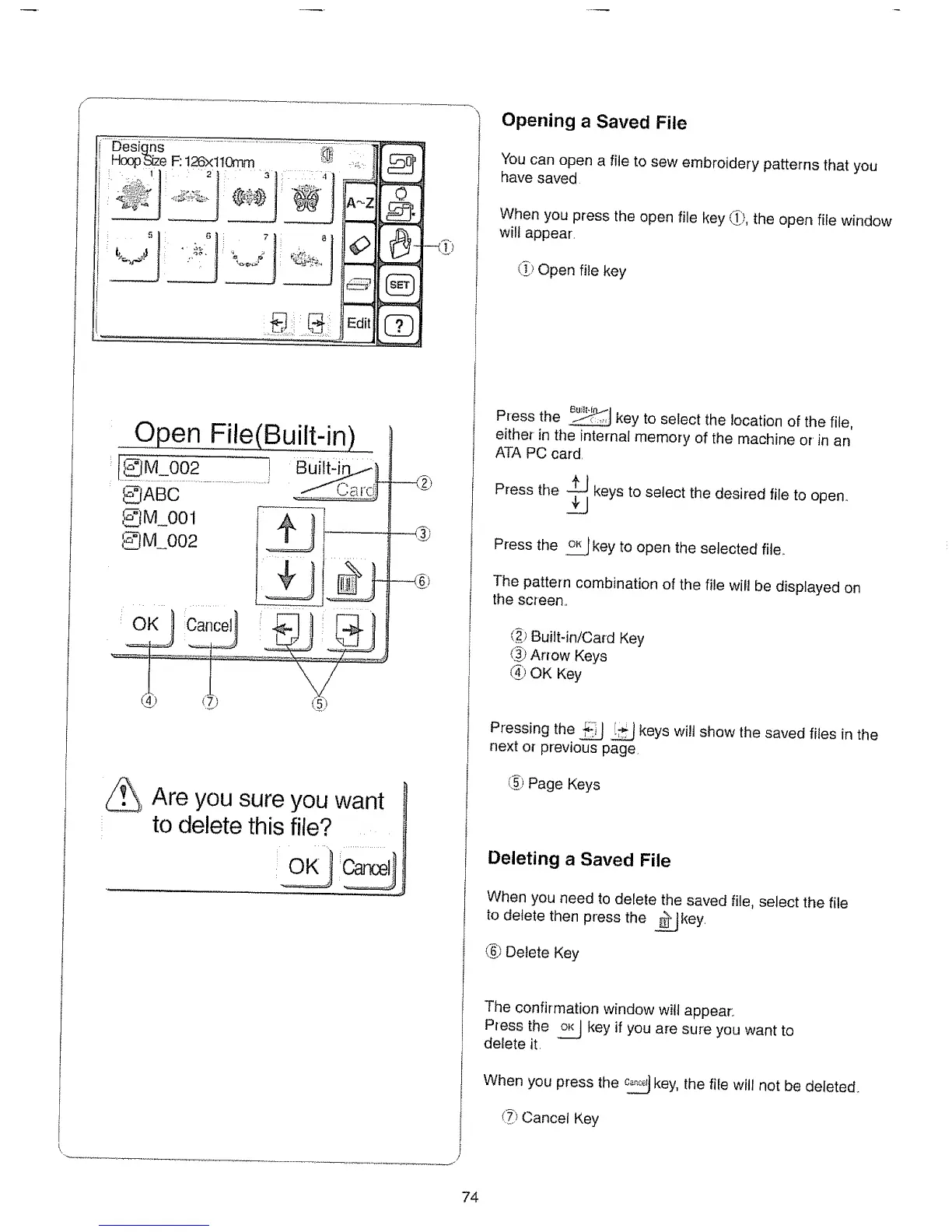
i You can open a file to sew embroidery patterns that you
have saved
I When you press the open file key _.), the open file window
will appear.
(f.3Open file key
Press the .J_ .,,jkey to select the location of the file,
either in the internal memory of the machine or in an
ATA PC card.
Press the _ keys to select the desired file to open..
Press the _ key to open the selected file..
The pattern combination of the file will be displayed on
the screen..
(_;_Built-in/Card Key
<i_}Arrow Keys
_"JOK Key
Pressing the _ _ keys wilt show the saved files in the
next o{ previous page
_,) Page Keys
Deleting a Saved File
When you need to delete the saved file, select the file
to delete then press the __Jkey
(6_Delete Key
The confirmation window wilt appear..
P_ess the o_ key if you are sure you want to
delete it.
When you press the _ key, the file will not be deleted.
(_ Cancel Key
74






 To Next Page