I_
[_
I
ATA PC Card (Optional)
o To insert the ATA PC card
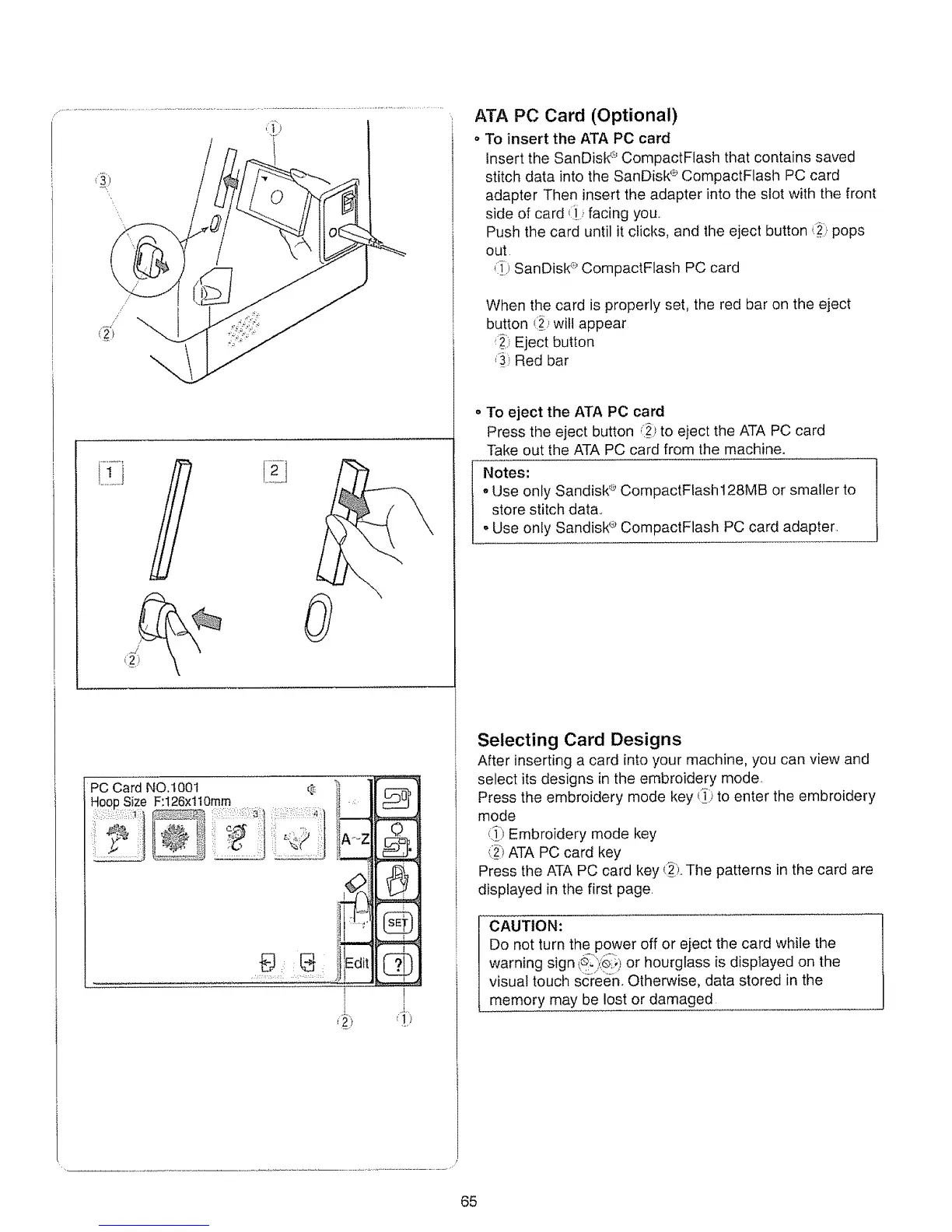
insert the SanDisk '-_CompactFlash that contains saved
stitch data into the SanDisk '_CompactFlash PC card
adapter Then insert the adapter into the slot with the front
side of card _:i..facing you.
Push the card until it clicks, and the eject button ,_ii_pops
out
{i}_i}SanDistd;' CompactFlash PC card
When the card is properly set, the red bar on the eject
button (i_iwill appear
_; Eject button
,_:,Red bar
• To eject the ATA PC card
Press the eject button J_)to eject the ATA PC card
Take out the ATA PC card from the machine.
Notes:
oUse only Sandisk'*':'CompactFlash 128MB or smaller to
store stitch data,,
° Use only Sandisk '_'CompactFlash PC card adapter
Selecting Card Designs
After inserting a card into your machine, you can view and
select its designs in the embroidery mode,
Press the embroidery mode key _,,*to enter the embroidery
mode
(!) Embroidery mode key
_i_)ATA PC card key
Press the ATA PC card key _}_iThe patterns in the card are
displayed in the first page
CAUTION:
Do not turn the power off or eject the card while the
warning sign t_il):'_i!)or hourglass is displayed on the
visual touch screen, Otherwise, data stored in the
memory may be lost or damaged
65






 To Next Page