Basic Operations
14
3
Secondary screen
• [
]/[ ] : The Secondary screen changes every
time you touch it. You can also change the
Secondary screen by flicking left or right on
the screen.
• Indicators: Displays the current source
condition and so on.
– ATT: The attenuator is active.
– DUAL: The dual zone function is on.
– MUTE: The mute function is active.
– LOUD: The loudness control function is on.
• Short-cut buttons: The source changes to the
one you have set as a short-cut. For the short-
cut setting, refer to Customize Short-cut
buttons on HOME screen (P.13).
4
[Û]
Touch to display the Hands Free screen. (P.49)
When connecting as Apple CarPlay or Android
Auto, it works as a phone provided in Apple
CarPlay or Android Auto.
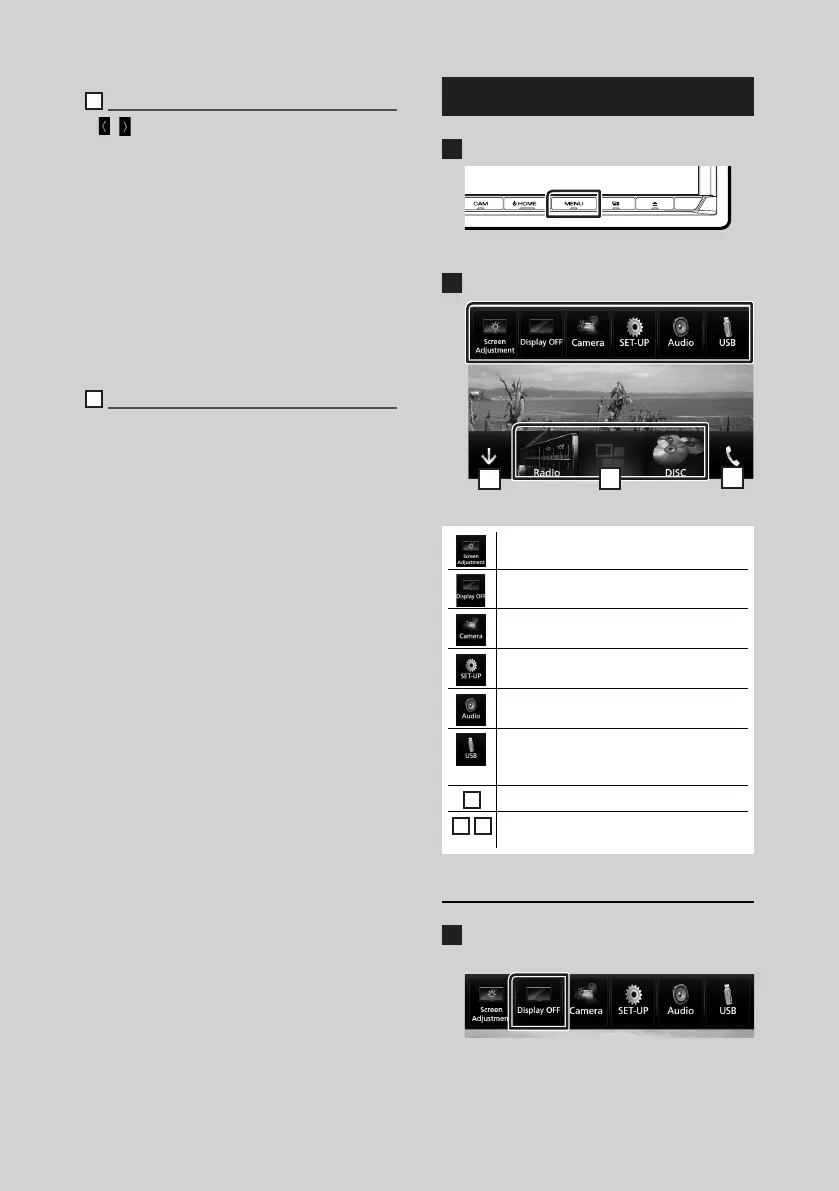
Popup menu
1
Press the [MENU] button.
Popup menu appears.
2
Touch to display the popup menu.
5
6
7
The contents of the menu are as follows.
• Displays the Screen Adjustment screen.
(P.57)
• Turns the display off. (P.9)
• Displays the view camera. (P.54)
• Displays the SETUP Menu screen.
(P.57)
• Displays the Audio Control Menu screen.
(P.63)
• Displays the control screen of current
source. Icon feature differs depending on
the source.
5
• Close the popup menu.
6
7
• See HOME screen descriptions
(P.11).
Turn off the screen
1
Select [Display OFF] on the pop-up
menu.

 To Next Page
 Loading...