Radio
34
Radio
Radio Basic Operation
Most functions can be controlled from the
source control screen.
To enter Radio source, touch [Radio] icon in
the source selection screen. (P.11)
NOTE
• Set the remote control mode switch to AUD
mode before starting operation, see Switch the
operation mode (P.72).
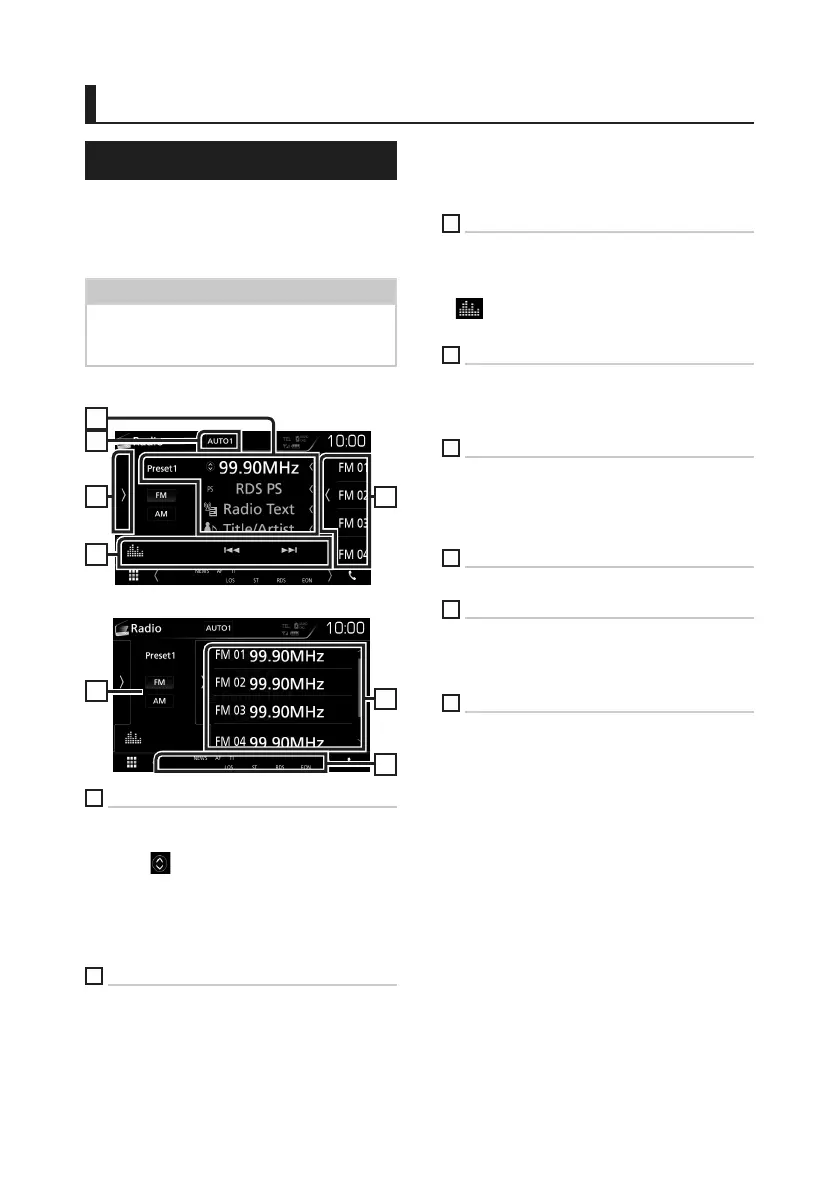
Control screen
2
5
3
4
1
Preset list screen
6
7
8
1
Information display
Displays the information of the current station:
Frequency
Touching [
] allows you to switch between
Content A and Content B.
Content A: PS name, Radio Text, Title & Artist
Content B: PTY Genre, Radio Text plus
Preset#: Preset number
2
[AUTO1] / [AUTO2] / [MANUAL]
Switches the seek mode in the following
sequence; [AUTO1], [AUTO2], [MANUAL].
• [AUTO1]: Tunes in a station with good
reception automatically.
• [AUTO2]: Tunes in stations in memory one
after another.
• [MANUAL]: Switches to the next frequency
manually.
3
Function bar
• [E] [F] : Tunes in a station. The method of
frequency switching can be changed (see 2
in table).
• [
] : Displays the Graphic Equalizer screen.
(P.66)
4
Preset key
Recalls the memorized station.
• Touch on the right side of the screen to display
the Preset list. Touch again to close the list.
5
Function panel
Touch on the left side of the screen to display
the function panel. Touch again to close the
panel. For details on the keys, see Function
panel (P.35).
6
[FM] [AM]
Switches the band.
7
Preset list
Recalls the memorized station.
When touched for 2 seconds, stores the current
receiving station in memory.
8
Indicator Items
• ST: A stereo broadcast is being received.
• MONO: The forced monaural function is on.
• AF: The AF search function is on.
• EON: The Radio Data System station is sending
EON.
• LOS: The Local Seek function is on.
• NEWS: News bulletin interruption is in
progress.
• RDS: Indicates the state of the Radio Data
System station when the AF function is on.
White: Radio Data System is being received.
Orange: Radio Data System is not being
received.
• TI: Indicates the reception state of traffic
information.
White: TP is being received.
Orange: TP is not being received.


 To Next Page
 Loading...