Other External Components
55English
■ Front Camera Mirror Image
(DDX9717BTS)
If you select [ON] for [Dashboard Camera /
Front Camera].
ON: Displays the picture from the front view
camera horizontally reversed.
OFF (Default): Displays the picture from the
front view camera as it is.
■ Dashboard Camera
(DMX7017DABS/ DMX7017BTS)
ON: Select this when the dashboard camera
is connected.
OFF (Default): Select this when no camera is
connected.
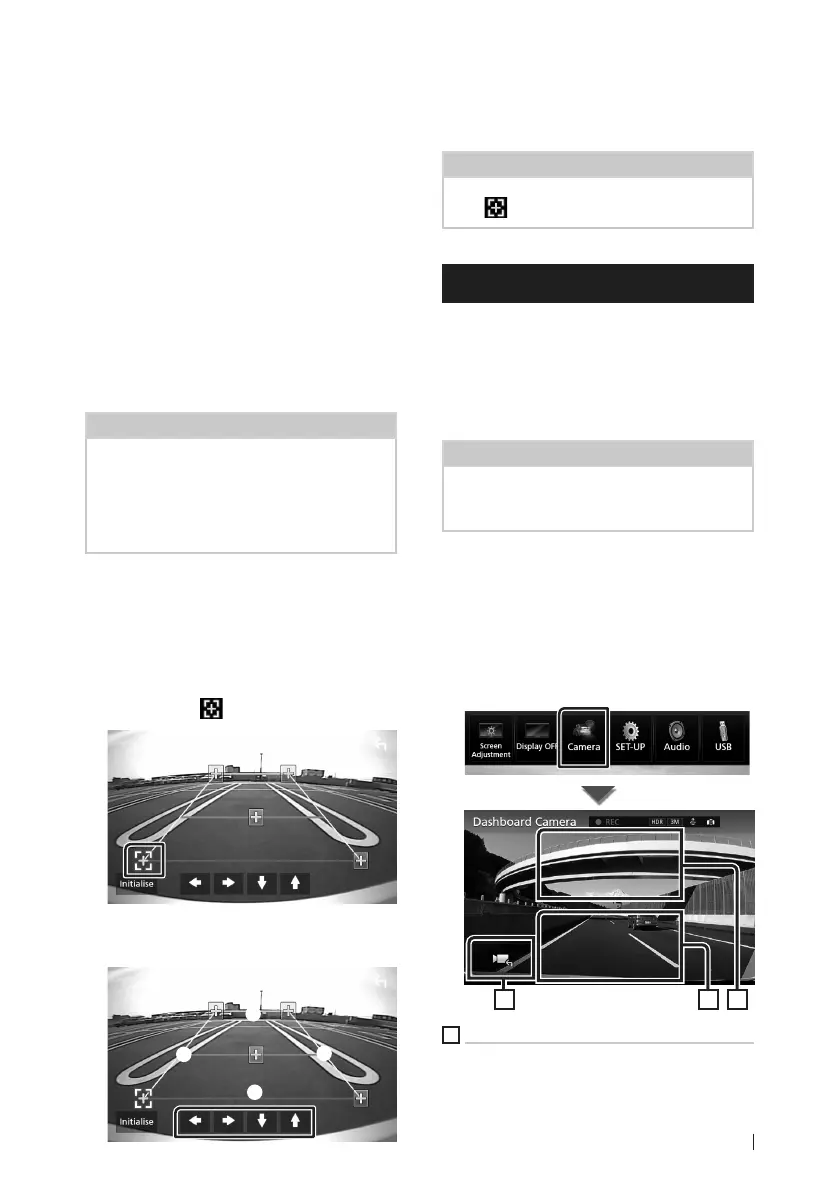
To adjust the parking guidelines
NOTE
• Install the rear view camera in the appropriate
position according to the instructions supplied
with the rear view camera.
• When adjusting the parking guidelines, make
sure to use the parking brake to prevent the car
from moving.
1
Touch [ON] of [Parking Guidelines] in the
Camera screen. (P.54)
2
Touch [Guidelines SETUP] in the Camera
screen.
3
Adjust the parking guidelines by
selecting the
mark.
4
Adjusting the position of the selected
mark.
A
B
C
D
Make sure that A and B are horizontally
parallel, and that C and D are the same
length.
NOTE
• Touch [Initialize] and after touch [Ye s ] to set all
the
marks to the initial default position.
Use Dashboard Camera
A Dashboard Camera, DRV-N520 (optional
accessory), connected to this unit lets you play
video-recorded data and so on.
For details, see the instruction manual of
the Dashboard Camera DRV-N520 (optional
accessory).
NOTE
• To connect a camera, see P.83.
• Sets the dashboard camera/front camera as
[Dashboard Camera]. (P.54)
Ñ Display the dashboard camera
screen
1
Press the [MENU] button.
Popup menu appears.
2
Touch [Camera].
123
1
Switching the View Camera
Touch to change the dashboard view camera
and rear view camera.


 To Next Page
 Loading...