Connection/Installation
83English
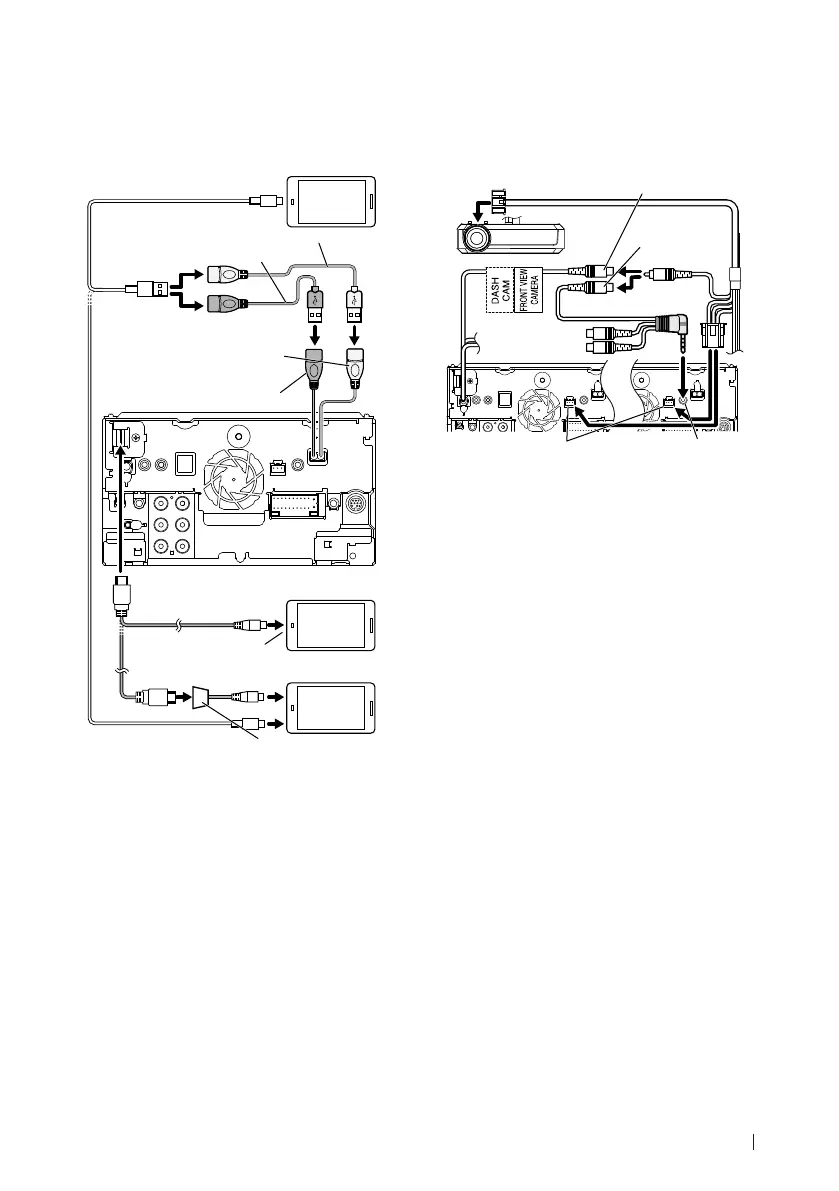
Ñ Connecting an Android
smartphone
Micro USB to USB cable
[2]
Android smartphone
(with Android Auto)
[2]
USB (Gray) terminal
[1]
(DDX9717BTS only)
USB (Black) terminal
[1]
Accessory 2 (Black) (1 m)
[5]
Accessory 3 (Gray) (1 m)
[5]
KCA-MH100 (1.8 m)
[3]
KCA-HD100
(1.8 m)
[3]
Micro HDMI to HDMI
adapter
[2]
Micro USB to USB cable
[2]
Android smartphone (with MHL)
[2]
Android smartphone (with HDMI)
[2]
[4]
[1]
USB maximum power supply current :
DC 5 V = 1.5 A
[2]
Sold separately
[3]
Optional accessory
[4]
Use conversion adapter to connect to
smartphones if necessary.
[5]
See Securing the USB extension cable
(P.82).
Ñ Connecting a Dashboard
camera
Not used.
(White, Red)
DRV-N520
[1]
CA-C3AV
[1]
Visual (Yellow)
Front view camera/ Dashboard
camera input (Yellow)
(DDX9717BTS only)
AV-IN/ Dashboard
camera input
(DMX7017DABS/
DMX7017BTS only)
Dashboard camera
interface
[1]
Optional accessory


 To Next Page
 Loading...