Disc
16
Disc
(DDX9717BTS)
Playing a disc
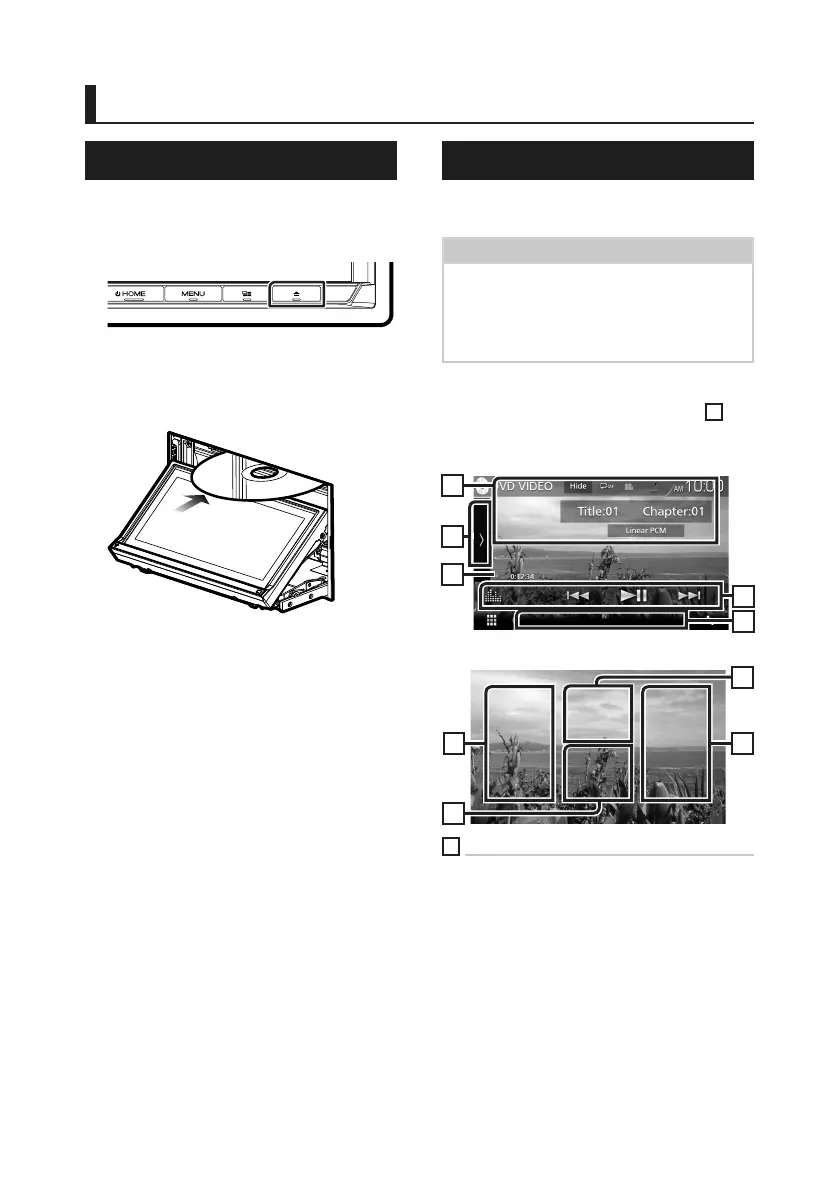
Ñ Insert a disc
1
Press the [G] button.
2
Touch [DISC EJECT].
The panel opens.
3
Insert the disc into the slot.
The panel closes automatically.
The unit loads the disc and playback
starts.
Ñ Eject a disc
1
Press the [G] button.
2
Touch [DISC EJECT].
When removing a disc, pull it horizontally.
3
Press the [G] button.
DVD/ VCD Basic Operation
Most functions can be controlled from the
source control screen and playback screen.
NOTE
• Set the remote control mode switch to DVD
mode before starting operation for DVD and VCD,
see Switch the operation mode (P.72).
• The screen shot below is for DVD. It may be
different from the one for VCD.
1
When the operation buttons are not
displayed on the screen, touch the
7
area.
Control screen
1
2
3
4
5
Video screen
7
6
8
6
1
Information display
Displays the following information.
• Title #, Chapter #: DVD title and chapter
number display
• Track #/Scene #: VCD track or scene number
display. Scene # is displayed only when
Playback control (PBC) is on.
• Linear PCM, etc.: Audio format
• [Hide]: Hides the control screen.

 To Next Page
 Loading...