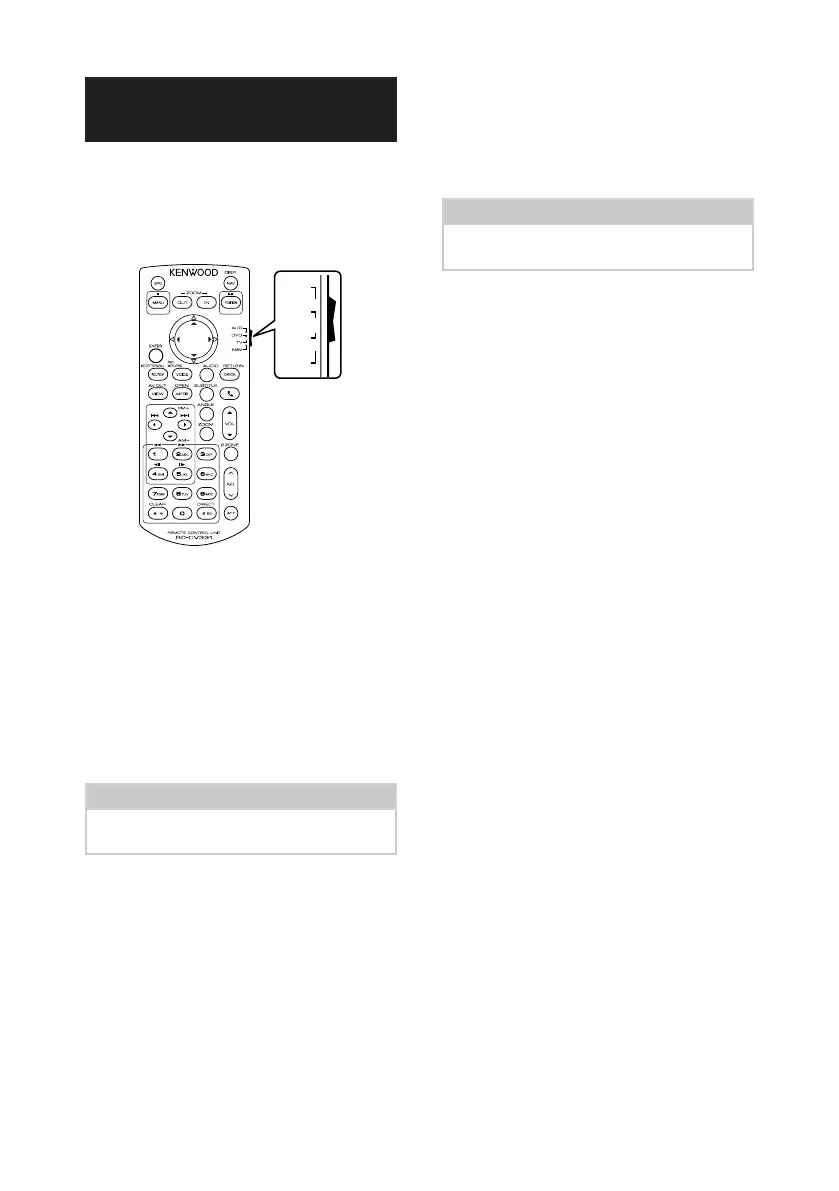
Remote control
72
Functions of the Remote
control Buttons
Ñ Switch the operation mode
The functions operated from the remote
control differ depending on the position of the
mode switch.
DVD
T V
NAV
AUD
•
•
•
•
■ AUD mode
Switch to this mode when controlling a
selected source or tuner source, etc.
■ DVD mode
Switch to this mode when playing a disc
media including DVD, VCD, and CD.
■ NAV mode
Not used.
■ TV mode
Not used.
NOTE
• When controlling a player that is not integrated in
the unit, select “AUD” mode.
Ñ Direct search mode
Using the remote control, you can jump
directly to the desired file, track chapter, etc.
with entering the number corresponding to
the content.
NOTE
• This operation cannot be performed for USB
device and iPod.
1
Press the [#BS] button several times until
the desired content appears.
The available contents are different
depending on the source.
■ DVD
Title number/Chapter number
■ VCD 1.X and 2.X (PBC OFF)
Track number
■ VCD 2.X (PBC ON)
Scene number/Track number
■ Music CD
Track number
■ Radio
Frequency value
2
Enter the number of the content you want
to play using the numeric keypad.
3
For DVD or VCD, music CD, press the
[ENTER] button.
For radio, press the [C] or [D] button.
The content you entered is played.


 To Next Page
 Loading...