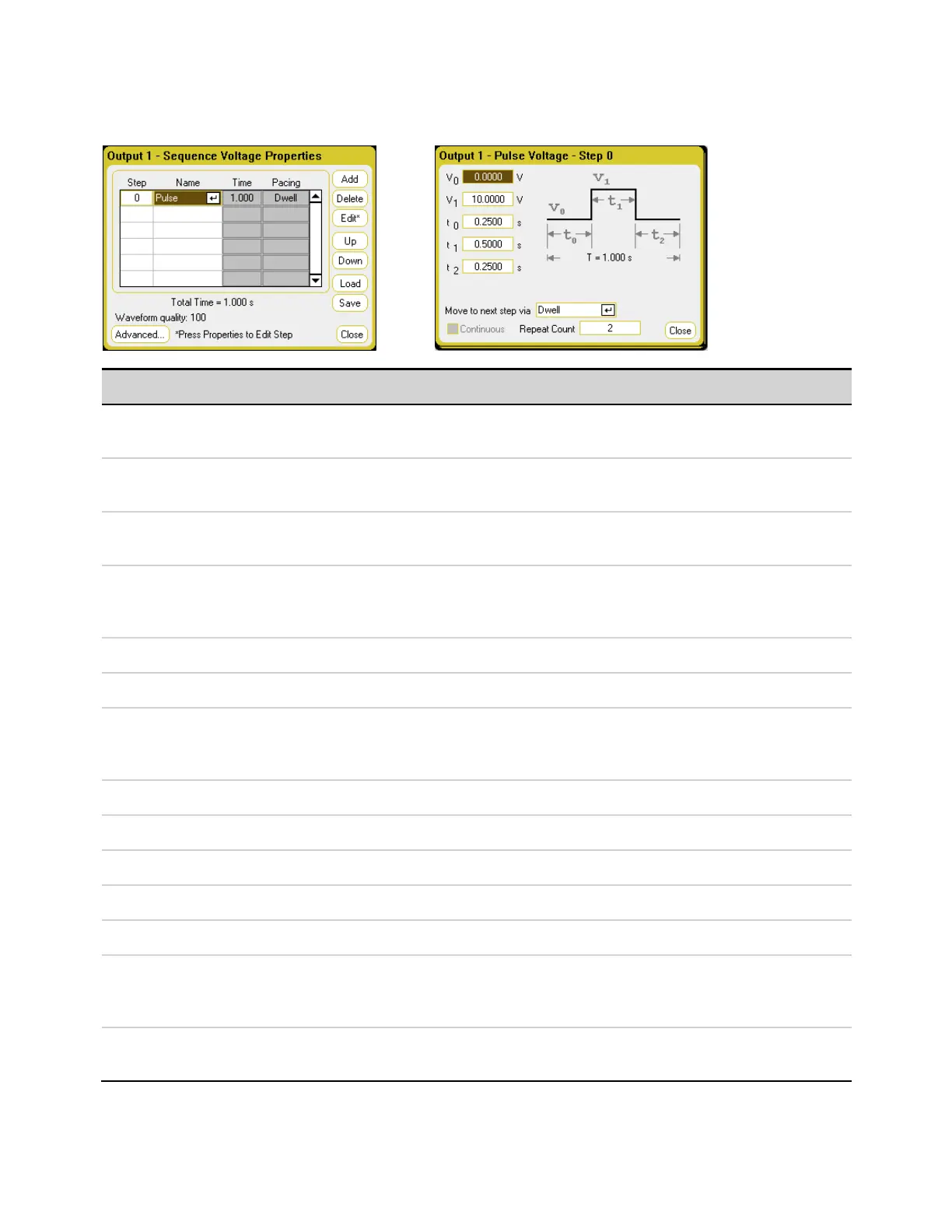
Arb Sequence Parameters
Parameter Description
Step <n> Each step of the sequence includes a step number, an arbitrary waveform, step time, and pacing option. The
total number of steps determines the length. Use the ▲ ▼ navigation keys to scroll through the steps.
Name The name of the Arb. Select an Arb from the dropdown list. Select Edit or Properties to editthe waveform. The
Pulse waveform editfields are shown above.
Time Displays the time that is allocated to the step in the Editfunction. This time does not include the number of
repeatcounts
Pacing Displays the pacing of the step. Dwell-paced transitions to the next step when the dwell time has elapsed. Trig-
ger-paced transitions to the next step when an external trigger is received. If the step time completes before the
trigger occurs, the step remains at the last Arb value while waiting for the trigger.
Add Inserts a step below the selected step; values are copied from the previous step.
Delete Deletes the presently selected step.
Edit Edits the selected Arb. The Pulse waveform edit fields are shown above. Move to the next step specifies the step
pacing. Repeatcount specifies how many times the Arb repeats. Continuous can only be selected if the Arb is
trigger-paced.
Up Move up through the steps.
Down Move down through the steps.
Load (.seq format) Loads a previously created sequence file.
Save (.seq format) Saves the present voltage or current sequence.
Total time Indicates the total run-time of the sequence.
Waveform Quality Indicates the number of points allocated to the continuously changing portion of the following waveforms:
sine, trapezoid, ramp, and exponential. The more of these waveforms that are added to the sequence, the fewer
points will be allocated, down to a minimum of 16 points.
Advanced Lets you editthe common properties that apply to the entire sequence. See Common Properties for more
information.
Keysight N6705C Operating and Service Guide 119
3 Using the Source Functions








 To Next Page