Parameter Description
Destination Path Specifies a destination directory.
Internal:\ specifies the instrument’s internal memory.
External:\ specifies the Memory port on the front panel.
Browse Lets you browse another directory or USB memory device.
Copy Copies the selected file to the specified destination.
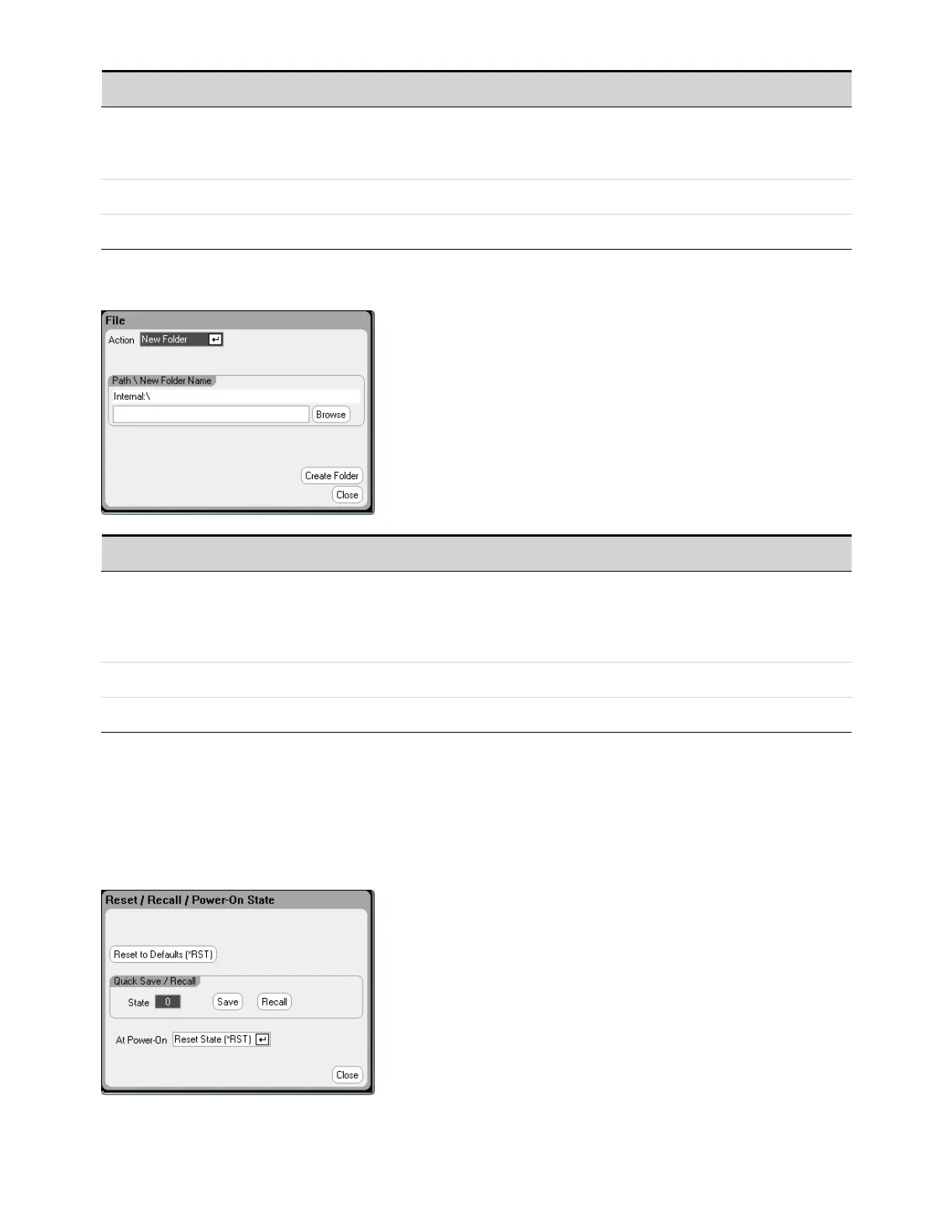
New Folder
Parameter Description
Path\New Folder Name Specifies a name for the folder.
Internal:\ specifies the instrument’s internal memory.
External:\ specifies the Memory port on the front panel.
Enter the name in the text field. See Enter the File Name.
Browse Lets you browse another directory or USB memory device.
CreateFolder Creates the newfolder in the specified location.
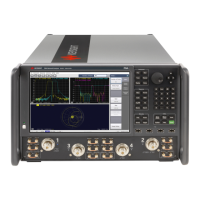
Reset/Recall/Power-On State
As shipped, the power analyzer is configured to automatically recall the Reset State (*RST) settings at
power-on. However, you can configure the reset, recall, and power-on state of the instrument. Press
the File key, then scroll and select Reset/Recall/Power-On State.
5 Using the System Functions
172 Keysight N6705C Operating and Service Guide








 To Next Page