Arbitrary Waveform Preview
Press Arb
This dialog displays the
arbitrary waveforms that have
been configured.
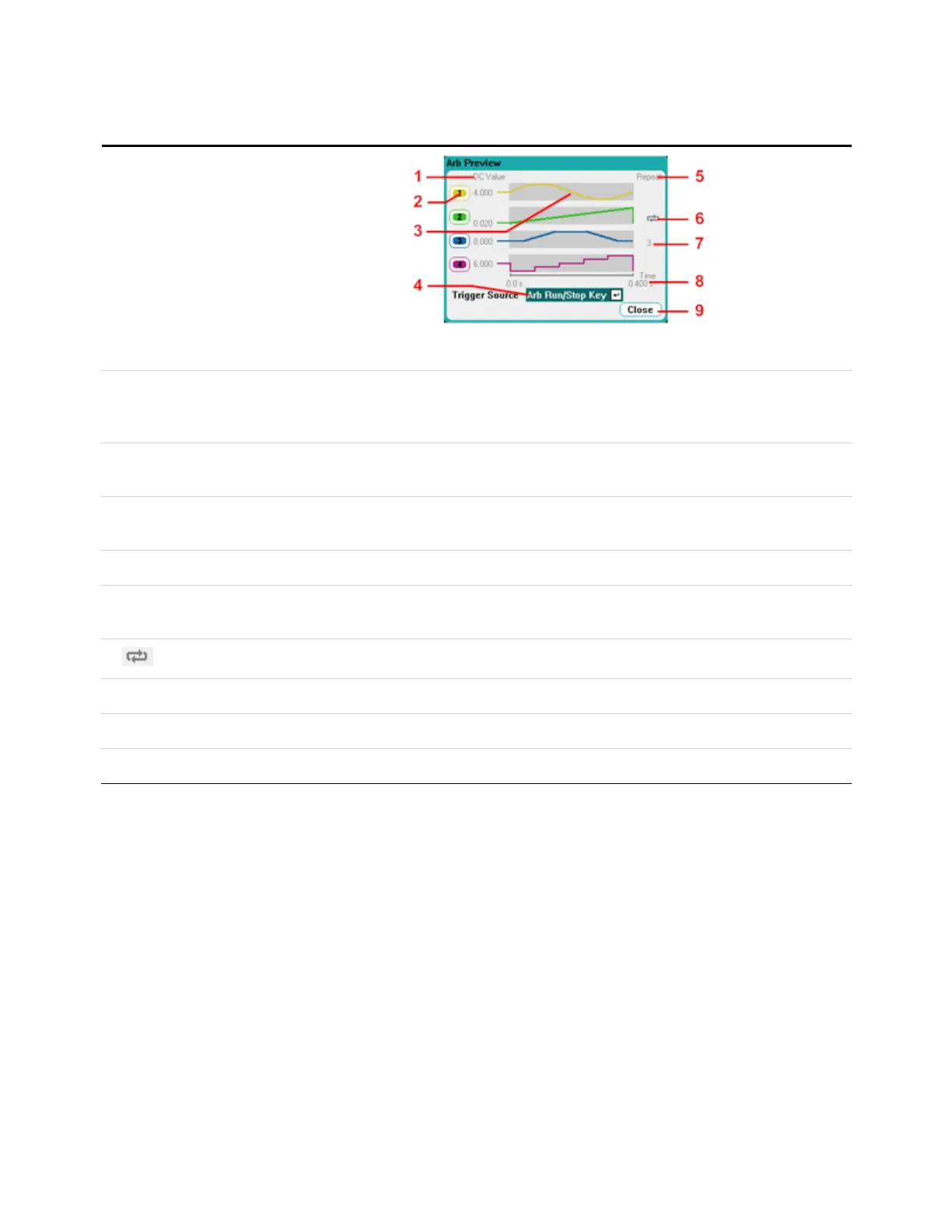
Arb Preview
1. DC Value This column indicates the present output voltage or current setting that appears atthe output before the Arb is
run. The output will return to this value after the Arb complete if the Return to DC value box has been
checked. If the Last Arb Value box is checked, the output will remain atthe last programmed Arb value.
2. Output This column identifies the output channel on which the associated waveform will run. Use the navigation keys
to select an output if you wish to select an Arb or editthe Arb on that output channel.
3. Wave shapes This column illustrates the waveshapes that will run on each output when the arb(s) are started. Note that all
Arbs will run simultaneously.
4. Trigger Source This dropdown list selects the trigger source for all configured Arbs.
5. Repeat This column indicates how many times the Arb will repeatif it has been configured to repeat. If the column is
blank, the Arb will only run once.
6. Indicates that the Arb on output 2 runs continuously.
7. 3 Indicates that the Arb on output 3 repeats threetimes.
8. Time Indicates the time that the longest Arb will run. In this example, all Arbs run the same amount of time.
9. Close Closes the Arb Preview and returns to the previous measurement view.
1 Quick Reference
22 Keysight N6705C Operating and Service Guide








 To Next Page