Bias Board Troubleshooting
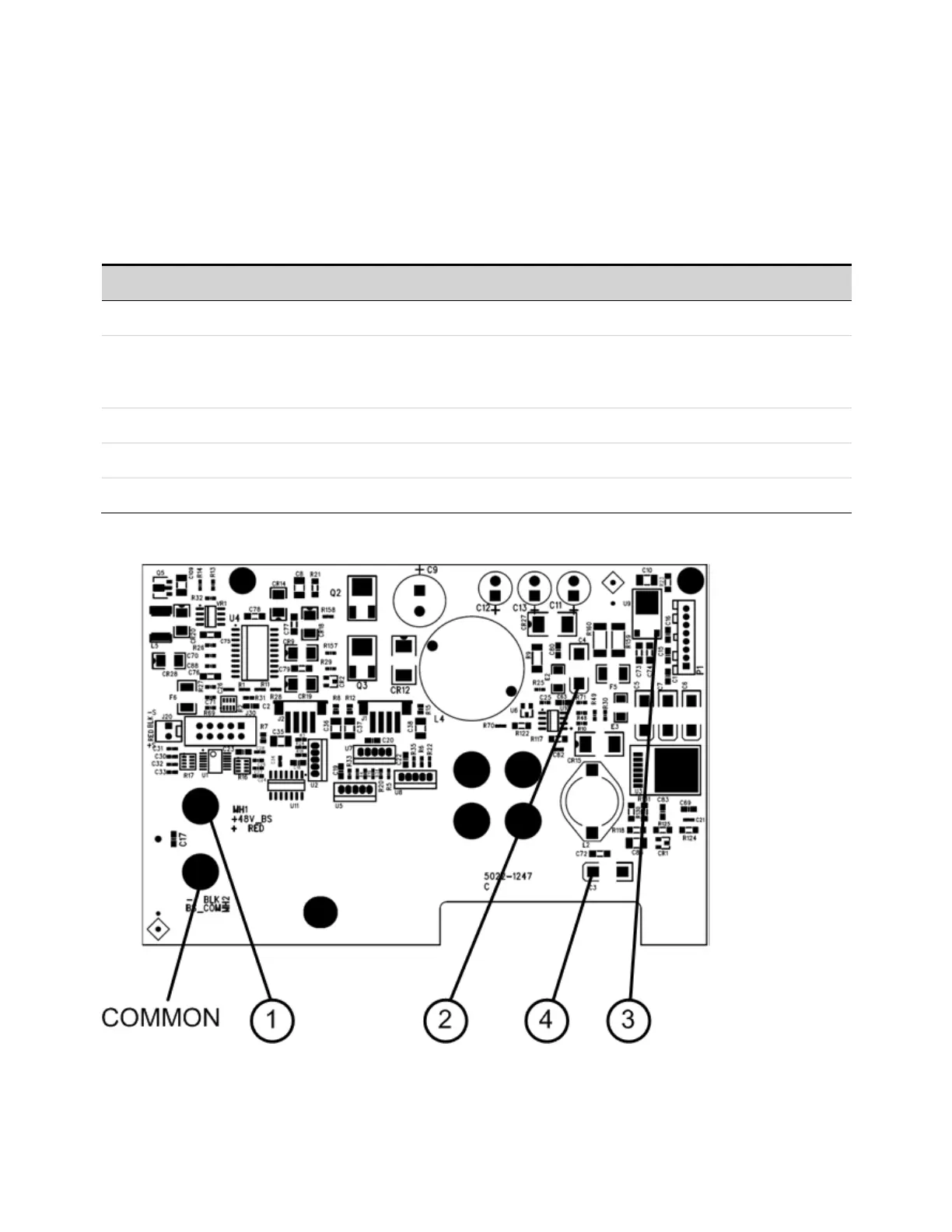
Troubleshooting the bias board involves checking for the presence of the correct bias voltages on the
board. Refer to the following table and figures.
Note that if the bias voltages at test points 2 - 4 in the following table are not present, it could be
caused by a defect in the power module or interface board that is pulling the bias voltage low.
Test Point Location Voltage Description
TP 1 + RED + 48 V Output of bulk supply. If not present, replacethe bulk supply.
TP 2 + C4 + 12 V If biases at TP 2, TP 3, or TP 4 are not present, disconnect the backplane and interface
board cable assemblies and recheck. If biases are still not present, replace the bias
board.
TP 3 U9 - 2 + 5 V Same as above.
TP 4 + C3 + 3.3 V Same as above.
Common − BLK common
9 Service and Maintenance
464 Keysight N6705C Operating and Service Guide








 To Next Page