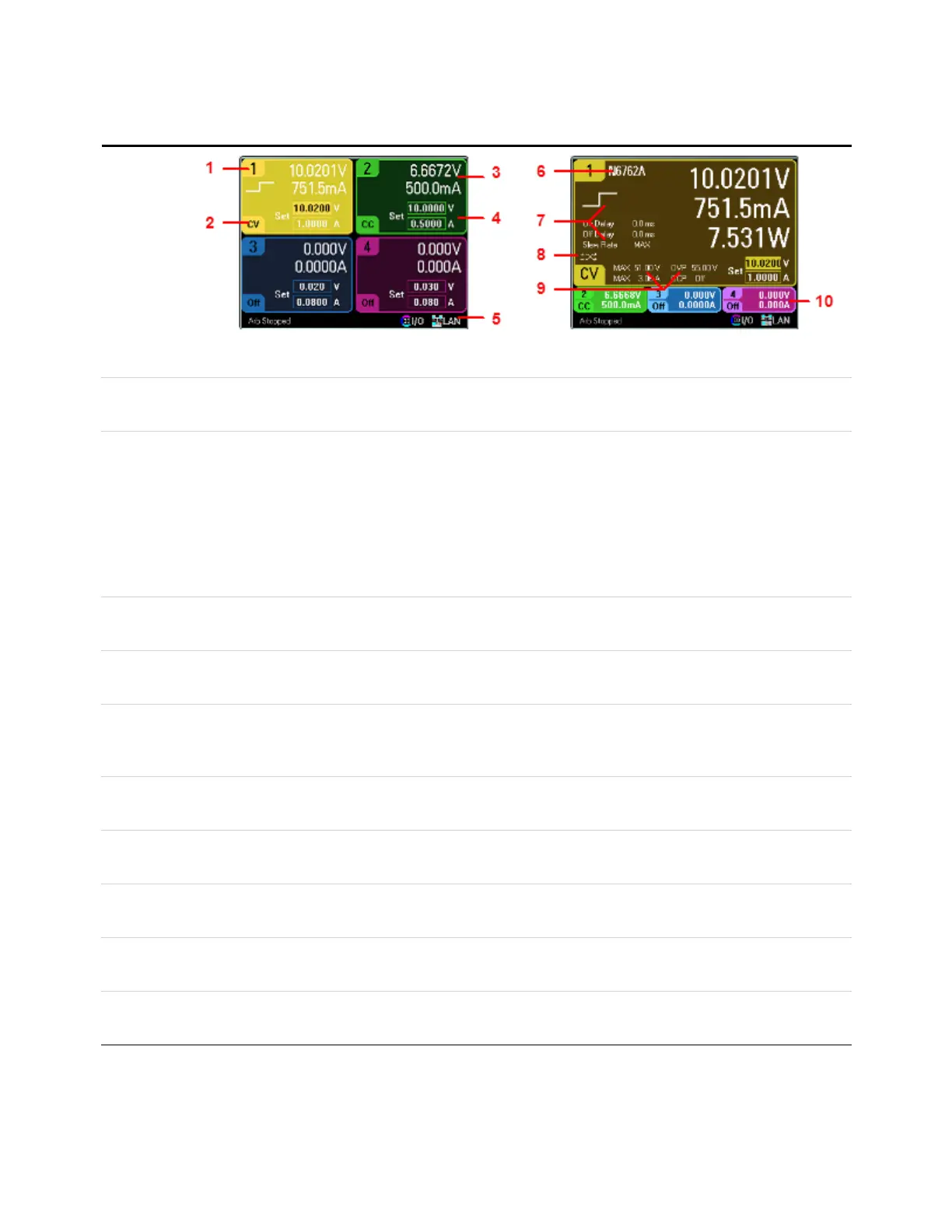
Meter View
Press Meter
View
This key
toggles
between
multiple and
single output
views.
Multiple Output View Single Output View
1. Output
Identifier
Identifies the output. When an output is selected, the background becomes highlighted. The selected output is displayed in an
enlarged formatin single output view.
2. Output
Status
Off: the output is off
CV: the output is in constant voltage mode
CC: the output is in constant current mode
Unr: the output is unregulated
CP+, CP–: a positive or negative power limit
CL+, CL–: a positive or negative current limit
VL+, VL–: a positive or negative voltage limit
OV: over-voltage protection tripped
OV–: negative voltage protection tripped
OC: over-current protection tripped
OT: over-temperature protection tripped
PF: a power-fail condition occurred
Inh: an external inhibit signal is received
Osc: the oscillation protection tripped
Prot: a coupled output protectoccurred
3. Output
Meter
Displays the actual output voltage and current. Displays power in single output view.
4. Output
Setting
Displays the present output voltage and current settings. Turn the front panel voltage or current knob to adjust these settings.
Can also be changed using the numeric keypad.
5. Remote
Status
Error – an error has occurred (press the Menu key, selectUtilities, then Error Log)
LAN– the LANis connected and has been configured
IO – there is activity on one of the remoteinterfaces
6. Model
Number
Identifies the model number of the power module connected to this output.
7. Arb, Delay,
& SlewRate
Displays the Arb waveform thatis presently configured for this output. If no Arb is configured, no waveform will be displayed.
Also displays the Output On and Output Off delay settings as well as the slewrate setting.
8. Polarity
Reverse
Indicates that the output and sense polarities are reversed.
9. Ratings &
Protection
Displays the maximum voltage and current ratings of the output. Also displays the present over-voltage protection setting
and whether over-current protection is on or off.
10. Other
Outputs
Displays the actual voltage, current, and status of the other outputs.
Keysight N6705C Operating and Service Guide 19
1 Quick Reference








 To Next Page