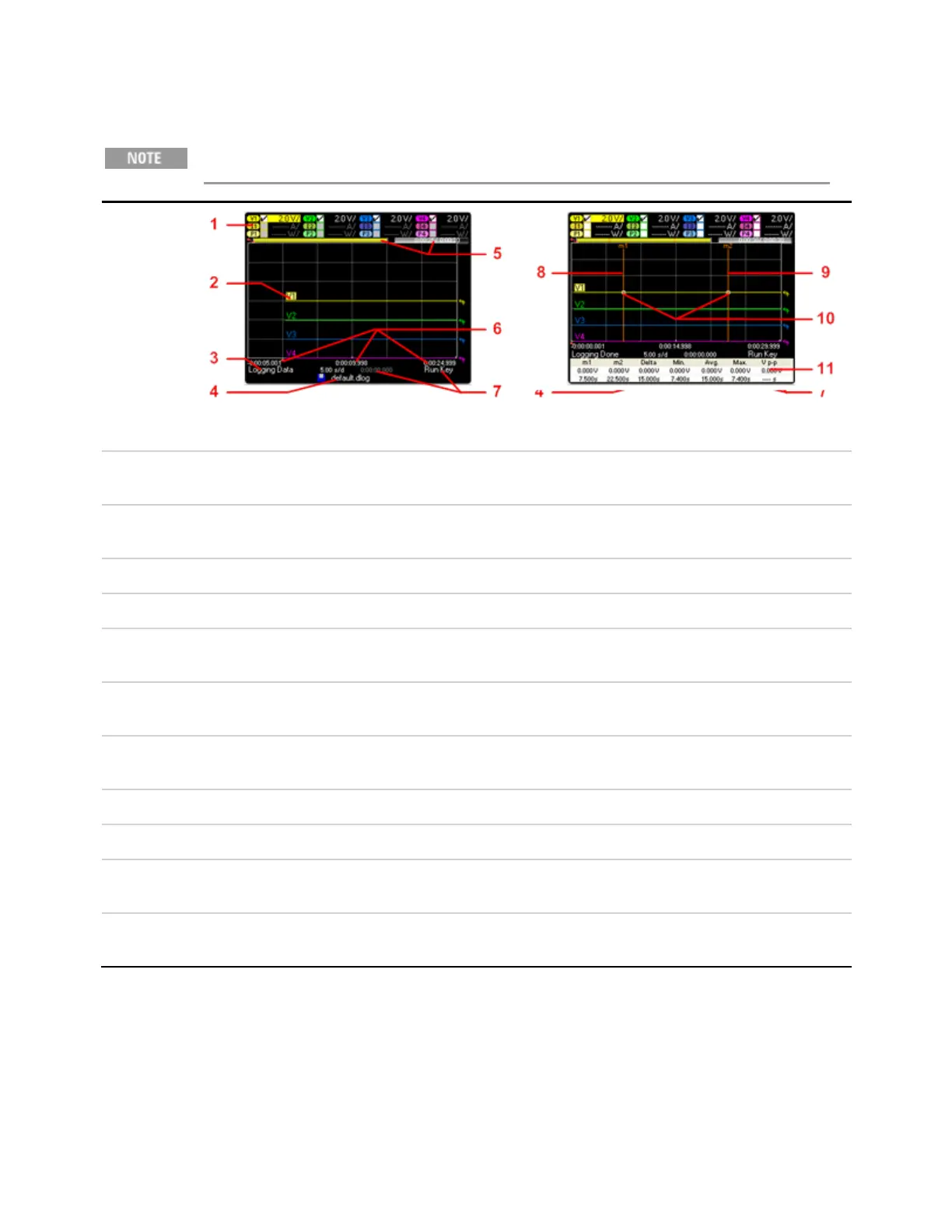
Data Logger View
Option 055 deletes the Data Logger function on Model N6705
Press Data
Logger
This key
toggles
between
standard and
marker views.
Standard View Marker View
1. Trace
Controls
Identifies the voltage or current trace that will be displayed. Dashes (----) indicate that the specified trace is turned off. Select
the traceand press Enter to turn iton or off.
2. Output
Traces
Voltage, current, or power traces. Voltage traces V1,V2, V3 and V4 shown. Press Trigger Level knob to autoscale all traces.
3. Status Indicates whether the Data Logger is logging data, done logging, or is empty.
4. Filename Indicate the file to which the data is being logged.
5. Data Bar &
Time Elapsed
Displays the progress of the data logger. The yellow bar indicates the visible data. Numbers to the right indicate time
elapsed/total duration.
6. Time base
Information
Displays the time remaining before the trigger point; the time at the center line of the grid in relation to trigger point; and the
time elapsed since the trigger
7. Trigger Identifies the trigger source and trigger offset. The trigger offsetis specified in % of the total duration, but shown in seconds
on the display
8. M1 Marker Measurement Marker 1 enabled. Adjust using Marker 1 knob. Press knob to reset.
9. M2 Marker Measurement Marker 2 enabled. Adjust using Marker 1 knob. Press knob to reset.
10. Intersect
Point
Shows where the measurement markers intersectthe waveform.
11. Meas-
urements
Shows the calculations of the waveform data between Marker 1 and Marker 2.
Keysight N6705C Operating and Service Guide 21
1 Quick Reference








 To Next Page