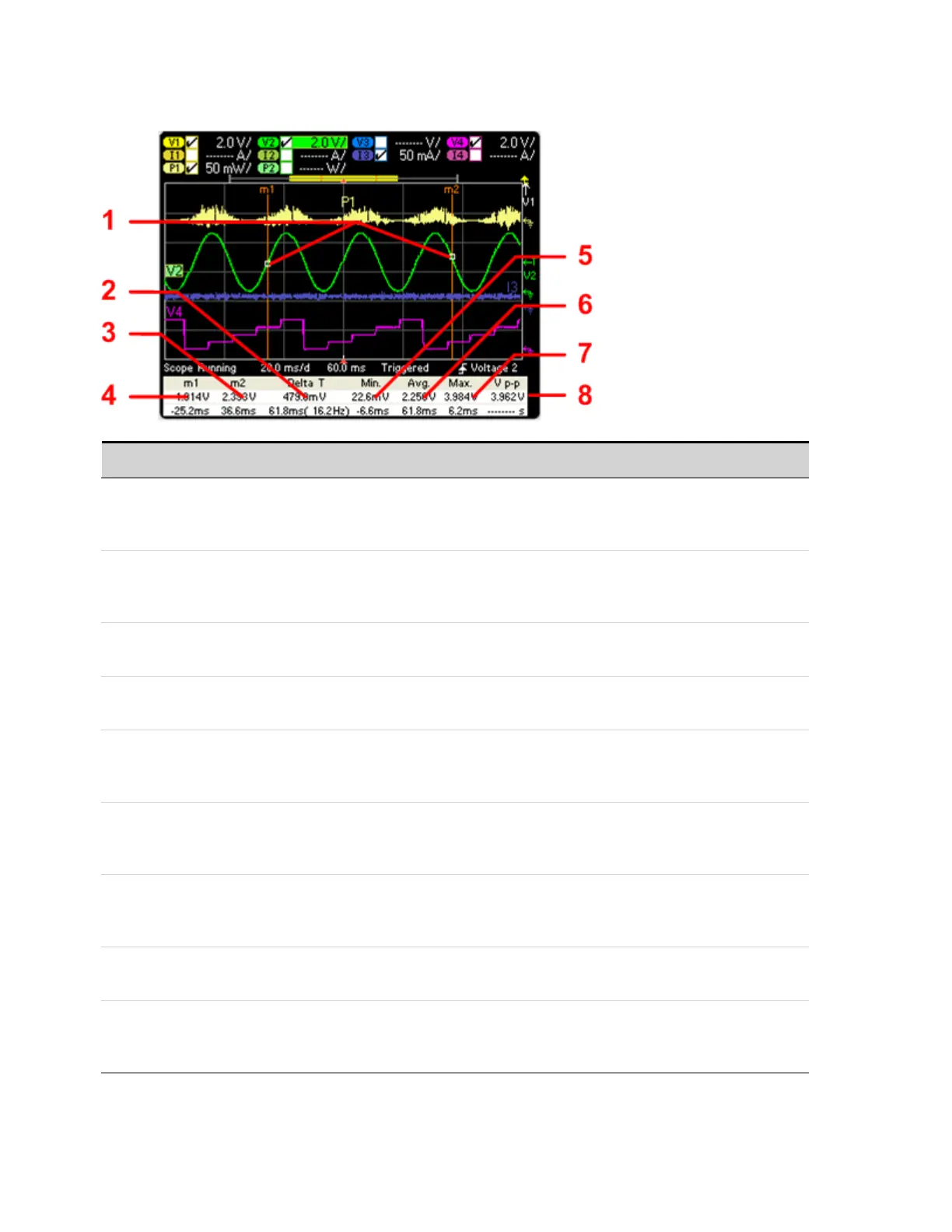
Marker View
Symbol/Field Description
1 m1/m2 points Shows where the measurement markers intersect the selected waveform. Data values at the bot-
tom of the display are referenced to the intersectlocations of the markers. Calculations are based
on the data points in between the intersect locations.
2 Delta Indicates the delta or absolutedifference between the markers in units (volts, amps, or watts) and
in time (seconds). The value in parenthesis is the frequency, which is the reciprocal of the time
(1/time).
3 m2 Indicates the m2 marker value in volts, amps, or watts atthe intersection point. Also indicates the
distance in time that the m2 marker is in relation to the present trigger position.
4 m1 Indicates the m1 marker value in volts, amps, or watts atthe intersection point. Also indicates the
distance in time of the m1 marker in relation to the present trigger position.
5 Min Indicates the minimum data value (in volts, amps, or watts) between the marker locations of the
selected waveform. Also indicates the distance in time of the minimum value in relation to the
present trigger position.
6 Avg Calculates the average data value (in volts, amps, or watts) between the marker locations of the
selected waveform. Time indicates the time between markers over which the average value is
calculated.
7 V p-p Indicates the maximum data value (in volts, amps, or watts) between the marker locations of the
selected waveform. Also indicates the distance in time of the maximum value in relation to the
present trigger position.
8 Trigger Mode Calculates the difference between the maximum and minimum values. Time information is not
valid for calculated p-p values.
RMS (if selected) Calculates the rms value between the marker locations. To view the rms values, you may need to
unselect one of the other measurements in the Scope Marker Properties window. Only 5
measurements may be displayed ata time.
4 Using the Measurement Functions
138 Keysight N6705C Operating and Service Guide








 To Next Page