Driving your vehicle
1686
Remote Smart Parking Assist (RSPA)
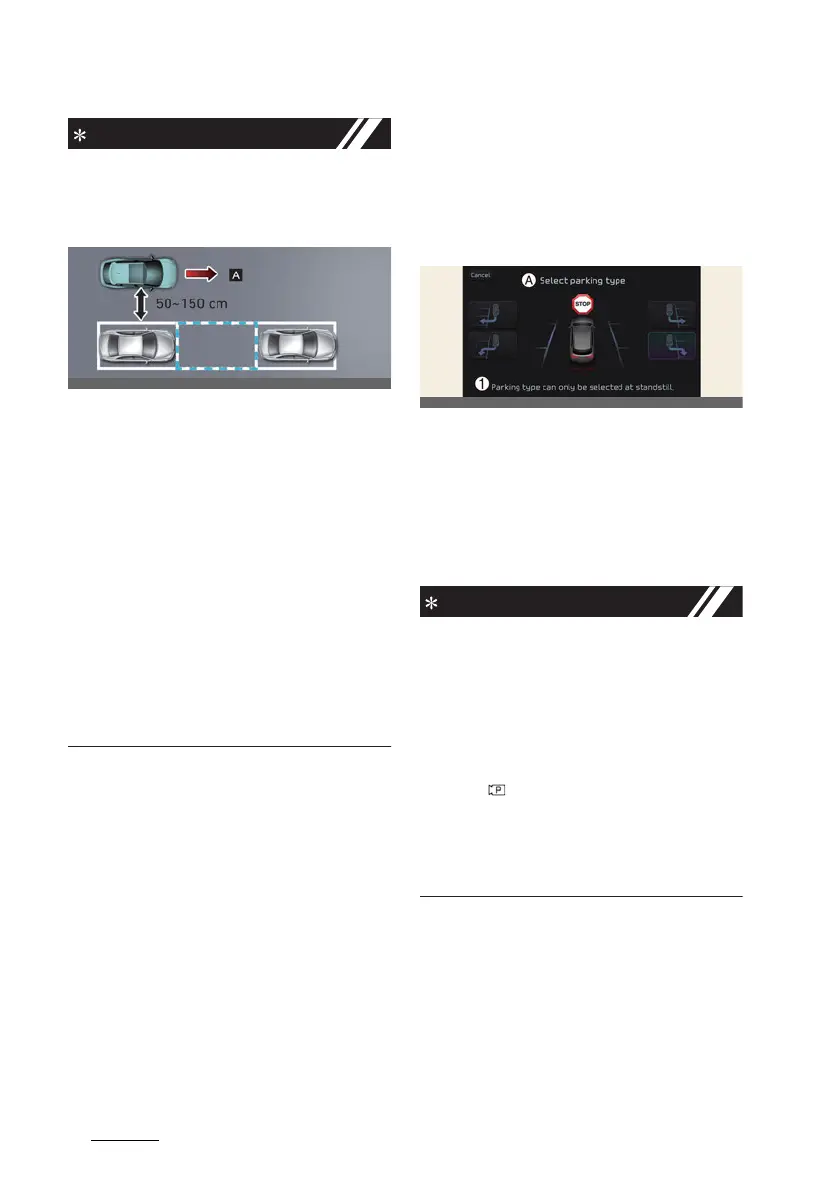
僅 If the distance is below 50 cm (20
inches) or over 150 cm (59 inches),
Remote Smart Parking Assist may not
be able to search for a parking space.
[A]: Searching for parking space
僅 If you do not maintain a certain dis
-
tance from the parked vehicle, the
performance to search for a parking
space may reduce.
僅 Even if a diagonal parking space is
searched as a parking space, parking
is not assisted normally.
僅 Due to abnormal performance of the
ultrasonic sensor or the influence of
the surroundings, Parking function
may not be able to search for a park
-
ing space even if there is a parking
space, or may search for a space that
is not suitable for parking.
3. Select parking type and oper
-
ating mode
1. Parking type – Perpendicular
reverse (Left/Right), Parallel
reverse (Left/Right)
A:
Select parking type
1 Parking type can only be selected at
standstill.
With the vehicle stopped by depressing
the brake pedal, touch the infotainment
system screen to select the desired
parking type.
僅 If you continue to drive without stop
-
ping after the parking type selection
screen appears, Remote Smart Park
-
ing Assist will return to the previous
stage and search for a parking space.
僅 If Parking function is canceled unin
-
tentionally by pressing the Parking/
View ( ) button before the parking
type is selected, you can return to the
parking type selection stage by press
-
ing and holding the button again
while the vehicle is stopped.



 To Next Page