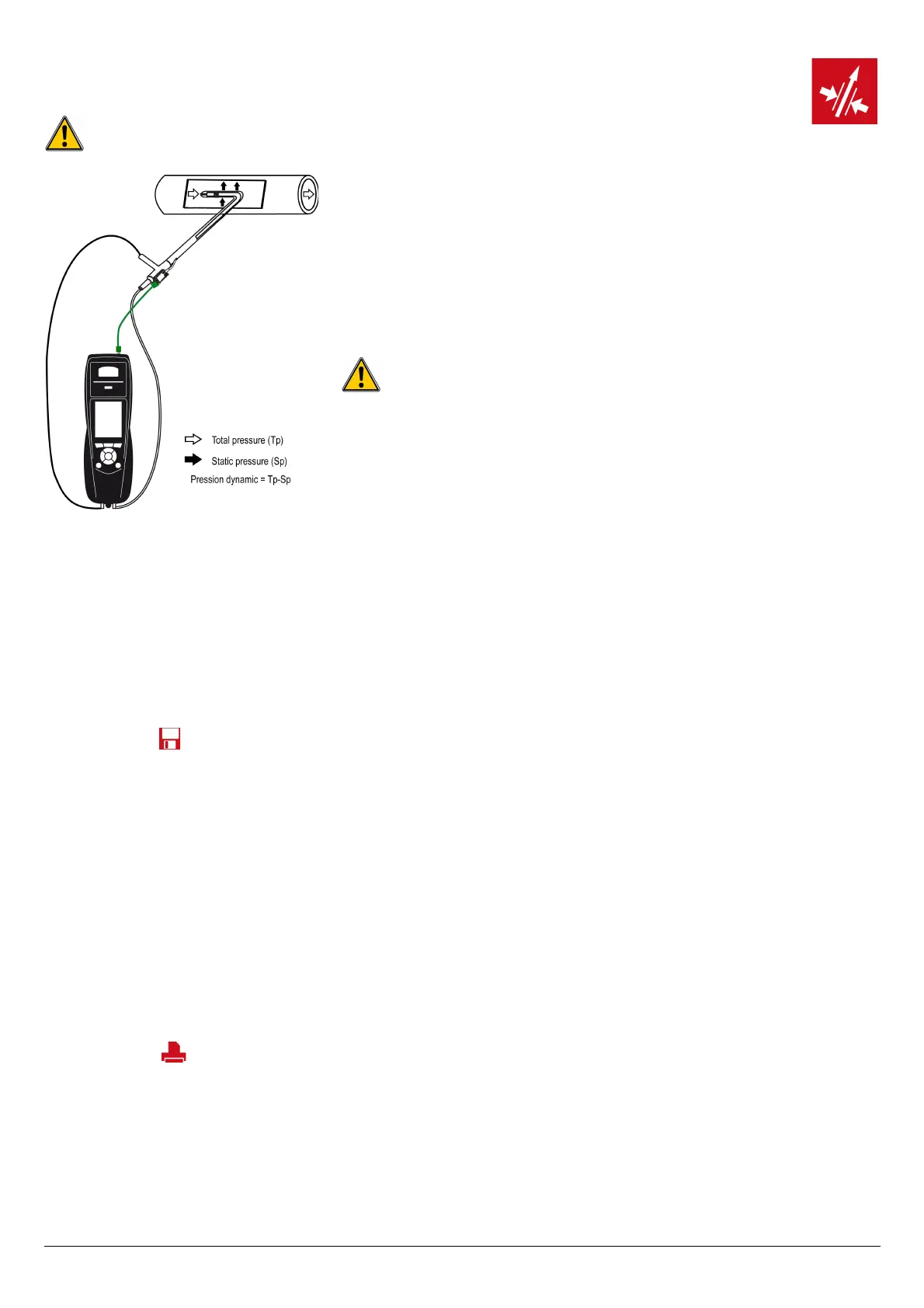
The Pitot tube must be introduced perpendicularly, in the middle into the duct and parallel to the
flow.
The head (ending with an ellipsoidal nose) must be maintained parallel and facing the flow.
The total pressure (+) caught by the nose, is connected to the P+ at the bottom of the analyser.
The static pressure (-) caught by the holes of the head, is connected to the P- at the bottom of
the analyser.
The connection cable of the thermocouple K probe is connected to the T1 K thermocouple inlet
of the top of the analyser.
If the K thermocouple cable is not connected, no value is displayed.
19. Perform a flue gas velocity measurement with a Pitot
tube
The used Pitot tube must be a Pitot tube type L with K thermocouple connection.
When the connections are made:
➢ Turn on the analyser.
➢ Go to “Measurement” menu then press OK.
➢ Go to “Pressure” menu then press OK.
➢ Go to “Flue gas velocity” then press OK.
The analyser displays the measured values.
19.1. Link the measurement to a customer
When the measurement has been performed, it is possible to link it to a customer registered in the analyser or to a customer unregistered in the
analyser that must be created.
➢ Press the function button.
The analyser displays the list of recorded customers.
➢ Select a customer with up and down arrows then press OK or create a customer (see page 22) then select it.
The analyser displays the list of available boilers.
➢ Select the boiler with up and down arrows then press OK or create a boiler (see page 23) then select it.
The analyser backs to the measurement screen.
19.2. Add the measurement to a group
The group function has to be activated (see page 17).
Once the measurement is linked to a customer and a boiler, it is possible to add it in a group in the instrument, or create a group:
The analyser proposes to add the measurement to a group.
➢ Go to YES and press OK.
➢ Go to the required group with the arrows and press OK, or create a group (see page 24).
The analyser backs to the measurement screen.
19.3. Print the results
It is possible to print the results on the ticket:
➢ Press the function button.
Results are printed on the ticket.
See page 17 for the printing configuration.
Perform a flue gas velocity measurement with a Pitot tube 35



 To Next Page