6-2
SERVICE DIAGNOSTICS MODE
As a requirement to run the Service Diagnostics
routine, the appliance must be turned ON.
The Service Diagnostics Mode is entered by
pressing the following 2 key sequence:
Press and hold the RC Temp Increase key,
and then the Power key, and hold both down
for 3 seconds.
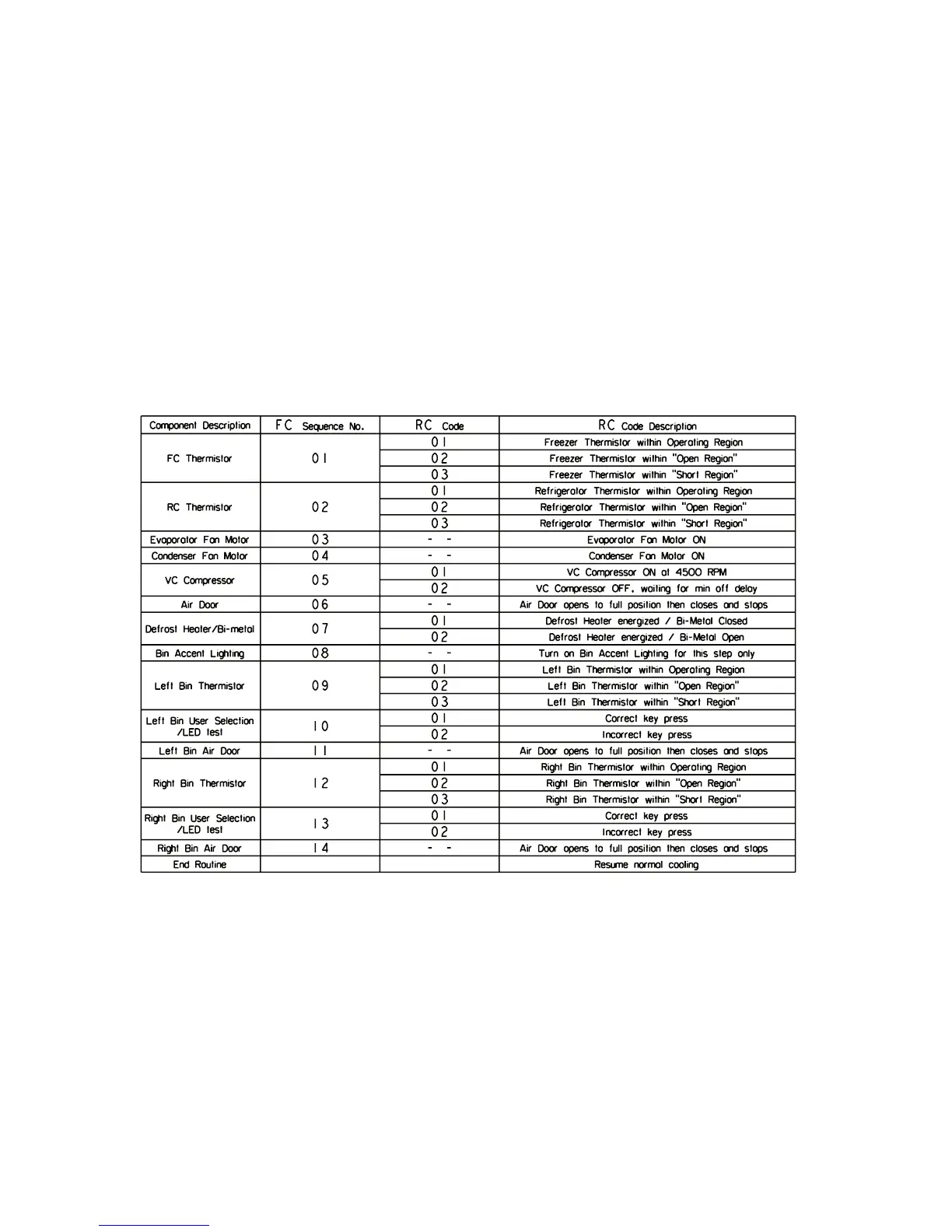
Use the Component Evaluation Mode chart
below to diagnose the components. When the
technician is satisfied that the first component
has passed the test, continue with the next
component evaluation by pressing either the RC
Temp UP key, or the Up arrow key. The routine
will end automatically after all the steps are
completed, or after 20 minutes have elapsed,
whichever occurs first. The control will then
resume the normal cooling mode.
SERVICE TIP: If the control does not respond,
it may be necessary to remove power from the
refrigerator for a few seconds. Reconnect power,
and perform the service diagnostics routine to
verify that the control is working properly.
If the bimetal is by-passed for testing (if appli-
cable), do not overheat the evaporator area.



 To Next Page