4-12
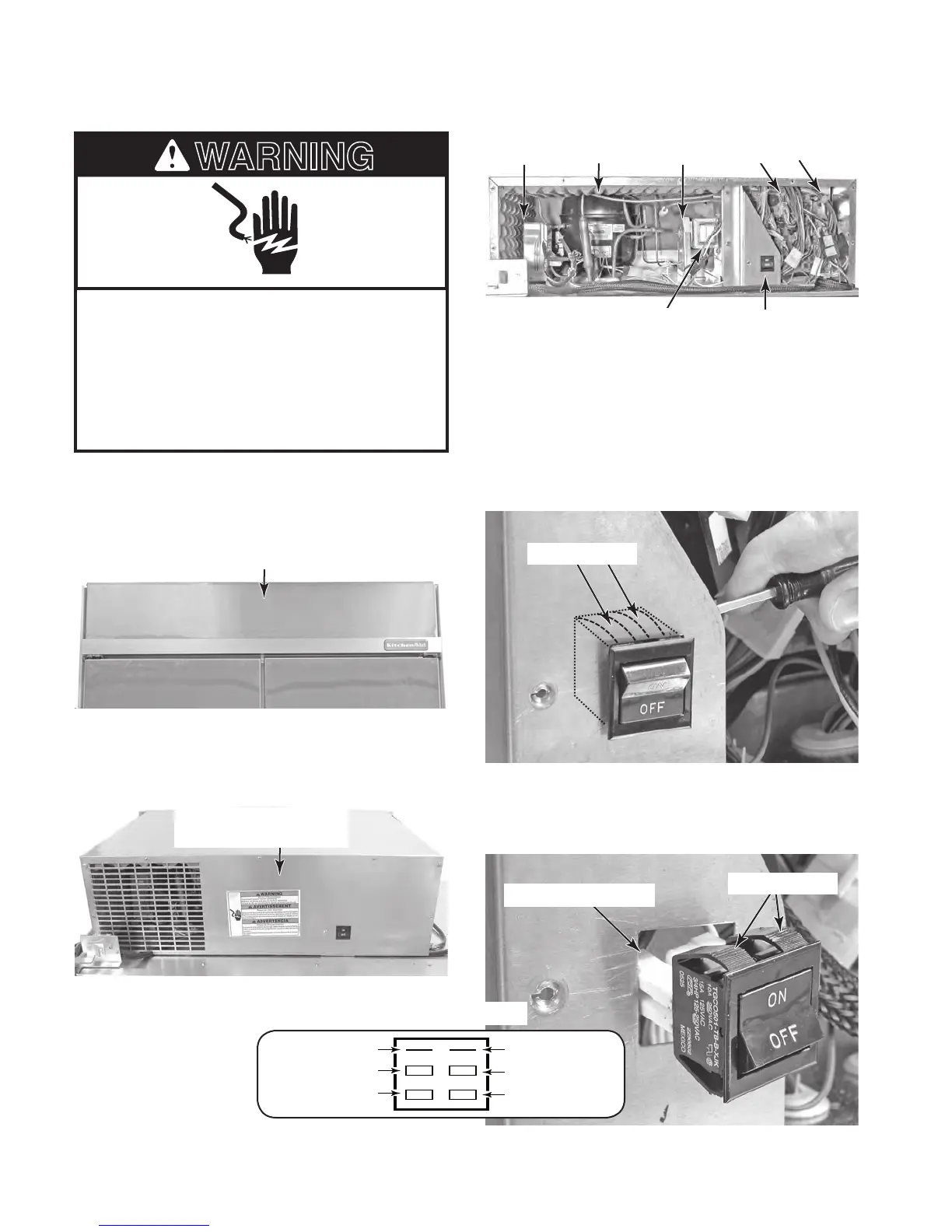
REMOVING THE UNIT COMPARTMENT COMPONENTS
Electrical Shock Hazard
Disconnect power before servicing.
Replace all parts and panels before
operating.
Failure to do so can result in death or
electrical shock.
1.
Unplug refrigerator or disconnect power.
2. Lift the decorative panel off the pins at
each end and remove the panel.
3. Remove the eight hex-head screws from
the front cover of the unit compartment
and remove the cover.
Decorative Panel
4. To remove the power switch:
a) Push the bottom of the switch forward
as far as possible, then use a flat-blade
screwdriver, and alternately press the
top retainers against the switch body.
Push the switch out of the bracket cut-
out.
Power Switch
b) Disconnect the four wire connectors
from the power switch terminals, and
remove the switch.
Wire Connectors (4)
Top Retainers
24V Transformer
Inverter Compressor Fan Motor Main & LV Boards
Unit Compartment Front
Cover (8 Screws)
(4) Unused(1) Unused
(5) BK
(6) Line (Smooth)
(2) WH
(3) Line (Ribbed)
Power Switch Pinouts
Condenser
Top Retainers



 To Next Page