KMS MP25(M)/MA25(M) manual Version 4.2
53
3.2.7 Function key F7
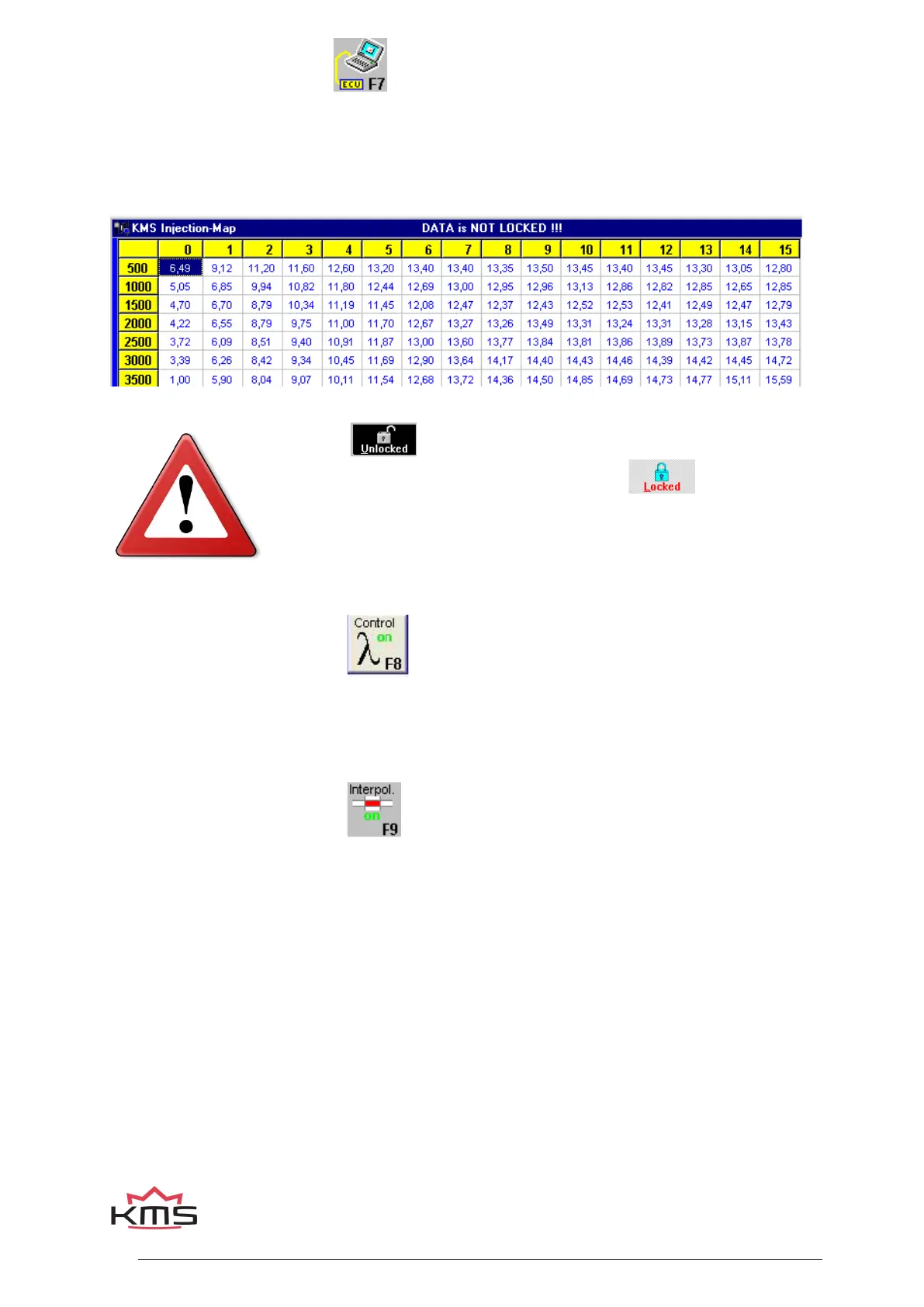
When data is changed or downloaded to the system, the screen will show the text 'DATA IS NOT
LOCKED !!!'. At the same time, the silver-colour bar of the diagram will change to a yellow color.
This is to indicate that the changes have not been saved yet. Save the changes by pressing the F7
function key.
When the box is clicked, the changes will be saved. If saving is
successful, the box will automatically change to . Once again, if
UNLOCKED is not clicked after the program has been changed, the
changes in the system will be lost when the power supply to the system
is broken.
3.2.8 Function key F8
This function key allows temporary activation/deactivation of the air fuel ratio feedback control.
However, the control will resume if the system has been without voltage or if the F8 key is pressed
again.
3.2.9 Function key F9
With this key the interpolation between the boxes can be switched on or off. When the
interpolation function is on, interpolation to the surrounding boxes will take place during engine
operation, taking account of engine speed and engine load. When the interpolation function is off,
there will be no interpolation to adjacent boxes, but the value shown in the box matching the
situation in which the system is functioning at that moment will be adhered to.


 To Next Page