Electrical Components: Communications Mounting Box
Pattern Number Represented:
Communications Mounting Box, YR1CMB
Parts List:
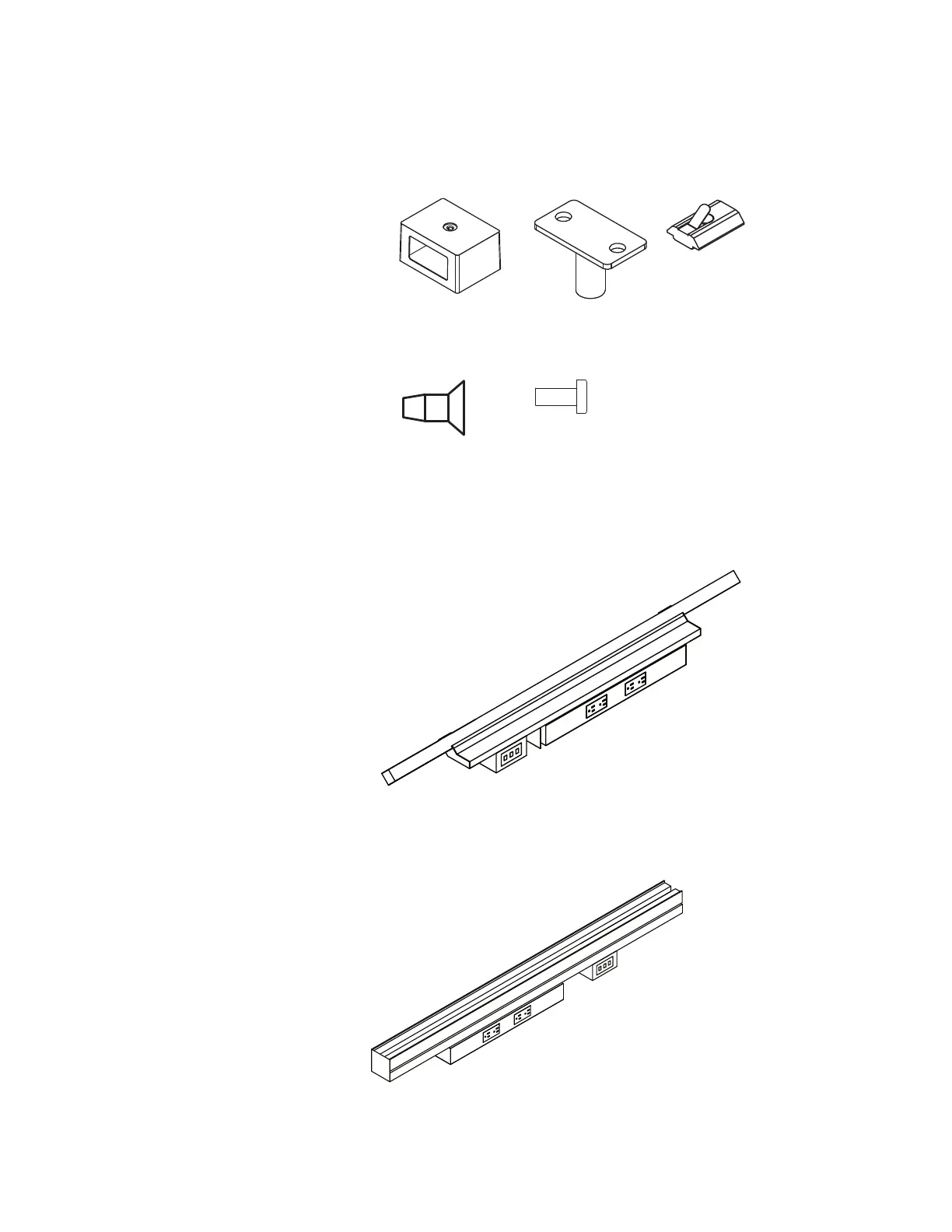
Data Box (A)
Rod Weldment (B)
Spring Nut (C)
M6 x 14mm Machine Screw (D)
5
/
16
–18 x ¾" Machine Screw (E)
Center Beam (or)
Power Harness Mounting Bracket for Desks
Tools Needed:
Drill
Phillips #2 and #3 bits
(A) 3AB5035* (B) 3AB8019* (C) 3AB402196
STEPS:
1. Insert (2) spring nuts (C) into the bottom
slot in the center beam of the Big Table
or in the Power Harness Mounting
Bracket for Desks at desired location.
2. Fasten the rod weldment (B) to the spring nuts
using (2) M6 x 14mm machine screws (D).
3. Attach the data box (A) to the weldment rod
using a
5
/
16
-18 x ¾" machine screw (E).
4. Install communication faceplates and
data modules, provided by others, by
snapping into the front and/or back
knockout of the data box, as required.
(D) 3AB405640 (E) 7060440
Antenna
™
Workspaces Planning Guide
February 2011
43
Antenna
™
Workspaces
Introduction Tops FenceSupports Electrical Screens Storage
Electrical
Data and Communication
Electrical
Data and communication faceplates are
housed in a communication mounting
box that is suspended from an extended
power harness mounting bracket on either
side of the power harness on a desk rail
or the center beam of the big table.
The mounting box has industry standard
decora-size openings for outlets facing
the inside or outside of the desk, and an
opening underneath for cable supply.
Center Beam with
12"W Power Harness
and Communications
Mounting Box
Center Beam with
24"W Power Harness
and Communications
Mounting Box
Desk Rail with 12"W
Power Harness
Desk Rail with 24"W
Power Harness
Desk Rail with 12"W
Power Harness and
Communications
Mounting Box
Desk Rail with 24"W
Power Harness and
Communications
Mounting Box
Vertical Wire
Manager
Cable Clip
Cable Basket
Communication Mounting Box
ABXY ABXY ABXY
A BXY ABXY ABXY
Communications Mounting Box
Communication
faceplate by others
Blank
Antenna
™
Workspaces Planning Guide
February 2011
43
Antenna
™
Workspaces
Introduction Tops FenceSupports Electrical Screens Storage
Electrical
Data and Communication
Electrical
Data and communication faceplates are
housed in a communication mounting
box that is suspended from an extended
power harness mounting bracket on either
side of the power harness on a desk rail
or the center beam of the big table.
The mounting box has industry standard
decora-size openings for outlets facing
the inside or outside of the desk, and an
opening underneath for cable supply.
Center Beam with
12"W Power Harness
and Communications
Mounting Box
Center Beam with
24"W Power Harness
and Communications
Mounting Box
Desk Rail with 12"W
Power Harness
Desk Rail with 24"W
Power Harness
Desk Rail with 12"W
Power Harness and
Communications
Mounting Box
Desk Rail with 24"W
Power Harness and
Communications
Mounting Box
Vertical Wire
Manager
Cable Clip
Cable Basket
Communication Mounting Box
ABXY ABXY ABXY
A BXY ABXY ABXY
Communications Mounting Box
Communication
faceplate by others
Blank
Desk Rail with 12" W Power Harness
and Communications Mounting Box
Center Beam with 12"W Power Harness
and Communications Mounting Box


 To Next Page