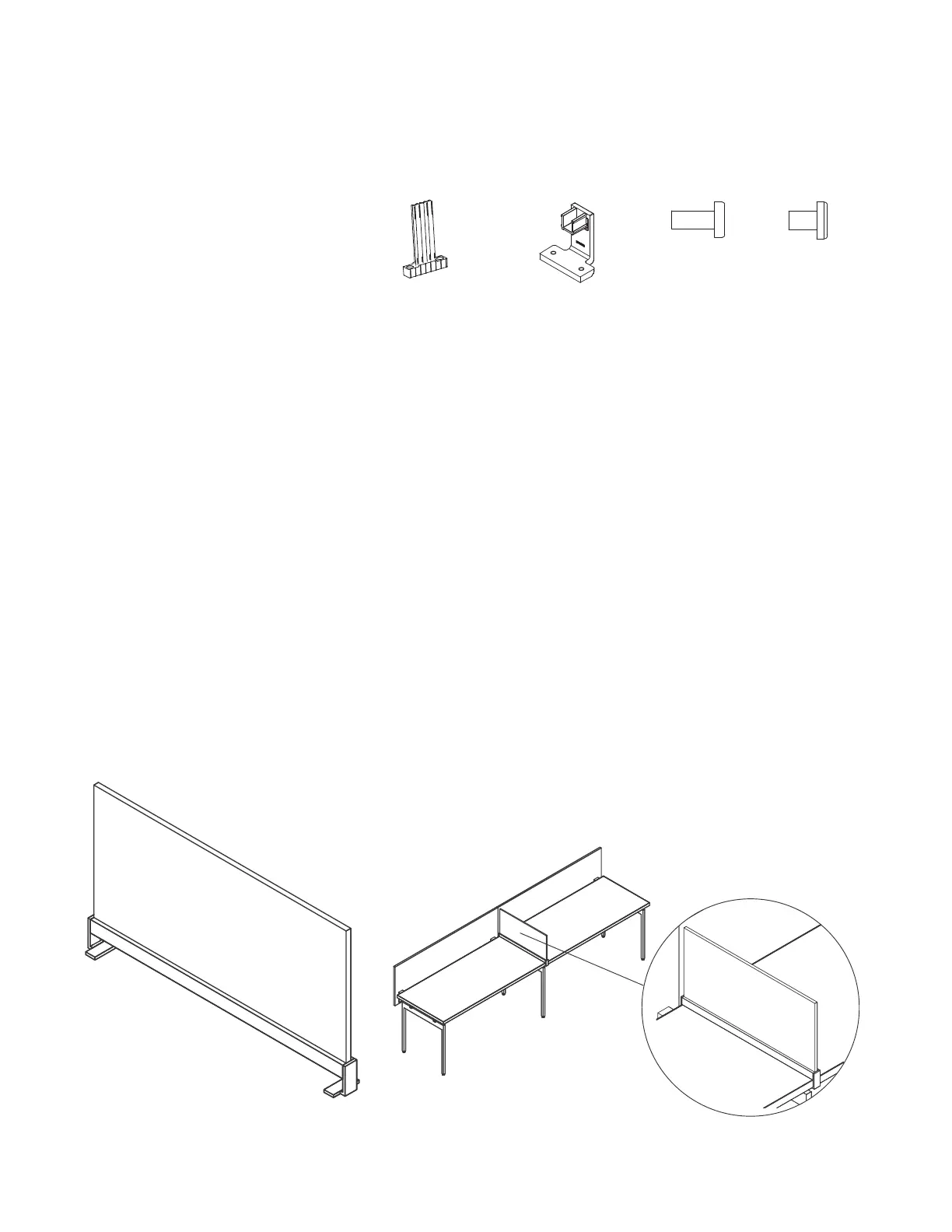
Fabric Intermediate Screens- Full Depth for Use
with Tops without Hinged Access
Pattern Numbers Represented:
Fabric Intermediate Screens, YPSI__F
Parts List:
Bayonet Mount Bracket (A)
Upholstered Intermediate Screen Rail Clamp (B)
5
/
16
-18 x ¾" Machine Screw (C)
¼ - 20 x
3
/
8
" Black Oxide Machine Screw (D)
Screen Bottom Extrusion
Screen
Tools Needed:
Drill
Phillips #2 and #3 bits
STEPS
1. Insert (2) bayonet mount brackets (A) into
the top of the screen bottom extrusion so
that the holes in the brackets align with
the two sets of holes in the extrusion.
2. Insert (4)
5
/
16
-18 x ¾" machine screws (C)
beneath the extrusion and firmly attach the (2)
bayonet mount brackets (A) to the extrusion.
3. Determine the desired screen position along
the width of the table, and position the screen
extrusion on the worksurface accordingly.
4. Hook (1) upholstered intermediate screen
rail clamp (B) behind the back edge of the
worksurface so that the clamp’s u-channel is
above the worksurface and the two screw holes
are below the worksurface. Slide one end of
the bottom screen extrusion onto the u-channel
portion to temporarily support the clamp.
5. Hook the second upholstered intermediate
screen rail clamp (B) on to the front edge
of the worksurface in a similar fashion,
sliding the u-channel portion into the other
end of the bottom screen extrusion.
6. Insert (2) ¼ - 20 x
3
/
8
" black oxide machine
screws (D) into the holes under the back rail
clamp (B). Hold the U-channel portion of the
rail clamp (B) firmly against the side of the
screen bottom extrusion and tighten the screws
against the bottom of the worksurface.
NOTE: The ¼ - 20 x
3
/
8
" black oxide machine
screws (D) are to be treated as set screws and
will create the tight connection between the
screen bottom extrusion and the worksurface.
The rail clamp (B) must be seated firmly within
the side of the bottom extrusion, but should not
be pressed tight against the bottom of the
worksurface. A space will remain between the
rail clamp and the bottom of the worksurface.
7. Repeat Step 6 with the second
(front) rail clamp (B).
8. Position the openings in the underside
of the screen over the bayonet mount
brackets (A) and push the screen down
until the screen is firmly seated.
(A) 3AB408200 (B) 3AB1206* (C) 7060440 (D) 7019440
Intermediate Screens
Planning and Specification Guidelines
Antenna Workspaces
142
Full Depth Intermediate Screen for Use
with Tops Without Hinged Access
Linked Desks Full Depth
Intermediate Screens


 To Next Page