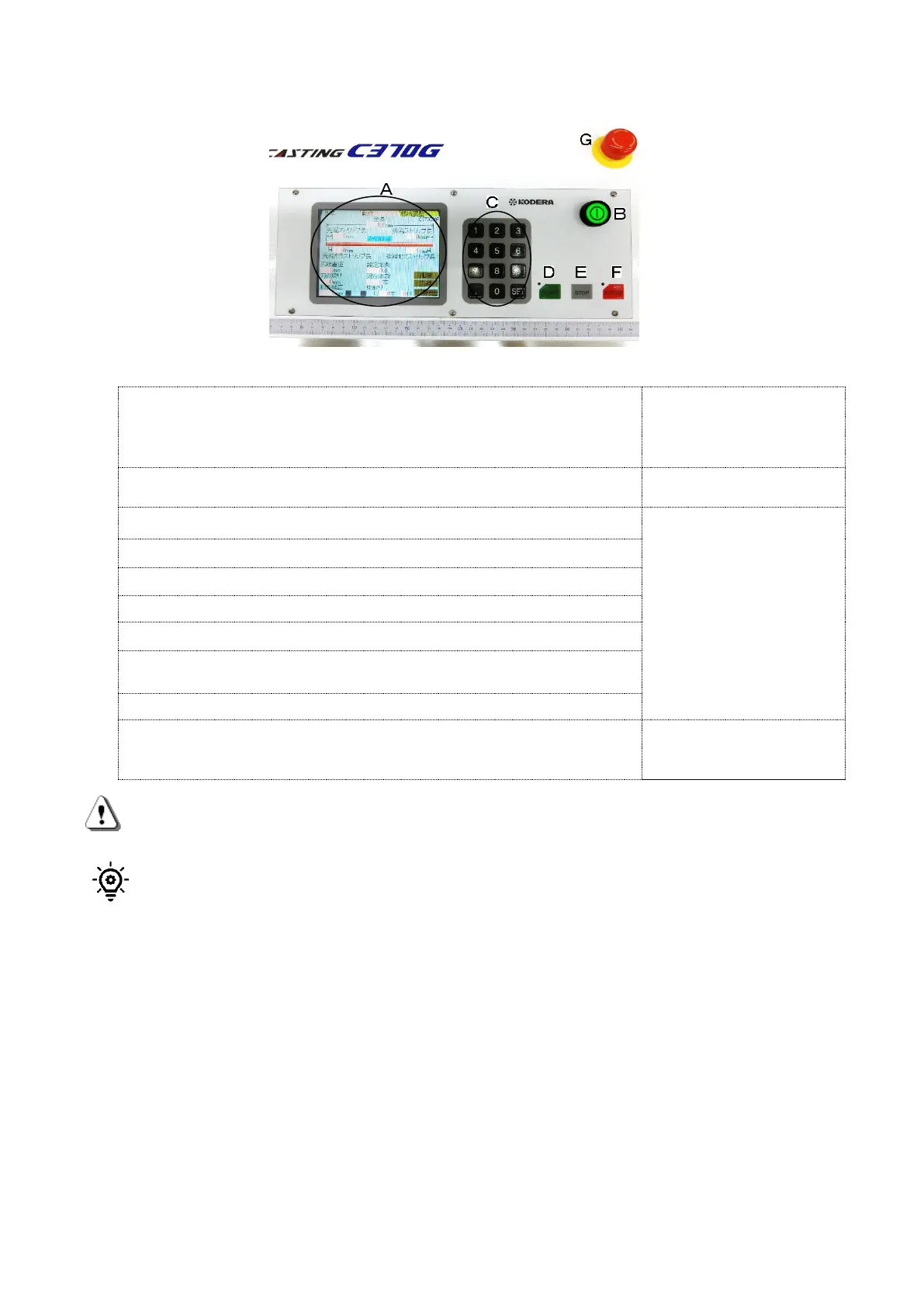
3. Explanation of Components on the Operation Panel
Explanation of components
(A)Setting screen (touch panel)
The keys on these
setting screen are
indicated with 《》 in the
text.
(B)Power switch ・・・Power ON/OFF switch button
Light turns on when
power is on.
(C)Keys for numerical value setting ( numeric keypad)
The keys on these
setting screen are
indicated with [ ] in
the text.
Keys for numerical value setting from [0] to [9]
[ .] ・・When the numerical value less than 0 is input
[SET] ・・When all numerical values are stored
(D)START・・・Start key (Start operation)
(E)STOP・・・Stop key (Cycle stop※, alarm and error sounds stop,
and return to the original point)
(F)E.STOP・・・E.Stop key (Emergency stop)
(G) Emergent Shut Down Switch・・・The Power will be OFF.
Turn the pressed switch
clockwise, it will return
to the original position.
CAUTION:Don’t press the touch panel or keys with sharp objects or press them
abnormally.
※Cycle stop means one cycle stop. If the stop key was pushed during any process, that wire
processing will be completed until final wire ejection.
(F) [E.STOP]key will stop all the operations immediately, and indicate [Emergency stop]to the
screen, moreover alarm sounds start. [STOP]key will return to the original position and
cancel them.
(G) [Emergent Shut Down Switch] will stop all the operations immediately, and indicate
[Emergency stop]to the screen, moreover alarm sounds start. Turn the pressed switch
clockwise, the switch will be canceled, and additionally [STOP]key will return to the
original position.
The difference between [E.STOP]key and [Emergent Shut Down Switch]is that switch can
not accept any key operations until the switch was returned its original position.


 To Next Page