AS-11.65.037
39 (40) (A) 2009-10-16
KDL16
Maintenance Instruction
© 2009 KONE Corporation
All rights reserved.
Disclosure prohibited
D.2 Adjusting load weighing device
Step Action Illustration/Note
1 In the control panel:
• Push MENU button until number 5
shows on the MENU display.
• Push ACCEPT button.
• Push ACCEPT button.
NOTE! Normally the value is more than
100 %, for example 134 %. It
should be between 103 % and 109
%.
5 __ __
5 _1 __
L _x xx (where xxx is load %)
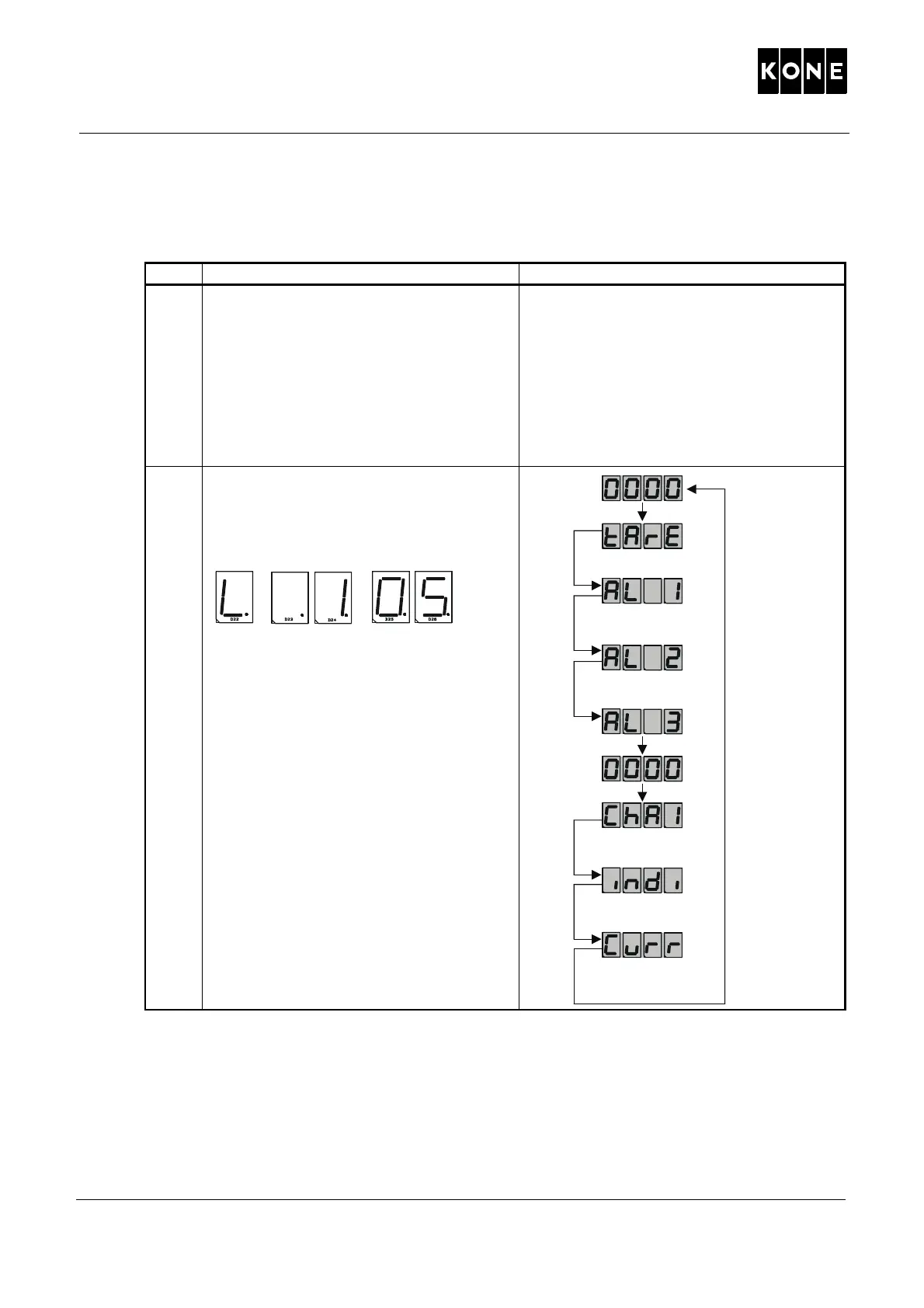
2 In the LWD control unit:
• Adjust the value of AL3-parameter
until the control panel (5_1) displays
103-109 %.
NOTE! Increasing the AL3 value in the
LWD control unit is reducing 5_1
value in the control panel.
1049869.wmf
“S”
“P”
“P”
“P”
“S”
“S”
“S”
“S”
“S”



 To Next Page