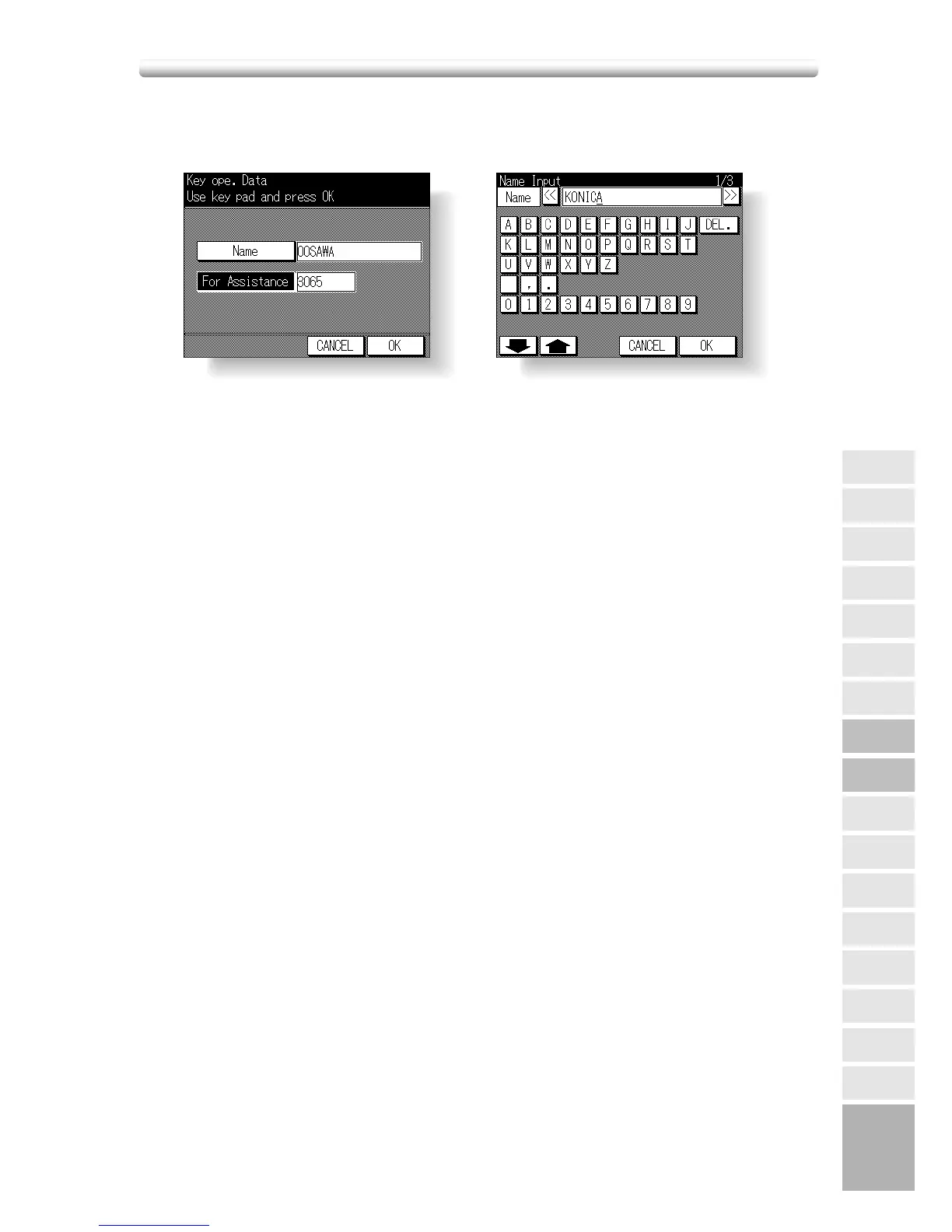
[8] Key Operator Data
Use this screen to enter the extension number of the key operator indicated on the
Help Screen.
Procedure
1 Touch 8. Key ope. Data on the Key Operator Mode Screen to display the Key Opera-
tor Data Input Screen.
2 Touch
Name to display the Name Input Screen.
Input desired name according to the procedure below.
(1) Max. 20 characters can be entered.
(2) Use c Upper arrow and d Lower arrow keys on the Name Input Screen to input
uppercase and lowercase letters and symbols.
(3) Touch
DEL. to delete the input character from the last.
(4) Touching
CANCEL on the Name Input Screen will clear all the input characters.
(5) To change the existing name, touch
DEL. to delete it and enter the new name.
3 Touch
OK on the Name Input Screen to return to the Key Operator Data Input Screen.
4 Touch
For Assistance.
Enter an extension number up to 6 digits from the keypad on the control panel.
The hyphen will be indicated as a space in the Help Screen.
If less than 6 digits are entered, the screen will not change when
OK is touched.
NOTE:
If an invalid extension number is entered, continue by entering the valid 8-digit number.
5 Touch OK to complete the setting and return to the Key Operator Mode Screen.
6 If no further changes are required, touch
RETURN to restore the Basic Screen to
perform copying operations.










 To Next Page