3-35
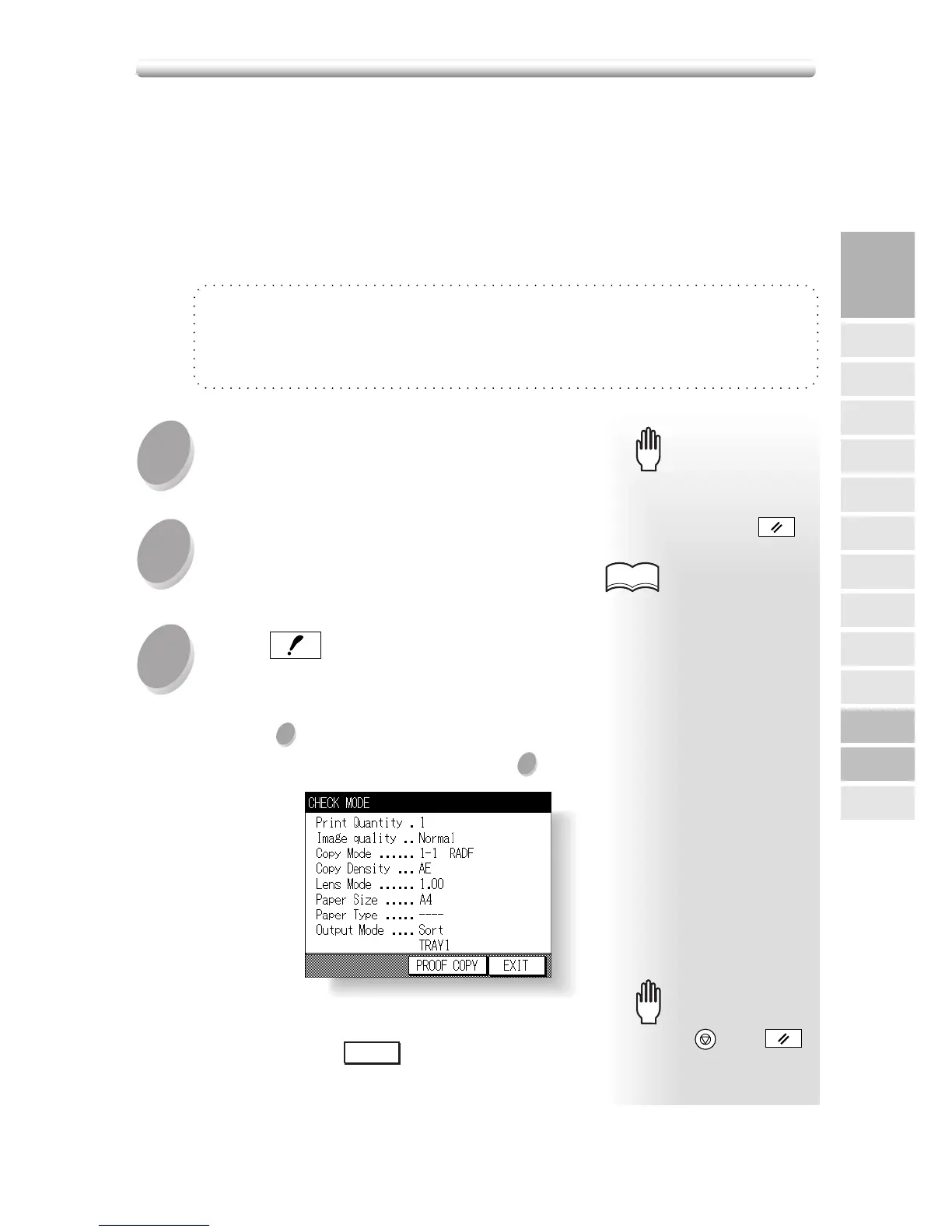
Use the Check mode to confirm copying selections before starting print operation.
In this mode, use Proof copy to produce a sample of the copied set before making
multiple copies. This is a convenient and cost effective way of viewing the results of
the following copying selections.
• Copying conditions using Store mode • Booklet
• Sheet/Cover insertion • Image insert
• Chapter • Dual page
• Combination
1
2
3
Specifications for Check Mode and Proof Copy
❒ Proof copy is available when using RADF, or Platen store mode for multiple originals.
❒ Proof copy cannot be used for testing the Userset density.
❒ Proof copy is unavailable with Group, E-SORT+group, and Reserve mode.
When starting a new copying
job, be sure to close the RADF
securely, then press
AUTO RESET
.
Please Be Reminded!Please Be Reminded!
Select the desired copy conditions and
enter the desired print quantity.
See p. 3-2 to p. 3-6 for details
on positioning originals.
HINTS
Position original(s).
Press
CHECK
on the control panel.
Verify the settings made for the current job.
• When a set of sample copy is needed, proceed
to step
4
.
• When settings are OK, proceed to step
8
.
• When any setting change is required before proof
copying, touch
EXIT
to return to the Basic
Screen, then change settings, as required.
Please Be Reminded!Please Be Reminded!
Pressing
STOP/CLEAR
or
AUTO RESET
will clear all the settings made.
Checking Feature Selections and Proof Copying
3
Copying
Operations
Paper Size
Setting
Print Quantity
Positioning
Originals
2
s
1
Using
Memory
FS-107
Output Modes
Output without
Finisher
Lens Mode
Density
1s2, 2s2
IT-101
Output Modes
Check Mode
& Proof Copy
Interrupt
Mode





 To Next Page