16
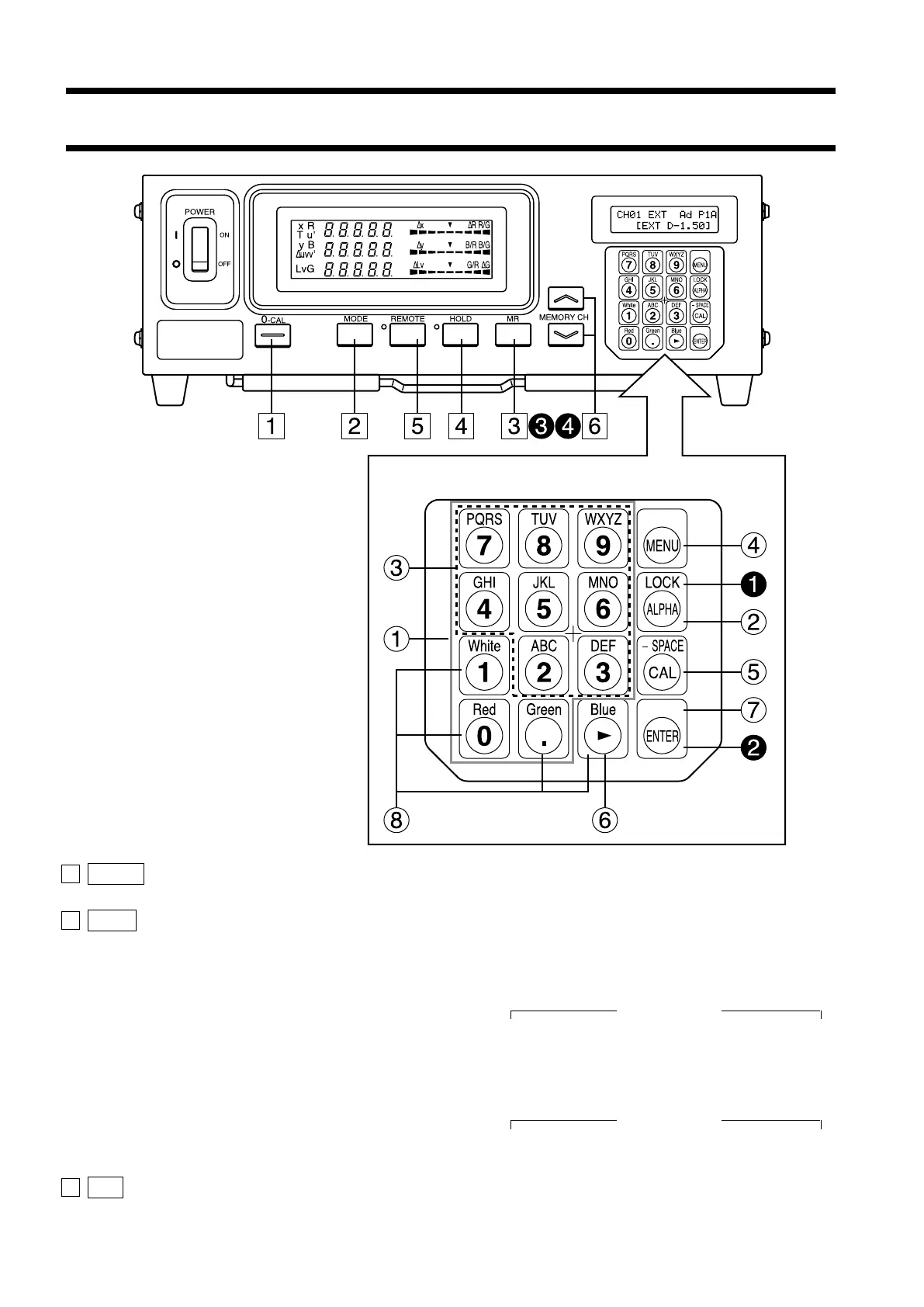
1 0-CAL key ............................................. • Performs zero calibration. Before pressing this key, make sure that
the measuring probe is blocked from light. (Page 34)
2 Mode key ............................................... • Select measurement mode. (Page 38)
Measurement mode changes in the following order.
When LED Universal Measuring ø27 Probe(CA-PU32/35) or LED
Universal Measuring ø10 Probe(CA-PSU32/35) is connected,
Analyzer mode
xyLv→T∆uvLv→RBG (R/G, B/G, ∆G)→RBG (∆R, B/G, G/R)→
u'v'Lv→XYZ →xyLv
When LED Flicker Measuring ø27 Probe(CA-P32/35) or LED
Flicker Measuring ø10 Probe(CA-PS32/35) is connected,
Analyzer mode
xyLv→T∆uvLv→RBG (R/G, B/G, ∆G)→RBG (∆R, B/G, G/R)→
u'v'Lv→Flicker**→XYZ →xyLv
3 MR key .................................................. • Displays the specified target color in the LCD display section. (Page
74) (For long depression of this key, refer to page 17.)
Function of Each Key
Key Panel















 To Next Page