86
Communicating with PC
This instrument allows two-way communication via RS-232C or USB.
1. Communicating with PC via RS-232C
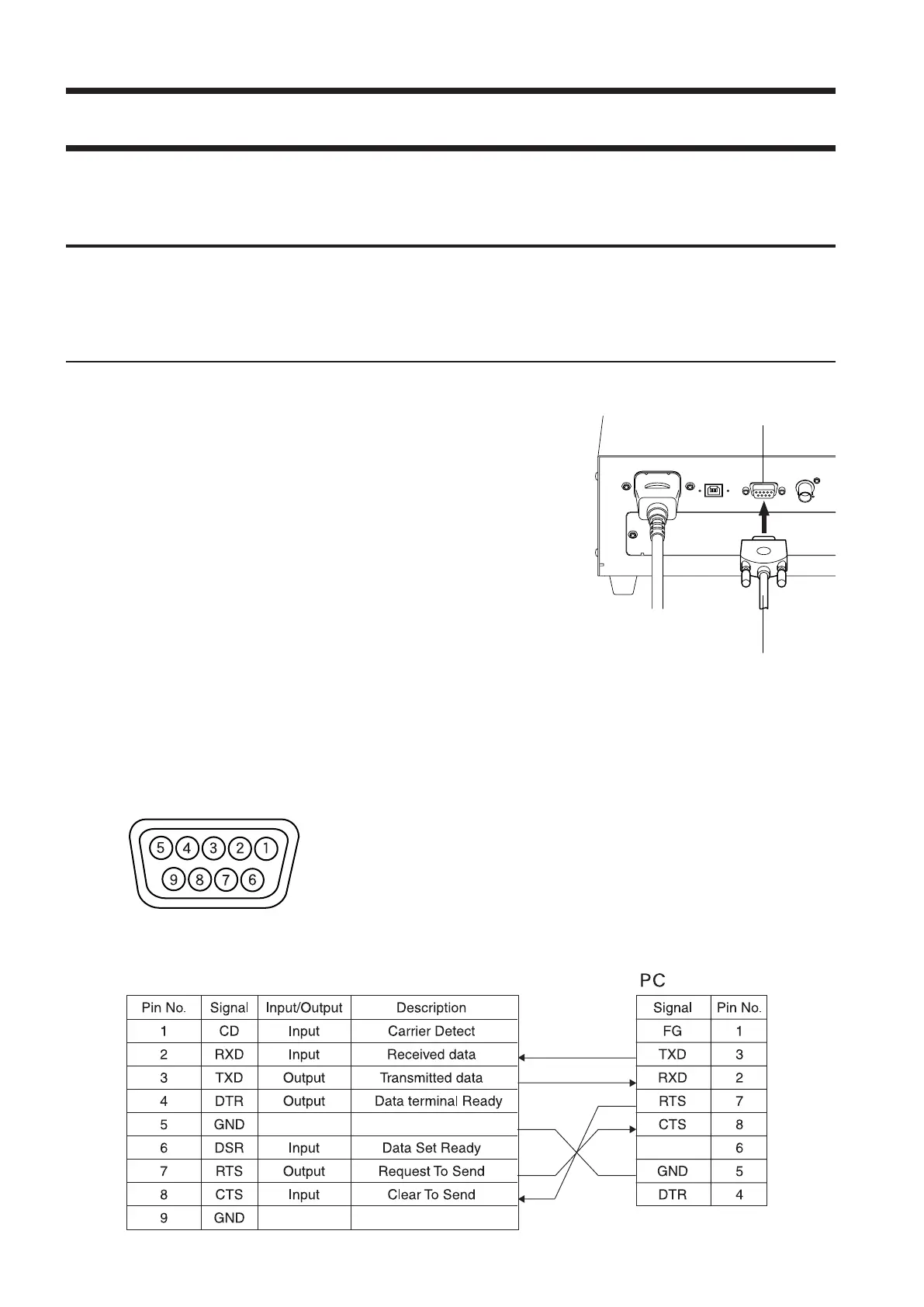
Before setting the POWER switch to ON, connect a RS-232C cable (for 9-pin D-sub female) to the RS-232C
connector on the instrument. Refer to the following for the wiring diagram.
[Connecting Method]
1
. Set the POWER switch to OFF (O).
2
. Connect the instrument to the computer with the RS-
232C cable.
3
. Connect the cable to the connector and secure them
with two screws firmly.
● When disconnecting the RS-232C cable, set the POWER switch to
OFF(O) rst, and pull the cable by holding the plug. Never pull the
cable by its cord.
RS-232C Cable
Pin Assignment
Wiring Diagram
CA-310
<Reference Document>
RS-232C Pin Assignment and Cable Wiring Diagram
RS-232C connector















 To Next Page