In Combinations (and Songs), the Drum Track simply sends MIDI to play one or more of the 16 Timbres/Tracks. For
more information, see “Drum Track function settings in Combination mode” on page 101 of the Operation Guide.
Simple program and combination editing
Adjusting the EQ and volume balance
For a program, the program’s EQ and master effect return amount can be adjusted in the P0: Play Main page.
In the P0: Play Mixer & Drum Track page you can adjust the volume balance of oscillators 1 and 2, and the drum
track. Here you can also adjust the EQ of the drum track program.
Using Tone Adjust
The KROME’s Tone Adjust function assigns program parameters that are useful for editing with buttons and sliders in
the display. You can use these to edit the sound efficiently.
1. Access the Program mode P0: Play Tone Adjust page. Press the PROG button, and then the Tone
Adjust tab.
2. Use the sliders and buttons in the display to make adjustments. You can also use the VALUE
controllers to make adjustments.
The parameters assigned to the sliders and knobs will differ depending on the program or combination. (For some
sounds, the result may be difficult to notice.)
For example, the “Pitch Stre.” slider produces rich tonal changes and variations without impairing the character of the
original sound. “1: F lfo IA” controls wah, “1: lfo IA” controls vibrato, and “1: Drive” can subtly fatten the sound or
apply extreme distortion.
“F/A EG A,” “F/A EG D,” “F/A EG S,” and “F/A EG R” respectively control the attack time, decay time, sustain level,
and release time of the filter and amp EGs.
If you turn the 1: Trsp button on, the oscillator 1 transposition will be modified by the value shown below the button,
raising or lowering the pitch.
Changing the program or volume balance of the timbres
Up to sixteen programs can be assigned to a combination, allowing you to produce dense and rich textures.
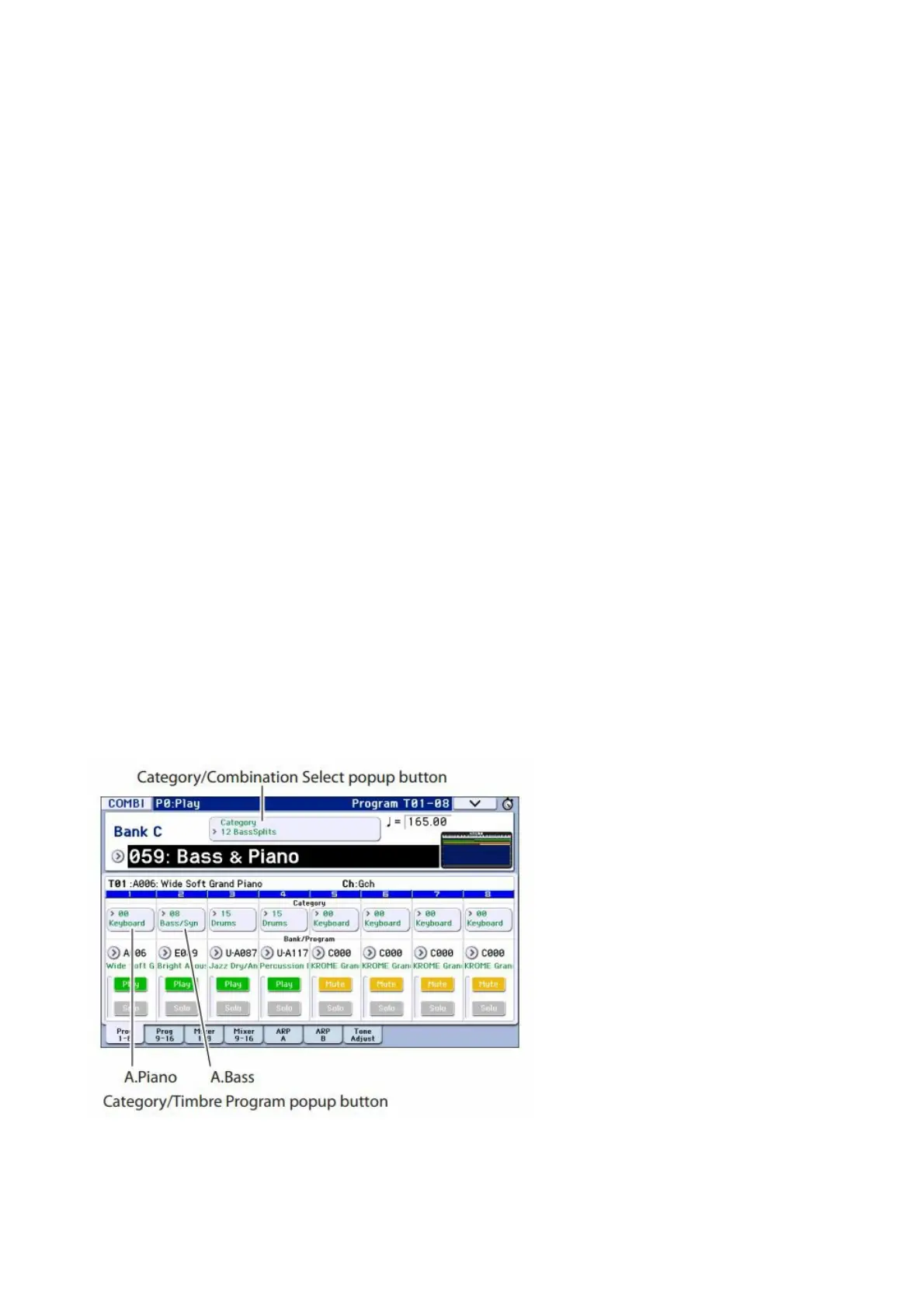
1. In Combination mode, press the Category Select popup button; then from tab 12 “Bass Splits,” choose
C059: Bass & Piano. The category Bass Splits contains split-type combinations where the lower range
of the keyboard plays a bass sound and the upper range plays a different sound.
Bass & Piano assigns an acoustic piano to timbre 1 and an acoustic bass to timbres 2 and 3.
2. Let’s try changing the program assignment
so that an organ is played instead of the piano.
Press the timbre 1 Category/Timbre Program popup button to access the list. At the left side of the list, press the
01 Organ tab, and then select a program from the list. Press the OK button to confirm your choice.
3. Play the keyboard. Notes C4 and above will play an organ sound, and lower notes will play a bass
sound.
4. Now let’s adjust the pan (stereo position) and volume of the organ and bass sounds.
In the lower part of the display, press the Mixer 18 tab. Adjust the Pan knob and Volume slider of each timbre.



 To Next Page