Category/Prog Select menu.
Press a tab on the left to select a sub category.
Select a program as described in step 3.
To confirm your choice, press the OK button. If you want to cancel, press the Cancel button. You will return to the
main category.
5. If you’re happy with the selected program, press the OK button to close the menu.
If you press the Cancel button, your selection here will be discarded, and you will return to the program that had been
selected immediately before you opened the menu.
Note: If you press the popup button to the left of “Program Select,” the Bank/Program Select menu organized into
banks will appear. The procedure is the same as described in “Selecting Programs by Category (B)”.
For other ways to select Programs, see “Selecting Programs” on page 21 of the Operation Guide.
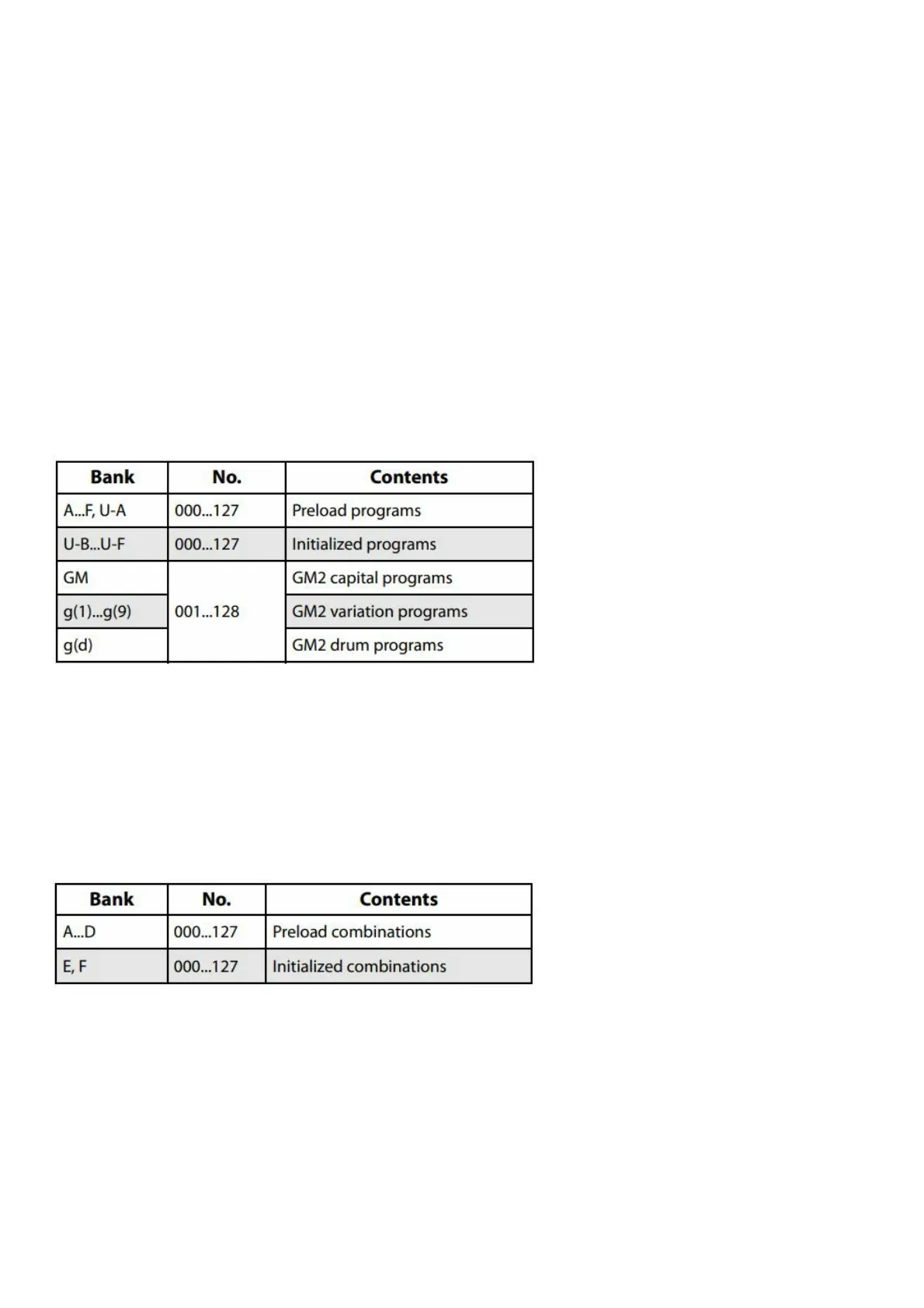
Program Bank Contents
The KROME has a total of 1,801 programs. When the unit is shipped from the factory, the internal memory contains
896 preload programs and 265 GM programs for immediate use. The remaining 640 programs are initialized
programs, provided for you to save your own original programs. You are also free to edit and overwrite any of the
programs in banks AF and U-A U-F, but not the programs of banks GM-g(d).
Program bank contents
Selecting Combinations
Here’s how to select a combination.
For more about combinations, see “Combination mode” on page 11.
1. Press the COMBI button to enter Combination mode.
The COMBI LED will light up. Once you’re in Combo mode, you can select and play Combinations by either
bank/number or category, in the same way as you did Programs.
Combination bank contents
Using controllers to modify the sound
Joystick, SW1 and SW2
The joystick (see page 6) and SW1/SW2 (see page 6) located on the left side of the KROME’s front panel are
controllers for you to use while performing. You can use these controllers to modify the sound.
The effect produced by each controller will differ for each Program or Combination. In addition to the typical
functions, the controllers in some cases might have the effect of emphasizing individual sounds, or might apply a
combination of several effects. So try them all out to see what each controller does for the selected sound.
Standard Joystick functions



 To Next Page