EasyManua.ls Logo

Korg M1R - Page 33

Korg M1R
137 pages
Print Icon
To Next Page IconTo Next Page
To Previous Page IconTo Previous Page
Loading...
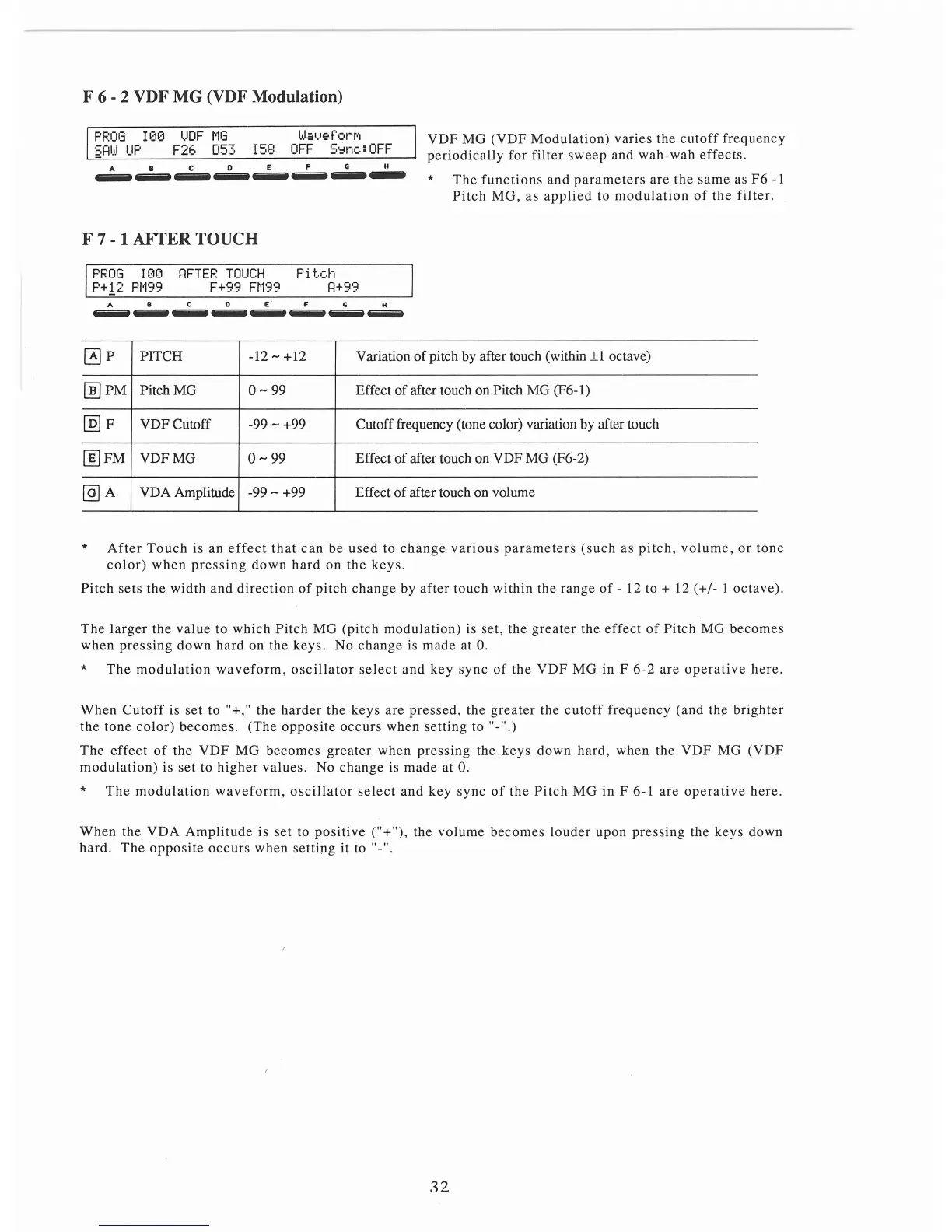
F 6 - 2 VDF MG (VDF Modulation)
PROG
!00
UDF
MG
WaveforM
SRW
UP
F26
053
158
OFF
S~nc:OFF
A B C 0 E F G H
--------
VDF
MG
(VDF
Modulation)
varies
the
cutoff
frequency
per
iodically
for
filter
sweep
and
wah-wah
effects.
*
The
functions
and
parameters
are
the
same
as
F6
-1
Pitch
MG,
as
applied
to
modulation
of
the
filter.
F 7 - 1 AFTER TOUCH
PROG
!00
RFTER
TOUCH
Pitch
P+!2
PM99
F+99
FM99
R+99
A B C 0 E F G H
-
---
4iiiiiiit
4iiiiiiit
4iiiiiiit
4iiiiiiit
4iiiiiiit
4iiiiiiit
~p
PITCH
-12-+12
Variation
of
pitch by after touch (within
±1
octave)
[])PM
Pitch MG
0-
99
Effect
of
after touch on Pitch MG (F6-
l)
@)
F
VDFCutoff
-99 - +99
Cutoff frequency (tone color) variation by after touch
[fil
FM
VDFMG
0-
99 Effect
of
after touch on VDF MG (F6-2)
@]A
VDA Amplitude
-99
- +99
Effect
of
after touch on volume
*
After
Touch
is an
effect
that
can
be
used
to
change
various
parameters
(such
as
pitch,
volume,
or
tone
color)
when
pressing
down
hard
on
the
keys.
Pitch
sets
the
width
and
direction
of
pitch
change
by
after
touch
within
the
range
of
- 12 to + 12 ( +
/-
1
octave).
The
larger
t
he
value
to
which
Pitch
MG
(pitch
modulation) is
set,
the
greater
the
effect
of
Pitch
MG
becomes
when
pressing
down
hard
on
the
keys.
No
change
is
made
at
0.
*
The
modulation
waveform,
oscillator
select
and
key
sync
of
the
VDF
MG
in F
6-2
are
operative
here.
When
Cutoff
is
set
to "+,"
the
hard
er
the
keys
ar
e
pressed,
the
greater
the
cutoff
frequency
(and
the brig
hter
the
tone
color)
becomes.
(The
opposite
occurs
when
setting
to"-
".)
The
effect
of
the
VDF
MG
becomes
greater
when
pressing
the
keys
down
hard,
when
the
VDF
MG
(VDF
modulation)
is
set
to
higher
values.
No
change
is made
at
0.
*
The
modulation
waveform,
oscillator
select
and
key
sync
of
the
Pitch
MG
in
F 6-1
are
operative
here.
When
the
VDA
Ampl
i
tude
is
set
to
positiv
e ("+"), the
volum
e
becomes
louder
upon
pressing
the
k
eys
down
hard.
The
opposite
occurs
when
setting
it
to "-".
32

Table of Contents

Related product manuals