14 Troubleshooting
14.1 Fault table
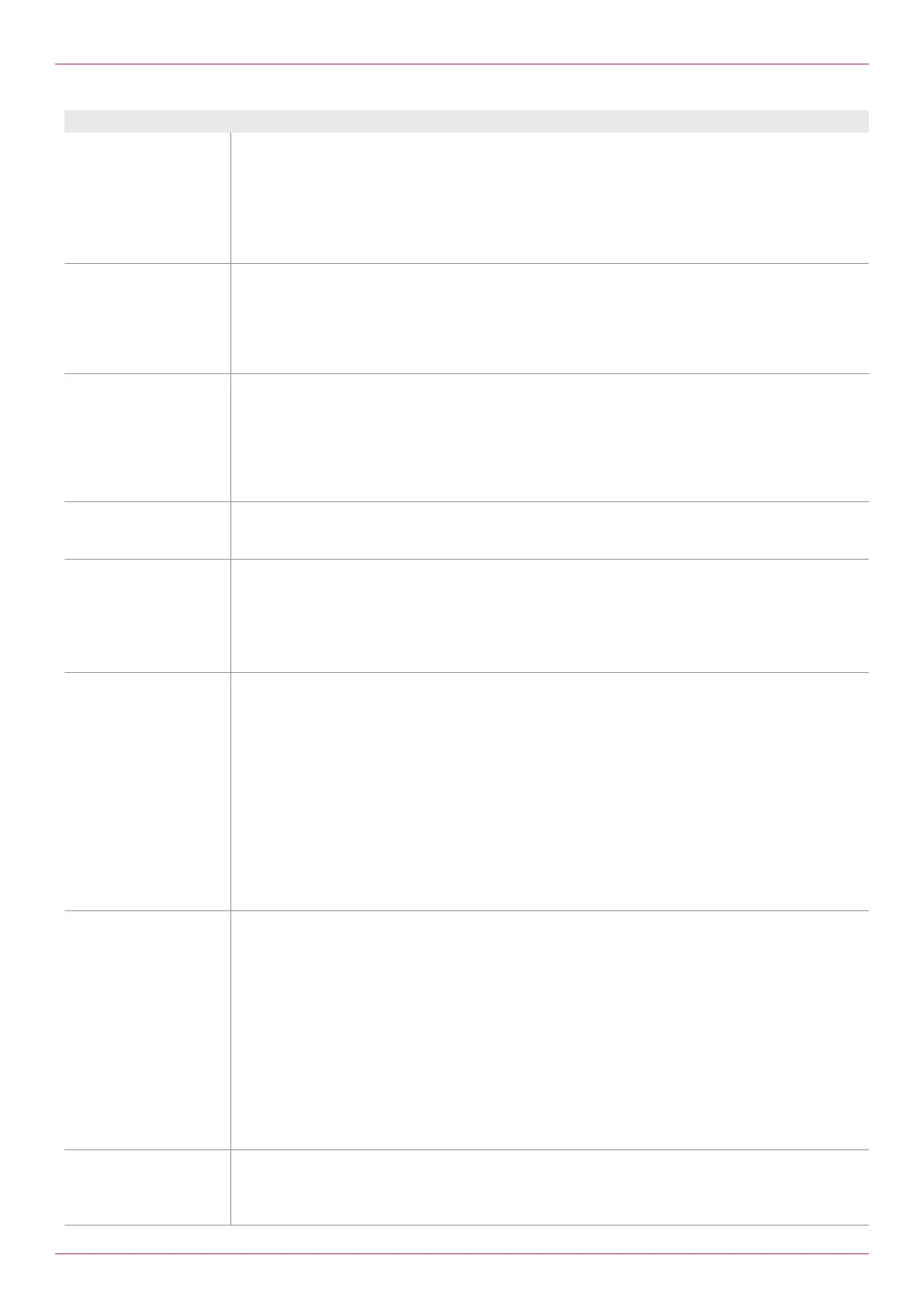
Fault message Cause and elimination
8.06Alarm Bypass
valve activated. Check
volumeter!
Relay2 for collective error message is active, Relay1 for bypass valve has dropped.
o Check flowmeter for blockage.
o Optimize settings in the menu items3.13–3.16 .
In case of independent measurement with two flowmeters:
o If bypass function is not desired, 3.14Setting Limit value bypass Set to0 .
o Reset the bypass and group error message, see 1.10Display reset bypass and group error
message.
8.07Alarm Max. FlowB
exceeded. Check pick
up!
The maximum permissible flow rate was exceeded in flowmeterA.
o Limit the flow rate.
o Check flowmeter.
o Use a larger size.
o Check and eliminate an electromagnetic interference using an oscilloscope (e.g. terminate shield
to Gnd).
8.08 Alarm VolumeterA
orB outside the
temperature range!
At least one of the measured temperatures of the connected flowmeter lies outside the permissible
range.
o Adjust temperature range of the flowmeters, see 2.19Setting Minimum temperature volumeter
or 2.20Setting Maximum temperature volumeter.
o Limit the temperature in the system.
o Use suitable sensors.
o Use suitable flowmeters.
8.09Alarm analog
output1 or 2 scaling
exceeded!
The flow rate exceeds the maximum scale value of an analog output.
o Correct the scale, see 3.03Setting Scale max. analog output1 or 3.05Setting Scale analog
max. output2.
8.10Alarm pulse
output1 or 2 max.
frequency exceeded!
The maximum output frequency of Pulse output1 or2 has been exceeded.
o Correct the scale, see 3.09Setting Scale pulse output1 or 3.11Setting Scale pulse output2.
o Correct the pulse width, see 3.12Setting Pulse output pulse width setting.
The maximum frequency of a pulse output amounts to:
o Mode Encoder: 1/(4 x pulse width ins)
o Mode Independent: 1/(2 x pulse width ins)
8.11 Alarm Change of
direction B exceeded,
check 30/s signals!
A pick up at flowmeter A has failed.
This error message is only displayed at the setting Function pulse inputs Encoder, see 2.13Setting
Function pulse inputs
o Check pulse inputs channelA (terminal7+19):
a)Square wave signal at both inputs: >30 direction change/s
-or-
b)Square wave signal at an input: Strong vibration (in case of standstill of the flowmeter)
-or-
c)A pick up delivers no signal (with running flowmeter)
With c):
o Check the connection of the corresponding pick up.
o Check the position of the corresponding pick up in the dry sleeve.
o Replace the corresponding pick up.
8.12Alarm Change of
directionB exceeded,
check 30/s signals!
A pick up at flowmeterB has failed.
This error message is only displayed at the setting Function pulse inputs Encoder, see 2.13Setting
Function pulse inputs
o Check pulse inputs channelB (terminals30 +40):
a)Square wave signal on both inputs: >30 direction change/s
-or-
b)Square wave signal at an input: Strong vibration (in case of standstill of the flowmeter)
-or-
c)A pick up delivers no signal (with running flowmeter)
With c):
o Check the connection of the corresponding pick up.
o Check the position of the corresponding pick up in the dry sleeve.
o Replace the corresponding pick up.
8.13Alarm temperature
sensor failure
VolumeterA!
Temperature sensorA or Temperature inputA is defective.
o Check the sensor connection.
o Replace the sensor.
o Check the temperature input.
Operating instructions
OIE 12en-GB Edition 2020-03
39


 To Next Page