14 Troubleshooting
14.1 Fault table
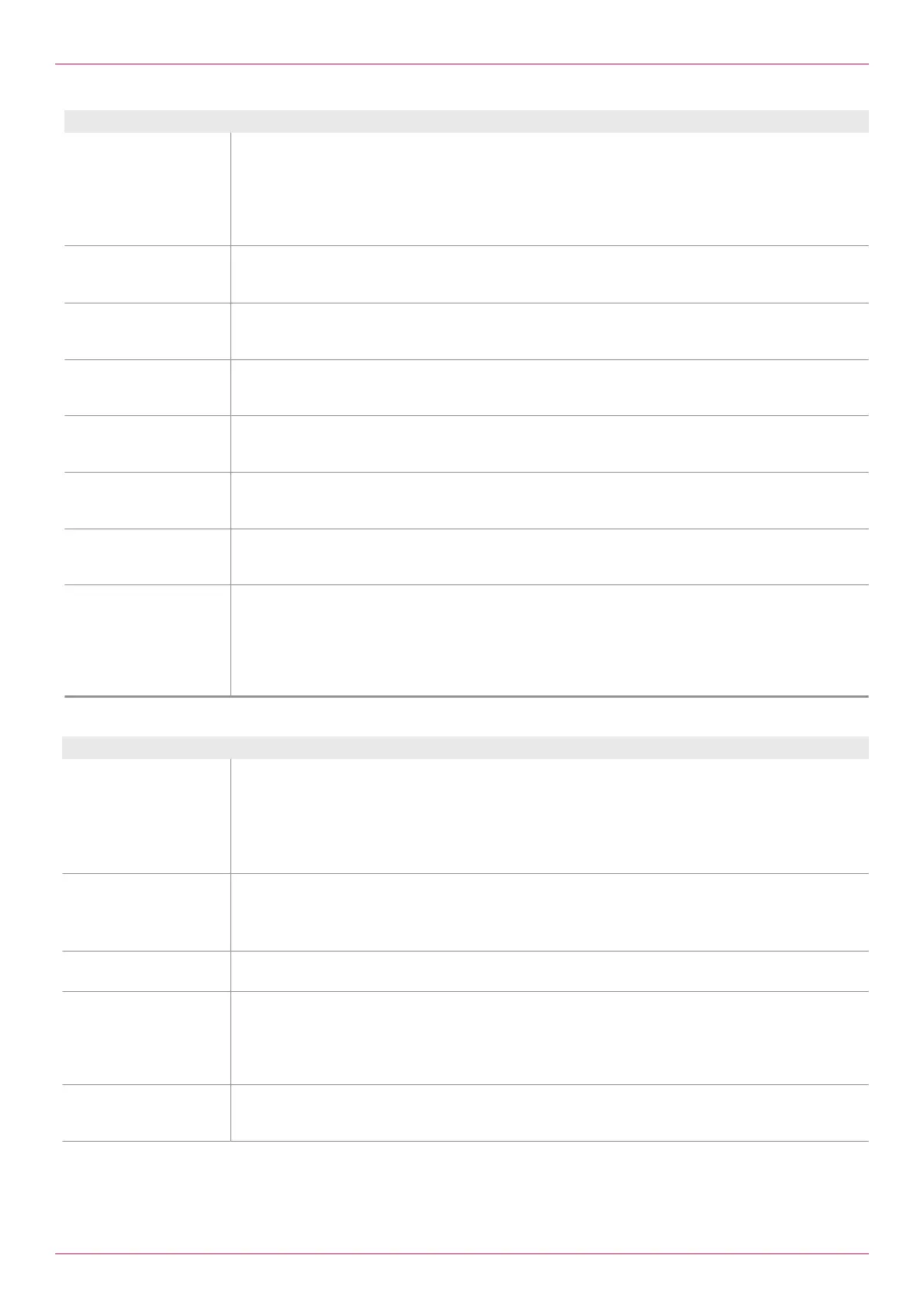
Fault message Cause and elimination
8.14Alarm temperature
sensor failure
VolumeterB!
Temperature sensorB or Temperature inputB is defective.
o Check the sensor connection.
o Replace the sensor.
o Check the temperature input.
If single-line measurement with temperature compensation is used:
o Connect a 100 Ohm resistor between Terminal36 and37 with a wire jumper from37 to38.
8.15Alarm Electronics
outside the temperature
range!
The temperature range of the electronic unit has been exceeded.
o Check the electronic unit.
o Replace the electronic unit.
8.16Alarm New unit
density. Correct density
values!
The unit of density has been changed.
o Convert the numerical values and correct the density table/density calculation.
8.17 Alarm New unit
temp. Correct temperat-
ure values!
The temperature unit has been changed.
o Convert the numerical values and correct the density table/density calculation.
8.16Alarm New unit
rate. Correct the scale
of analog output!
The unit of the rate has been changed.
o Check the scale of the analog outputs and correct it.
8.19Alarm New unit
total. Correct the scale
of pulse output!
The unit of Total has been changed.
o Check the scale of the pulse outputs and correct it.
8.20Alarm Mode
changed. Check value
density determination!
Mode has been changed.
o Correct the density table/density calculation.
8.21Alarm Max. FlowB
exceeded. Check pick
up!
The maximum permissible flow rate was exceeded in flowmeter B.
o Limit the flow rate.
o Check flowmeter.
o Use a larger size.
o Check and eliminate an electromagnetic interference using an oscilloscope (e.g. terminate shield
to Gnd).
Further faults
Further fault Cause and elimination
Rate = 0, although pulse
signals can be measured
at the terminals of the
electronic unit with the
oscilloscope
One pick up each per flowmeter is connected and the function pulse input Encoder is selected.
o 2.13Setting Function pulse inputs Set to Counter .
If a pick up fails in Encoder mode or the temperature sensor fails, a rate of 0 is displayed and the total
value is no longer modified.
o Check the wiring, replace the pick up.
Analog output does not
function
Analog output function selected incorrectly.
o Select the correct function, see 3.01Setting Function analog output
Signal cable connected to an incorrect analog output.
o Correct the connection.
Negative flow The signal wires at the respective flowmeter are connected incorrectly.
o Swap the signal wires.
No flow or flow rate too
low
o Check the alarms, see Menu8 Alarms
o Check the connection of the pick up.
o Check the pick up and replace it if necessary.
o Check the connection of the temperature sensor.
o Check the temperature sensor and replace it if necessary.
Double flow when the
option flow direction
detection is used
o Switch the function of the pulse input of Set Counter to Encoder , see 2.13Setting Function
pulse inputs.
40
OIE 12en-GB Edition 2020-03
Operating instructions


 To Next Page