14
4
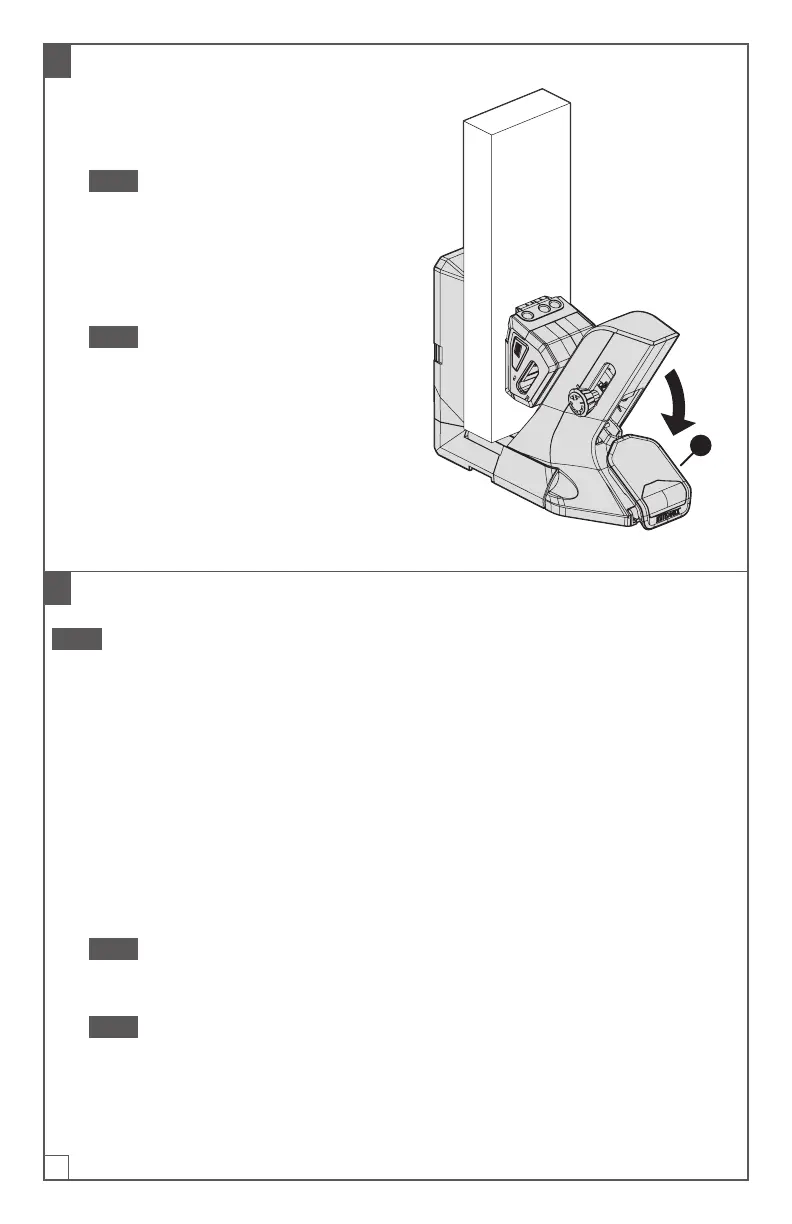
Clamp Your Workpiece
a. Press down on the jig handle (1)
in one smooth motion until the jig
handle (1) is at its travel limit.
Note If you have difculty pressing
the jig handle (1) to its travel limit,
decrease* the clamp pressure.
b. Check to see if your workpiece is
held securely in the jig; increase* the
clamp pressure, if necessary.
Note Increase the clamp pressure
if the clamp does not hold the
workpiece as securely as you
want, if you see movement in the
workpiece, or if you are using a plug
cutter drill guide attachment.
* See Adjustable Clamp Pressure
onpage4.
1
5
Optional: Set the Adjustable Stop
Note The adjustable stop enables you to drill pocket holes on similar workpieces at
a faster pace. The adjustable stop is an accessory that is included with the docking
station. Ifyou are not using the docking station, skip this step and continue to step6.
a. If necessary, change the conguration of the adjustable stop to accommodate
the size and orientation of your workpiece in the jig:
■ Wide workpiece: If the workpiece is wide enough to extend onto the top
of a material support wing (I), use the adjustable stop (1) in its centered
conguration.
■ Narrow workpiece: If the workpiece does not extend across the gap
between the jig and the material support wing (I), use the adjustable stop(1)
in a side conguration.
Note For a side conguration, use whichever outer notch in the adjustable stop
arm will be farther from the jig after you place the adjustable stop (1) onto a
material support wing (I).
Note For instructions on changing the conguration, see Attach the
Adjustable Stop Arm to the Adjustable Stop Base onpage11.


 To Next Page