2 INSTALLATION
14
OPTISONIC 8300
www.krohne.com 03/2020 - 4008065101 - QS OPTISONIC 8300 R01 en
2.10 Mounting the field housing, remote version
2.10.1 Wall mounting
Mounting the field version (F) on the wall
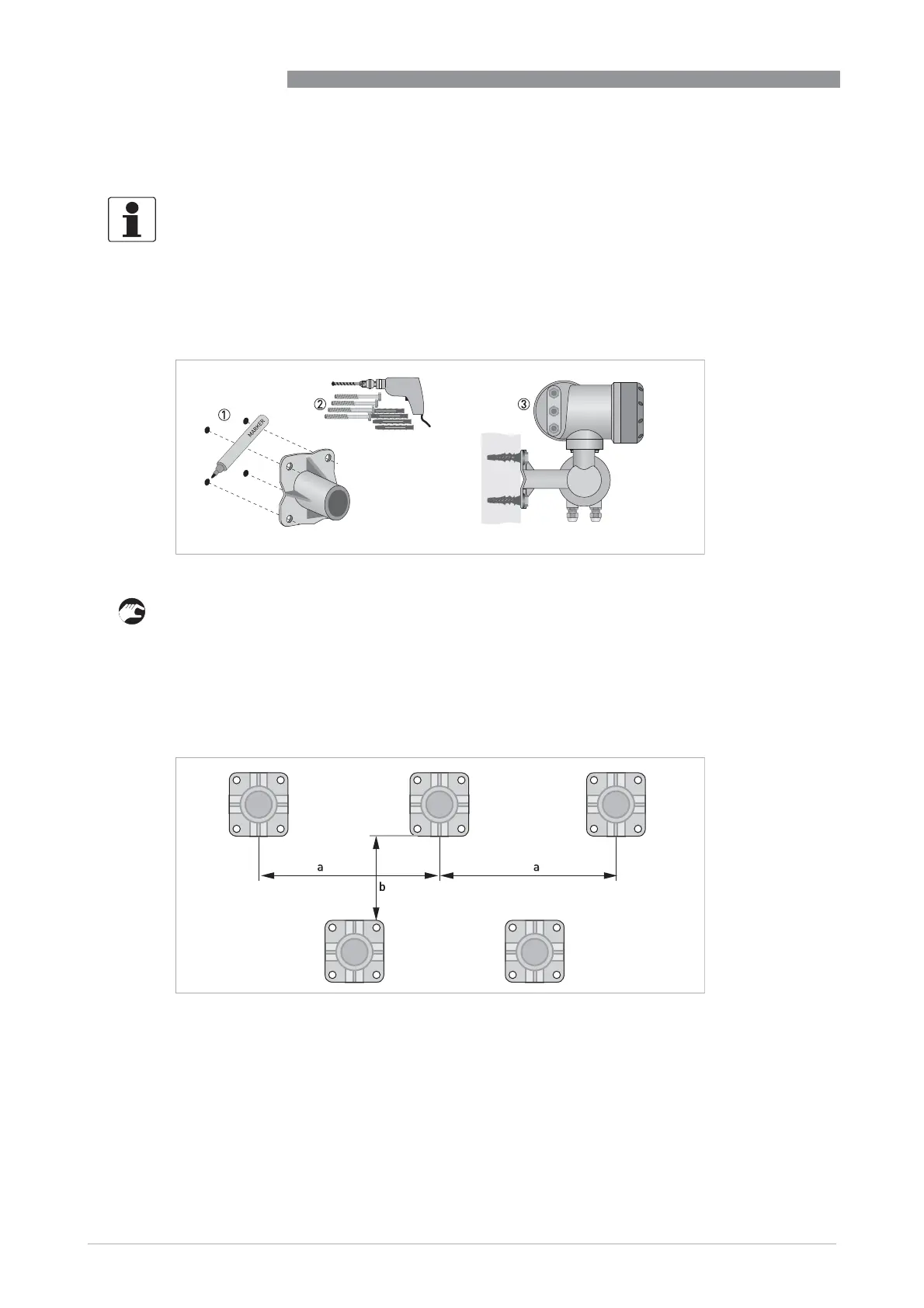
1 Prepare the holes with the aid of the mounting plate.
further information refer to
Mounting plate of field housing
on page 25.
2 Use the mounting material and tools in compliance with the applicable occupational health
and safety directives.
3 Fasten the housing securely to the wall.
4 Screw the signal converter to the mounting plate with the nuts and washers.
INFORMATION!
Assembly materials and tools are not part of the delivery. Use the assembly materials and tools
in compliance with the applicable occupational health and safety directives.
Figure 2-14: Wall mounting of the field housing
Figure 2-15: Mounting multiple devices next to each other
a t 600 mm / 23.6"
b t 250 mm / 9.8"








 To Next Page