6 Operation
25 of 88
BoosterControl Advanced
Table17: Access levels
Access level Description
Standard (no login) Access without password entry.
Customer Access level for the expert user with
access to all parameters required for
commissioning.
Service Access level for service personnel.
If a parameter's access level is not explicitly specified, the parameter is always
assigned the customer access level.
Table18: Access level parameter
Parameter Description Possible setting Access level required Factory
setting
3-2-1-1 Enter customer password for
access
0000...9999 Standard 0000
Enter service password for access 0000...9999 Service -
Change customer access level
password
0000...9999 Customer -
Password-protected access level
for customer parameter
Disabled
Enabled
Customer Disabled
Entering the password
Customer access level
You must enter the password under (3-2-1-1) Login to gain access. The password can
be changed under Customer Password after entering "7353" (factory password). If
password protection is deactivated via parameter 3-2-1-2, the customer access level
becomes the standard access level. This applies to the factory settings.
Service access level
You must enter a password under Service Login.
NOTE
If no keys are pressed for ten minutes, the system will automatically return to the
standard access level.
6.1.3.3.3 Displaying and changing parameters
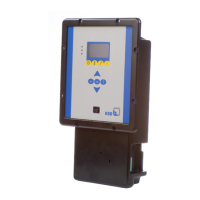
The parameter numbers contain the navigation path, which helps you find a
particular parameter quickly and easily. The first digit of the parameter number
indicates the first menu level, which is called up directly via the four menu keys.
Table19: Assignment of menu keys
Key Menu
Operation
Diagnosis
Settings
Information
Subsequent steps are carried out via the navigation keys.
Example
Parameter 3-5-1 Setpoint
1. First digit of parameter number: 3-5-1
Press the "Settings" menu key.
ð 3-1 appears in the top left of the screen.
2. Second digit of parameter number: 3-5-1
Press the arrow key to change the display 3-1 on the screen (upper left) to 3-5.


 To Next Page