113OPERATING THE TRACTOR
POWER SHIFT TRANSMISSION CONTROL
To avoid personal injury or death:
A The ez-command center has no neutral
position. To bring the tractor to a complete
stop, step on the brake pedal or set the shuttle
lever to neutral.
BOutline
This machine is equipped with an electronic transmission
for 24-speed change in both forward and reverse motion.
With the optional creep device in place, the traveling
speed can be changed by up to 40 stages. Further, in road
and field modes, the "auto shift" mode as well as the
"manual" mode may be selected.
In the auto shift mode, the optimum traveling speed can
be automatically selected by electronic control within the
operator-preset speed range. Thanks to this mode, no
troublesome gear shifting is required any longer, allowing
the operator to concentrate on his or her job.
The gear shift sensitivity in response to the engine load
and other settings may also be flexibly made. With this,
PTO-driven and towed implements are operated with high
accuracy in an eco-friendly way.
In the maximum traveling speed range, the overdrive
mechanism works for the engine to run at medium rpm but
for the machine to travel at maximum speed. In short, this
helps to run the machine economically.
BSwitching the Operation Modes
When the engine gets started, the "manual" mode is
selected all the time. By stepping on the clutch pedal, the
minimum traveling speed (A-1) is automatically selected.
To operate the machine in the auto shift mode, press the
auto shift button to switch to the "auto shift" mode.
Every time the auto shift button is pressed, the auto shift
mode and the manual mode are switched alternately.
Which mode is now on can be checked with the LCD
indicator on the instrument panel.
However, when the gear shift range in auto shift mode
memory is other than the minimum gear shift (A-1), it will
not switch to auto shift mode even when you press the
auto shift button.
After switching the main gear shift and range gear shift
with the ez-command center until within the gear shift
range in memory, press the auto shift button to switch to
auto shift mode.
(Example)
When the gear shift range in auto shift mode memory is
B1 to B3
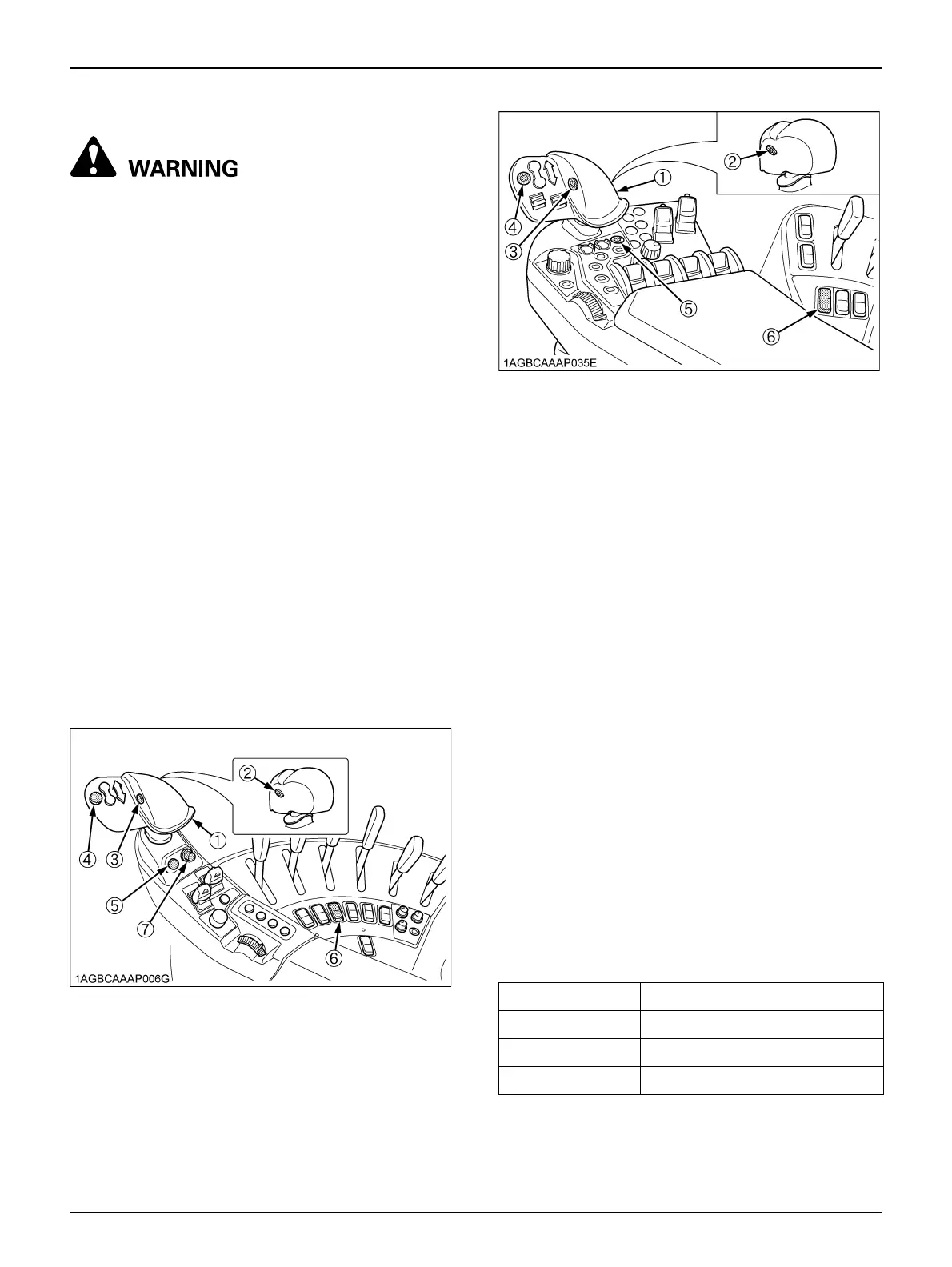
(1) Ez-command center
(2) Shuttle enable button
(3) Range gear shift button
(4) Auto shift button
(5) Shuttle neutral button
(6) Transmission mode select switch
(7) Auto shift sensitivity dial [Standard model]
Current gear shift Press the auto shift button
A1 Does not switch to auto shift mode
B1 or B2 or B3 Switches to auto shift mode
B4 Does not switch to auto shift mode



 To Next Page