INTELLIPANEL(TM) CONTROL46
BSetting the Remote Control Valve
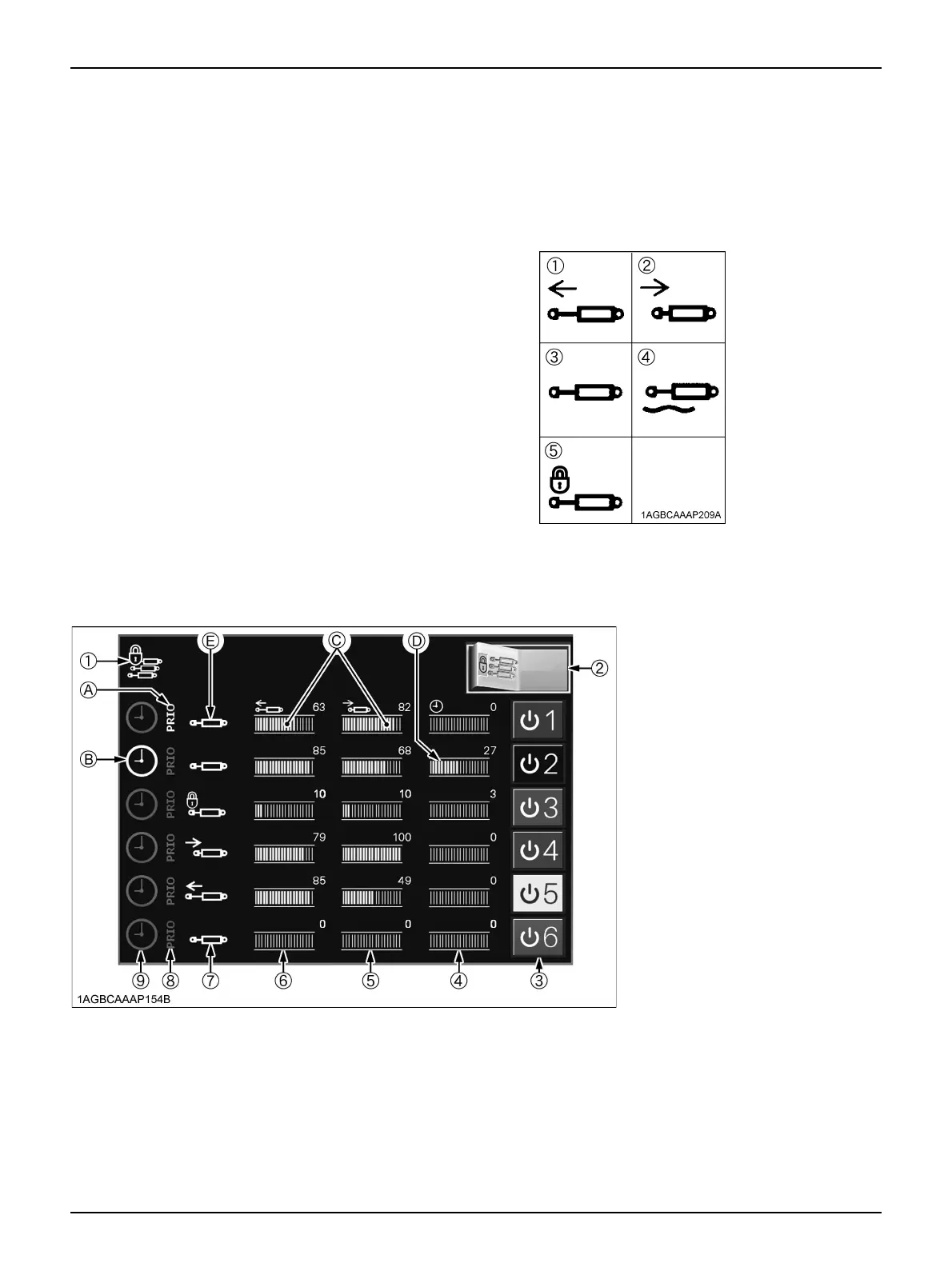
In the figure below, the settings of all the remote control
valves can be checked.
1. If you want to modify any of the settings, touch the
"graph" of the relevant valve. In so doing, the "detailed
settings of remote control valve" screen, discussed
later, shows up.
2. Touch the left half of the switch (2), and all the remote
control valves are collectively locked and the
implement cannot be raised and lowered. A touch on
the right half unlocks all the valves.
In locked status, the indicator (1) also lights up.
C How to use the chart (screen)
(A) The priority flow from the hydraulic pump is set for
the first remote control valve.
(B) The automatic shut-off timer of the second remote
control valve is set at ON.
(C) The preset oil flow rate to each implement (remote
control cylinder) is displayed.
(The third remote control cylinder remains locked,
which means that no oil is flowing.)
(D) The automatic shut-off timer (time) of remote
control is displayed.
(E) Valve action status indicator:
The oil flow to the implement (remote control
cylinder) is indicated with the icon shown below.
(1) Extend
(2) Retract
(3) Blocked (Neutral)
(4) Float
(5) Lock
(1) Collective remote control valve lock
indicator
(2) Collective remote control valve lock
switch
(3) Individual remote control valve lock/
unlock switch
(4) Valve operating time
(5) Discharge rate from cylinder (retract)
port
(6) Discharge rate from cylinder (extend)
port
(7) Valve operating status indicator
(8) Priority valve indicator
(9) Timer mode indicator



 To Next Page