67INTELLIPANEL(TM) CONTROL
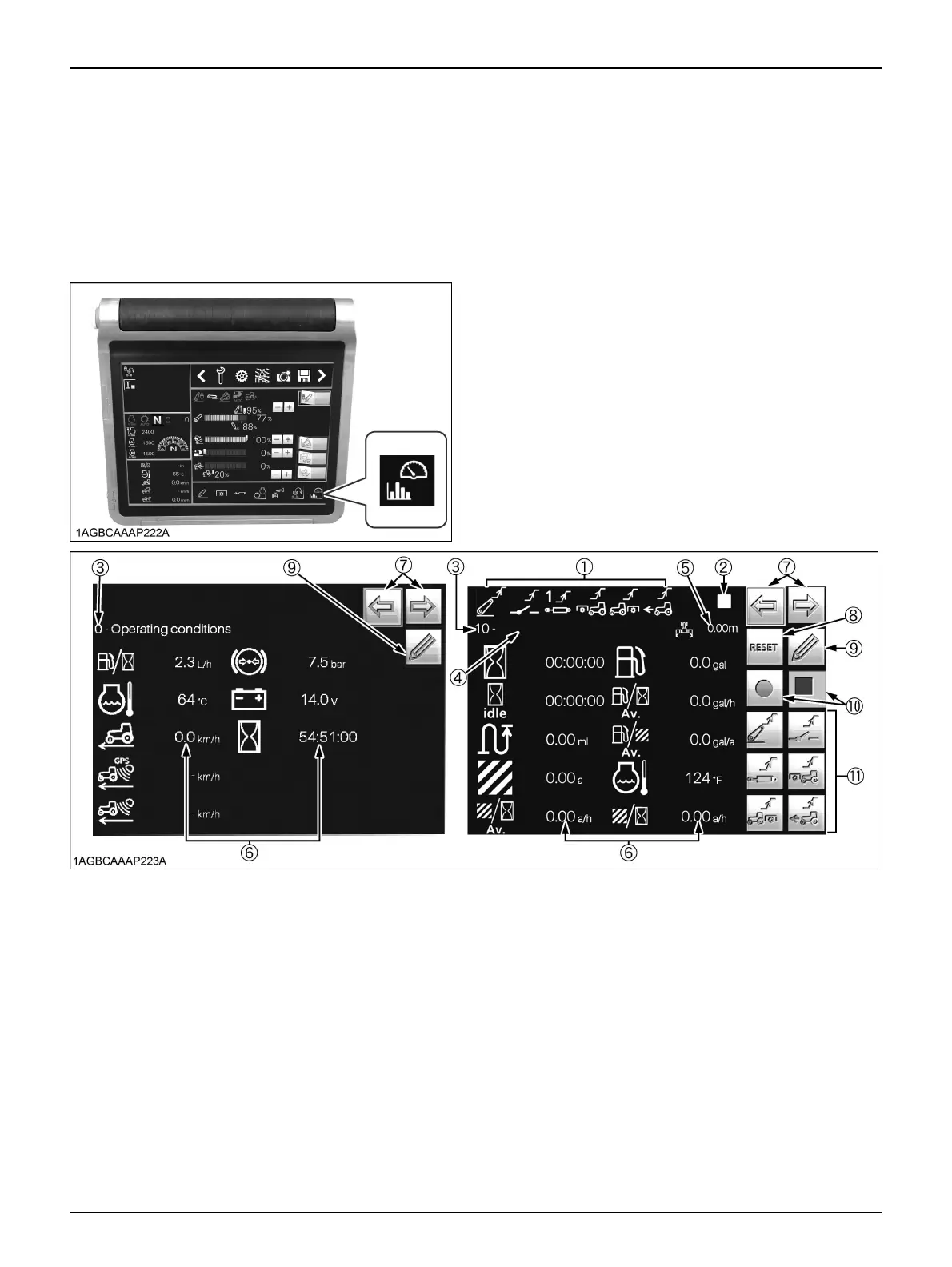
BOperating Conditions
The tractor is equipped with one set of screens which
automatically record information arbitrarily set from
among some 18 types of operation information such as
fuel consumption, time worked, work efficiency and so on,
and one screen for information display only.
C Calling up the data screen and preparation
1. The recording screen has 11 pages available (screens
No. 1 to 11). Screen No. 0 is for information display
only. Select the screen to be used for recording with
the scroll switch (7). Touch the reset switch (8) to
delete the recorded data from the screen.
2. Enter field names, etc. into the free text box (4) as
necessary. Touch the free text box and use the
displayed ten-key pad for input.
3. Touch the working range of implement icon (5) to enter
the working range of the implement, using the
displayed ten-key pad. If the working range of the
implement is not correctly entered, accurate data will
not be recorded.
4. Touch the edit switch (9) to switch to the edit screen.
(1) Operating conditions indicator
(2) Data record status indicator
(3) Screen number
(4) Free text box
(5) Working range of implement
(6) Recorded data
(7) Screen scroll switch
(8) Reset switch
(9) Edit switch
(10) Record start/stop switch
(11) Record conditions switch



 To Next Page