INTELLIPANEL(TM) CONTROL50
BSetting the PTO
To avoid personal injury or death:
A Use caution when setting auto engagement, considering type of implement in use.
Automatic ON/OFF setting of PTO shaft revolutions, which is interlocked with the lifting height of the rear 3-point-hitched
implement, can be made.
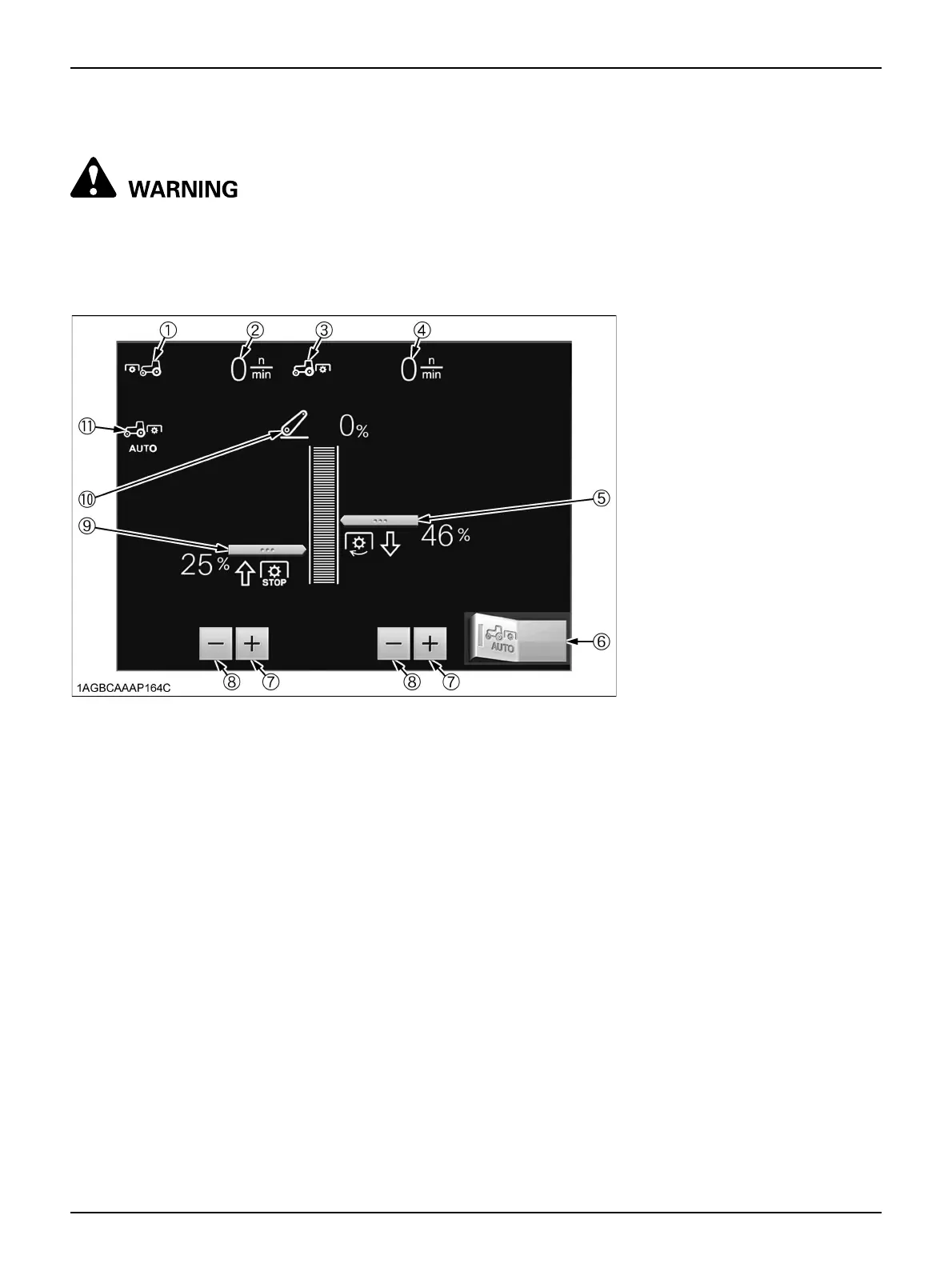
C Setting the 3-point-hitch-interlocked PTO function
Start the engine and start PTO rotation.
Touch the left half of the Auto PTO switch (6), and the 3-
point-hitch-interlocked PTO function is enabled. A touch
on the right half disables this function. While the 3-point-
hitch-interlocked PTO function is on, the indicator (11)
lights up and stays on.
C Setting the height at which the PTO restarts
turning when the implement is lowered
Touch the "Plus (+)" switch (7) or "Minus (-)" switch (8) on
the right side to readjust the height at which the PTO shaft
restarts turning. Raise the percentage to raise the height
at which turning restarts.
C Setting the height at which the PTO stops turning
when the implement is raised
Touch the "Plus (+)" switch (7) or "Minus (-)" switch (8) on
the left bottom to readjust the height for the PTO shaft to
stop turning. Lower the percentage to lower the height at
which turning stops.
C Displaying the PTO rpm
With the PTO switch at ON (engage), the front PTO rpm
(2) as well as the rear PTO rpm (4) are displayed.
(1) Front PTO indicator
(2) Front PTO rpm
(3) Rear PTO indicator
(4) Rear PTO rpm
(5) Height at which the PTO turns on
when the implement is lowered
(6) Auto PTO switch
(7) Plus (+) switch
(8) Minus (-) switch
(9) Height at which the PTO turns off
when the implement is raised
(10) Current lift arm height
(11) Auto PTO indicator



 To Next Page