EasyManua.ls Logo

Kyocera 255b - Page 190

Kyocera 255b
366 pages
Print Icon
To Next Page IconTo Next Page
To Previous Page IconTo Previous Page
Loading...
6-32
Sending > Registering Destinations in the Address Book
3
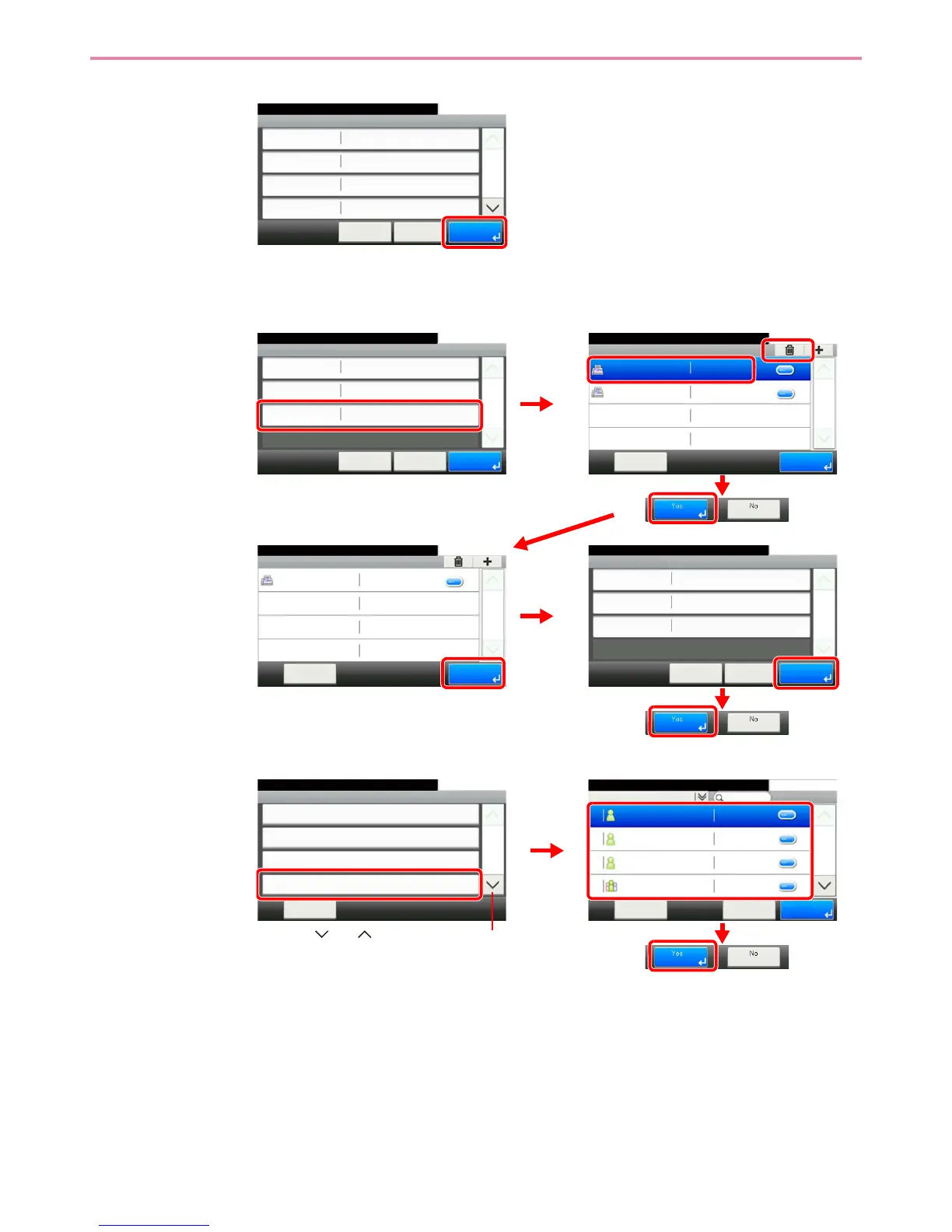
To delete a member (group)
To delete a member from a group, select the destination you wish to delete and press
[(Delete)] (the trash can icon).
To delete
Select the destination (contacts) or group to delete.
GB0786_00
Edit - Confirm
Sales department 1
10:10
㪚㪸㫅㪺㪼㫃
Ready to send.
Address Number
FAX
Name
Auto
㪓㩷㪙㪸㪺㫂
1/2
㪪㪸㫍㪼
E-mail Address
Member
10:10Ready to send.
Sales department 1
㪤㪼㫅㫌
1/1
㪜㫅㪻
0123456
Support department 0234567
Edit - Confirm
Support department
10:10
㪚㪸㫅㪺㪼㫃
Ready to send.
Address Number
Member
Name
Auto
㪓㩷㪙㪸㪺㫂
1/1
㪪㪸㫍㪼
Member:2
GB0787_00
GB0114_04
1
3
2
4
Edit - Confirm
Support department
10:10
㪚㪸㫅㪺㪼㫃
Ready to send.
Address Number
Member
Name
Auto
㪓㩷㪙㪸㪺㫂
1/1
㪪㪸㫍㪼
Member:1
Member
10:10Ready to send.
㪤㪼㫅㫌
1/1
㪜㫅㪻
Support department 0234567
56
GB0114_05
GB0787_01
7
GB0396_01
Menu
Sort (No.)
10:10
㪚㫃㫆㫊㪼
Add
Edit
Delete
2/2
Use [ ] or [ ] to scroll up and down.
GB0788_00
Address Book (All)
10:10Ready to send.
Sales department 1
㪤㪼㫅㫌
1/2
㪛㪼㫃㪼㫋㪼
Support department
SYSTEM DEP.
Sales department 1 Member:2
019
002
001
003
㪚㪸㫅㪺㪼㫃
1
2
3

Table of Contents

Other manuals for Kyocera 255b

Related product manuals