9-15
Setup, Registration, and User Management > System Menu
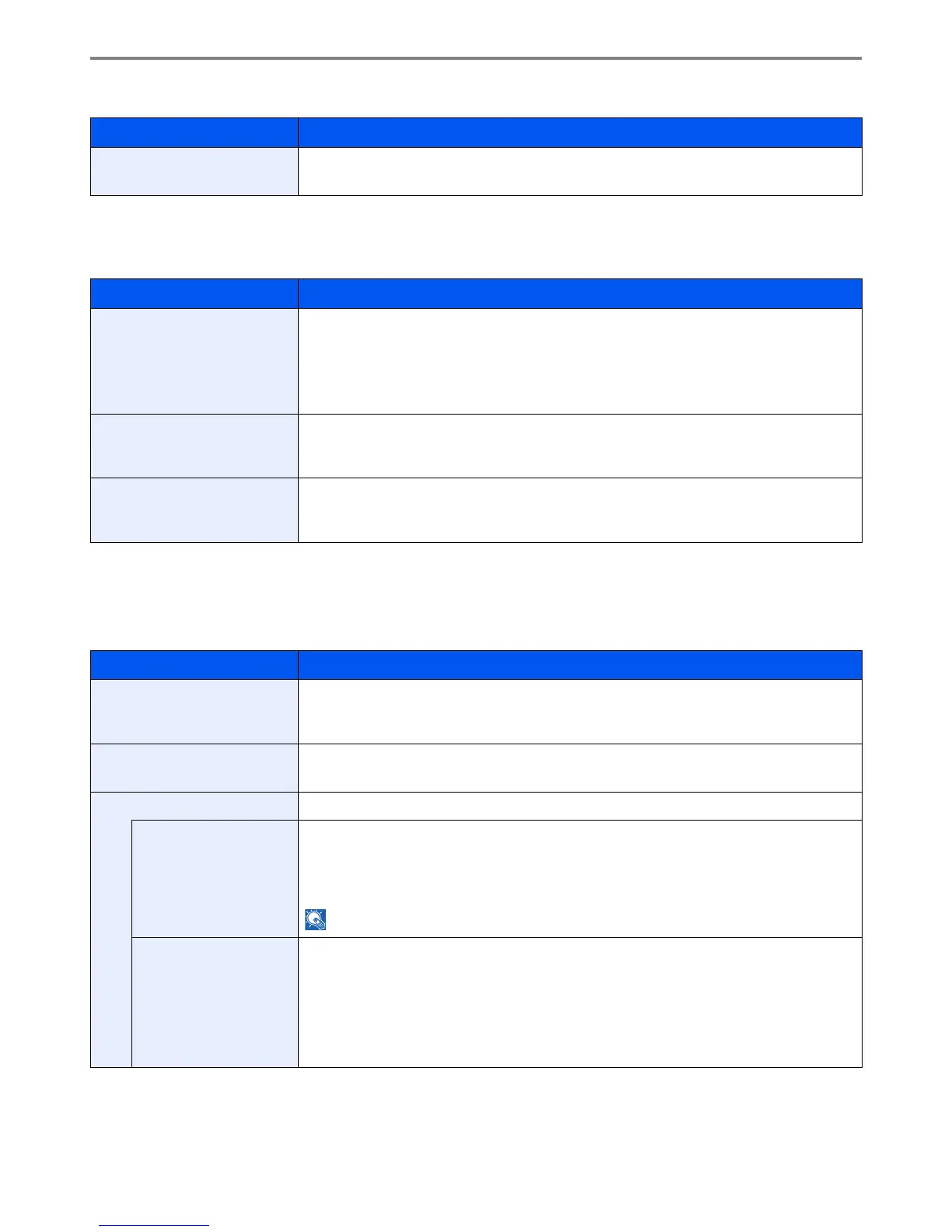
USB Keyboard Type
Copy
Configures settings for copying functions.
Send
Configures settings for sending functions.
Item Description
USB Keyboard Type Select the type of USB keyboard that you want to use.
Value: US-English, US-English with Euro
Item Description
Auto Paper Selection If [Auto] is selected for Paper Selection, set the paper size selection method when the zoom
changes.*
Value
Most Suitable Size: Select paper based on the current zoom and the size of the original.
Same as Original Size: Select paper that matches the size of the original, regardless the zoom.
* If you want to enable the changed defaults immediately, move to the function screen and press the Reset key.
Auto % Priority When a paper source of different size from the original is selected, select whether automatic
zoom (reduce/zoom) is performed.*
Value: Off, On
Reserve Next Priority Once the scan of the original is complete, the basic screen will be displayed, and you can
proceed to the next operation.
Value: Off, On
Item Description
Dest. Check before Send When performing sending jobs, display the confirmation screen of destinations after pressing
the Start key.
Value: Off, On
Entry Check for New Dest. When adding new destination, display the entry check screen to check the entered destination.
Value: Off, On
Send and Forward Set whether to send the original to another destination and store it when sending images.
Forward Set the rule to send the original. Multiple rules can be selected.
Value
Forward: Off, On
Rule: FAX, E-mail, Folder(SMB), Folder(FTP)
NOTE: [FAX] is displayed when the optional FAX kit is installed.
Destination Set the destination to use when storing originals.
Select the destination using either of the following methods:
• Address Book
• Ext. Address Book
• Address Entry (E-mail)
• Address Entry (Folder)











 To Next Page