9-9
Setup, Registration, and User Management > System Menu
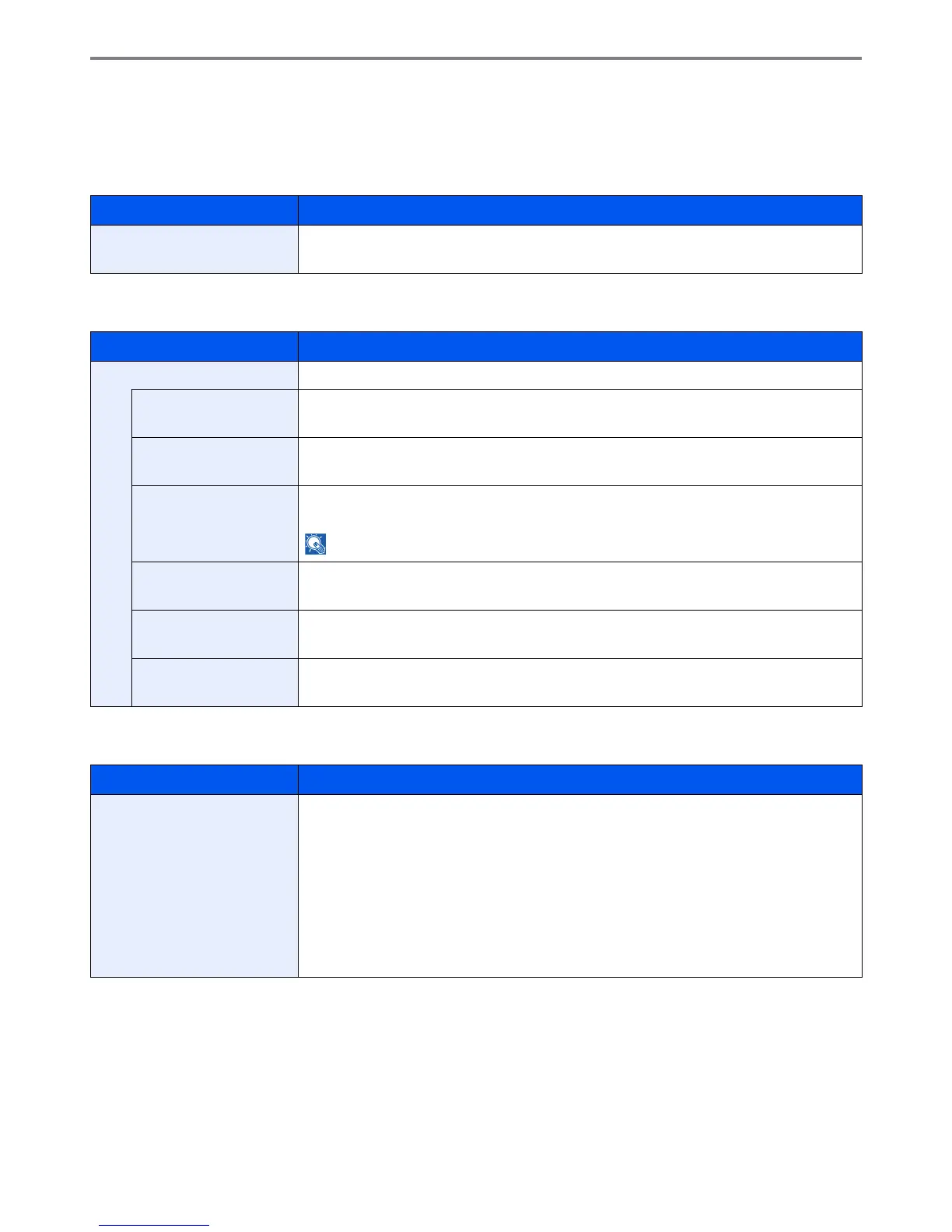
Common Settings
Configures overall machine operation.
Default Screen
Sound
Original Settings
Item Description
Default Screen Select the screen appearing right after start-up (default screen).
Value: Copy, Send, FAX, Document Box, Favorites, Status
Item Description
Buzzer Set options for buzzer sound during the machine operations.
Volume Set the buzzer volume level.
Value: 0 (Mute), 1 (Minimum) to 5 (Maximum)
Key Confirmation Emit a sound when the operation panel and touch panel keys are pressed.
Value: Off, On
Job Finish Emit a sound when a print job is normally completed.
Value: Off, On, FAX Reception Only
NOTE: [FAX Reception Only] is displayed when the optional fax is installed.
Ready Emit a sound when the warm-up is completed.
Value: Off, On
Warning Emit a sound when errors occur.
Value: Off, On
Key Confirmation (USB
Keyboard)
Emit a sound when a key on the optional USB keyboard is pressed.
Value: Off, On
Item Description
Custom Original Size Set up frequently-used custom original size. The custom size option is displayed on the screen
to select original size.
To register a custom paper size, press [On] and enter the desired size. The custom size option
is displayed on the screen to select original size.
Value
Custom: Off, On
Size Entry
Inch models – X: 2 to 17" (in 0.01" increments), Y: 2 to 11.69" (in 0.01" increments)
Metric models – X: 50 to 432 mm (in 1 mm increments), Y: 50 to 297 mm (in 1 mm increments)











 To Next Page